
It’s post-dinner in Mumbai 🌃, and Rahul is just browsing through Facebook 📱. He pauses his scroll in the middle to look at a post from Pinnacle Properties Dubai, a sleek-looking 2BHK 🏙️ in Dubai Marina for just under AED 1.8M. Next thing you know, Rahul is already hitting the message button to know more.
Back in Dubai, the Pinnacle team’s five agents are long gone for the night 😴. Their phones are flipped over, their inboxes piling up by the minute. But Rahul isn’t left hanging. Within four seconds, he gets a ping.
‘Hi! Thanks for reaching out to Pinnacle Properties. Are you looking to buy or invest?’
By the time Rahul actually turns in for the night, he’s already knocked out six questions, shared his budget, and locked in a Saturday 10 AM call. A specific agent’s calendar just blocked itself off while they were still asleep. No human touched that chat, not once.
That’s the reality of a Facebook AI chatbot done right. For a Dubai real estate outfit, this isn’t some ‘nice-to-have’ luxury. It’s the difference between closing a lead at 11 PM or watching them go to the agency that does.
The real problem: Your DMs are out of control
The Dubai property market does not wait around. One viral video 📈 about a fresh launch or a sudden price drop can absolutely flood your Facebook inbox by morning. I have literally watched agencies jump from twenty messages a day to over two hundred in a single weekend just because an off plan project got some hype.
Your agents simply cannot keep up with that kind of volume. They are busy humans. Between running site visits and drowning in paperwork, asking them to sit and babysit a Messenger inbox during a massive traffic spike is just asking for burnt-out staff and wasted leads.
And then there is the time zone 🌍 headache. People who are interested in purchasing from Dubai are all over the UK, Europe, and South Asia. You and your team may be ready to go home at 6 PM GST, but the person in London is just sitting down to have lunch. And the person in Singapore is getting ready to have dinner. If your page is completely quiet, they don’t hang around. They go somewhere else where they get a response instantly.
A well built Facebook AI chatbot handles every single one of these issues at the exact same time. Plus, it does the heavy lifting without you having to hire a single new person.
What the ideal Facebook AI chatbot flow looks like
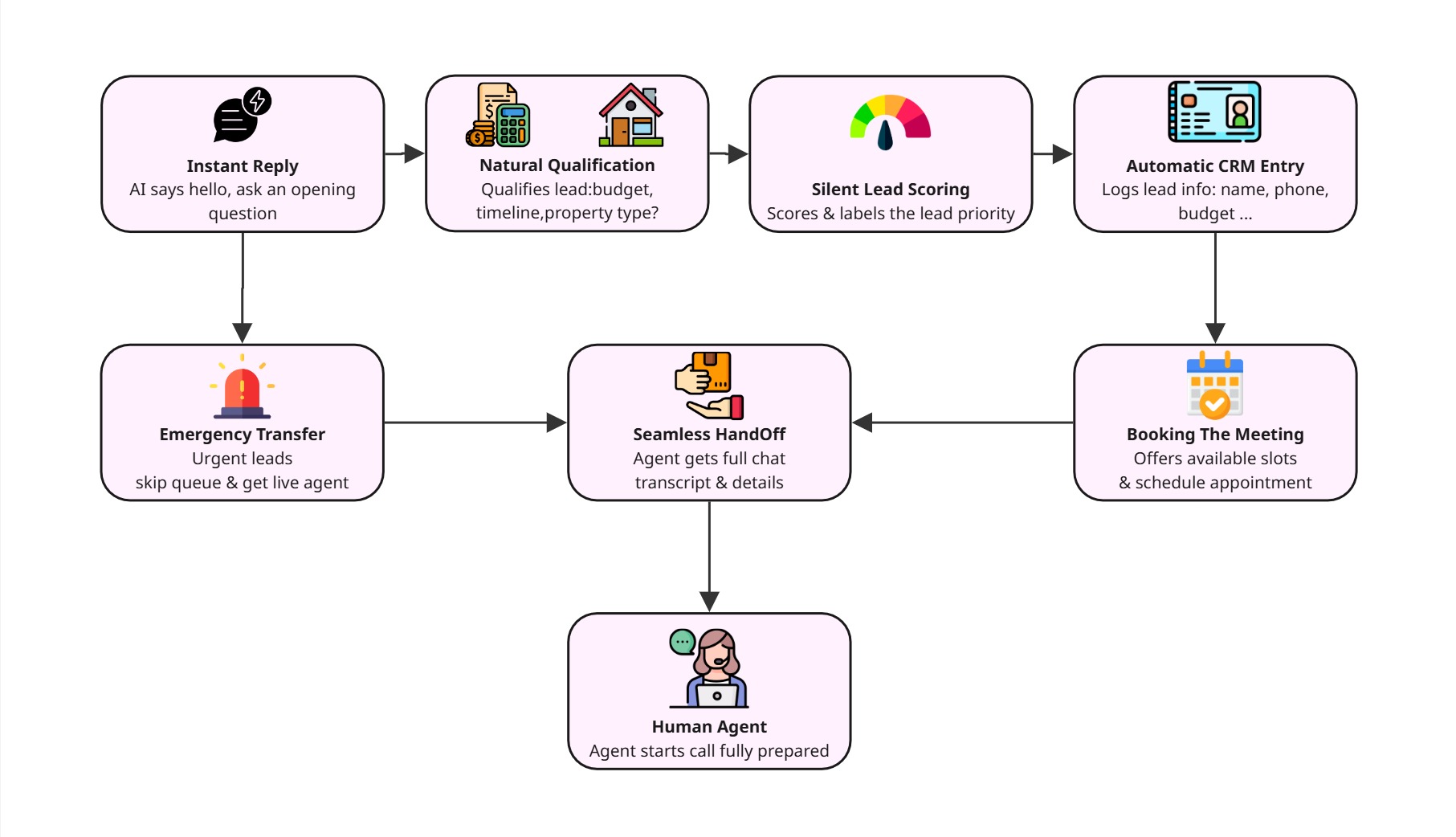
Before we actually dive into the setup, you really need to see the big picture. Here is exactly how a properly built Facebook AI chatbot takes a completely cold lead from their very first message straight to a booked meeting.
Step 1: Instant reply 🚀. A customer sends a message to your Facebook page. The AI answers right away. It says hello and drops a simple opening question just to get the ball rolling.
Step 2: Natural qualification. Over the next four or five messages, the Facebook AI chatbot casually asks the exact same things your top agents would. Are they buying or investing? What is the actual budget? Do they want a ready property or an off-plan project? Are they looking to buy immediately, waiting six months, or just browsing around?
Step 3: Silent lead scoring. The AI takes those answers and quietly labels the person as a high priority or just a nurture case. Think about a buyer with a 2 million Dirham budget, a strict six-month timeline, and a specific property in mind. That is a seriously hot lead. On the flip side, someone who just wants to check prices with zero timeline gets pushed into an automated follow-up sequence. They do not get anywhere near your agent’s calendar.
Step 4: Automatic CRM entry 📊. If the lead actually qualifies, all their details get logged. Their name, phone number, budget, and a quick summary of the chat get shoved right into your CRM.
Step 5: Booking the meeting 📅. The customer eventually asks to talk to a real person. The Facebook AI chatbot instantly checks your actual schedule. It throws out two or three available slots, locks in the appointment, and fires off confirmation emails to everyone involved.
Step 6: The seamless handoff. By the time your agent actually jumps on that call, they have everything. They can see the entire chat transcript, the lead score, and whatever specific preferences the AI managed to flag. They walk into the conversation fully prepared instead of totally blind.
Step 7: The emergency transfer 🚨. Sometimes people are in a massive hurry. If a user types that they need to speak to someone right now, the Facebook AI chatbot catches that urgency. It completely skips the normal queue and routes the chat straight to an available agent in real time. That agent sees the whole conversation history instantly. No one ever has to ask the customer to repeat themselves.
That entire journey from a completely cold message to a locked-in appointment can happen in less than ten minutes. At two in the morning. And zero humans have to lift a finger until it is time for the actual meeting.
Can a Facebook AI chatbot actually qualify real estate leads on its own?
Absolutely. It is one of the best ways to use AI in a sales environment right now. A properly set up Facebook AI chatbot literally asks the exact same things your sharpest agent would ask. It scores every single answer. Then it takes those hot leads and saves them straight into your CRM or hands them right over to a real person.
The real magic here is scale. It handles hundreds of these chats at the exact same time. It does it at three in the morning. It never gets exhausted or forgets a single detail.
In a crazy high volume market like Dubai, automating your lead qualification is not just some neat trick to save a little time. It is literally the only way to guarantee a serious buyer never slips through the cracks.
How to build it: Step-by-step
1. Set up your Facebook developer account
Go straight to the Facebook developer portal and spin up an app that links directly to your business page. You obviously need admin access and a fully verified business account to do this.
Once you get inside the dashboard, turn on the Messenger API and the Webhooks API under your app’s products. Those are the two main connections your bot needs to actually function. One handles sending and receiving messages. The other listens for live triggers, like when someone shoots you a direct message or reacts to a post.
Make sure you copy your Page Access Token and App Secret. Your Facebook AI chatbot platform needs those to log in. Meta’s Messenger Platform getting-started guide explains how to get both.
2. Connect your AI chatbot platform
Once your developer app is good to go, you just link it up to whichever Facebook AI chatbot platform you prefer. Most modern tools actually handle all the heavy lifting for you. You simply authenticate your Facebook page and click “approve” on the permissions. The software completely configures the Messenger webhook quietly in the background. You do not have to touch a single line of manual API wiring.
Under the hood, three core APIs are basically running the entire show.
The Messenger Send API physically shoots your replies back out to the customer.
Webhooks just sit there listening for incoming direct messages and instantly trigger your Facebook AI chatbot to respond in real time.
The User Profile API pulls the public name of the buyer. That makes the entire conversation feel incredibly personal instead of stiff and robotic.
When you are actively shopping for a platform, you need one that supports all three of those natively. Look for a visual flow builder. And make absolutely sure it lets you plug straight into your CRM and calendar tools without needing a developer to write any custom code.
3. Build your knowledge base
This is where most teams underestimate the work — and where the quality gap between a mediocre bot and a great one lives. Your locations, pricing tiers, inventory, process, and FAQs must all be known to your AI. You can feed it this knowledge in several ways:
Website crawl is basically scraping all the details from the webpage, but only if your website is well-structured. If your listings are filtered using dynamic filters and JavaScript rendering, the crawler won’t be able to scrape them. You’ll have to add extra sources.
PDF uploads are excellent sources for property brochures, project factsheets, and floor plans. Extract them and directly upload them.
Excel and CSV are excellent sources for inventory lists, pricing charts, and availability charts. Structured data is easily crawled and ingested.
Word documents are useful sources for internal FAQs, agent scripts, and process documents that the AI model can use.
The goal is to give the AI enough material that it can answer 80–90% of common questions confidently and know when to escalate the other 10–20%.
4. Define your response style and tone
Your Dubai luxury real estate Facebook AI chatbot should not sound like a chatbot! It should sound like your best junior agent: knowledgeable, friendly, professional, and efficient. So, define your Facebook AI chatbot’s persona: first person, conversational, no jargon, no filler words. Define your chatbot’s response to questions on pricing (range, not exact), off-plan properties (collecting interest, not guaranteeing returns), and competitor properties (agreeing, but not engaging).
Also, decide what your chatbot won’t answer. If asked, for example, how mortgages are calculated or what the structure of legal ownership is, your chatbot should say, “That’s a great question for one of our specialists – let me get you booked in.”
5. Set your handoff rules
Not every single chat needs to end with a booked meeting. You need very clear rules for handing things over to a human.
Set up specific keyword triggers. If they type “urgent” or “call me right now,” route them to a live person immediately.
Use qualification thresholds. If their lead score hits a certain number, pass them straight to a senior agent.
Build in failure triggers too. If the Facebook chatbot completely misses the mark twice in a row, it should proactively offer a human.
Set up a time-based system. If it’s during work hours and the lead is hot, offer a call instead of a meeting.
The agent should see the entire chat history every single time a handoff occurs. The customer should never have to repeat themselves.
6. Automate meeting scheduling with MCP
This is the part that is actually mind-blowing. By using the Model Context Protocol tool (MCP) connections, your Facebook AI chatbot can talk straight to your calendar system. It does not matter if you use Google Calendar, Calendly or whatever with an API.
Here is what that looks like in the real world. A customer says they want to book a call. The Facebook AI chatbot does not give them some generic line about getting back to them later. It instantly checks your live schedule. It throws out open slots that actually exist. It completely books the appointment. It updates the calendar and fires off confirmation emails to everyone. It even blocks off the time for your agent. All of this happens directly inside the Messenger chat. No back-and-forth. No double bookings. No “let me check and get back to you.”
Let us be honest for a second. Building this from scratch is hard.
You are completely right if you read through those six steps and thought, “That sounds like a full-time job.”
When a real estate team tries to make a Facebook AI chatbot all by themselves, this is what usually happens.
Week one. They set up the developer account. Then they immediately hit a brick wall with webhook verification and waste two whole days trying to figure out why messages are failing to come through.
Week two. They try to build the knowledge base. The website crawler completely misses half the properties because the site runs on heavy code. So they pivot to manual uploads and it takes way longer than anyone actually planned.
Week three brings the CRM integration. The API documentation is two hundred pages long. They panic and hire a freelancer. That freelancer needs three extra weeks just to figure it out.
By week five, the calendar booking kind of works. Except it double-books people randomly. Setting up that MCP connection actually requires a developer who understands complex tool calling architecture.
Then week seven rolls around and something just breaks. Nobody has any clue why.
This is not a knock on the actual technology. The tech is unbelievably powerful. The real problem is stitching it all together. Taking a Facebook developer app, an AI platform, a knowledge base pipeline, a CRM connector, and a calendar system and building it from scratch is a massive engineering project. It is absolutely not a quick afternoon task.
Most property agencies do not have an in-house developer sitting around. The ones that do definitely have them focused on bigger things than chatbots.
That is the exact nightmare Agentzee was built to eliminate.
Why Agentzee makes the entire process faster
Almost everything we just covered usually requires serious developer time. You are stuck trying to stitch together API connections, knowledge bases, CRMs, and complex calendar tools across completely different platforms. It is a massive headache.
Agentzee was quite literally built to collapse that entire nightmare.
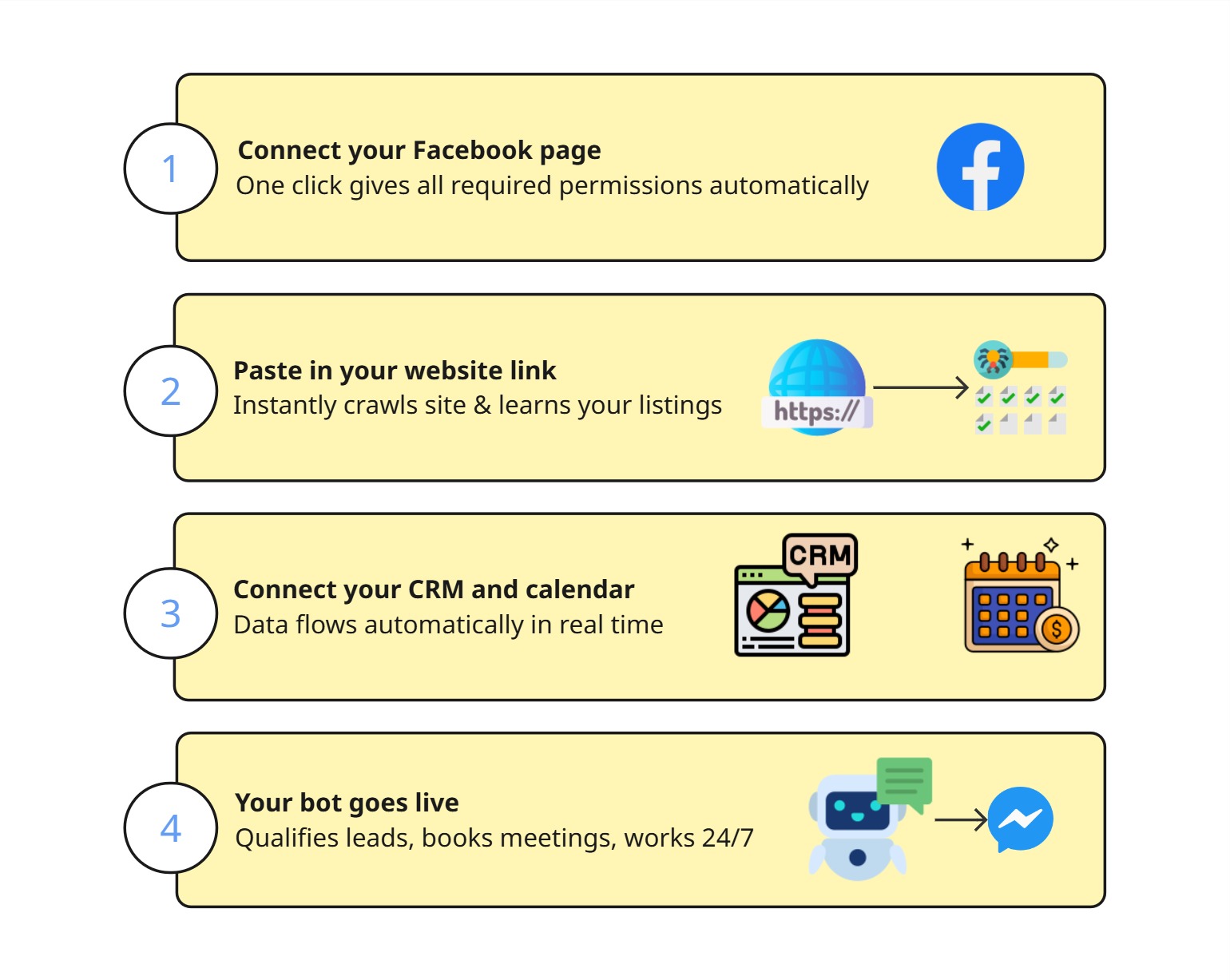
Here is exactly what the setup looks like when you use it.
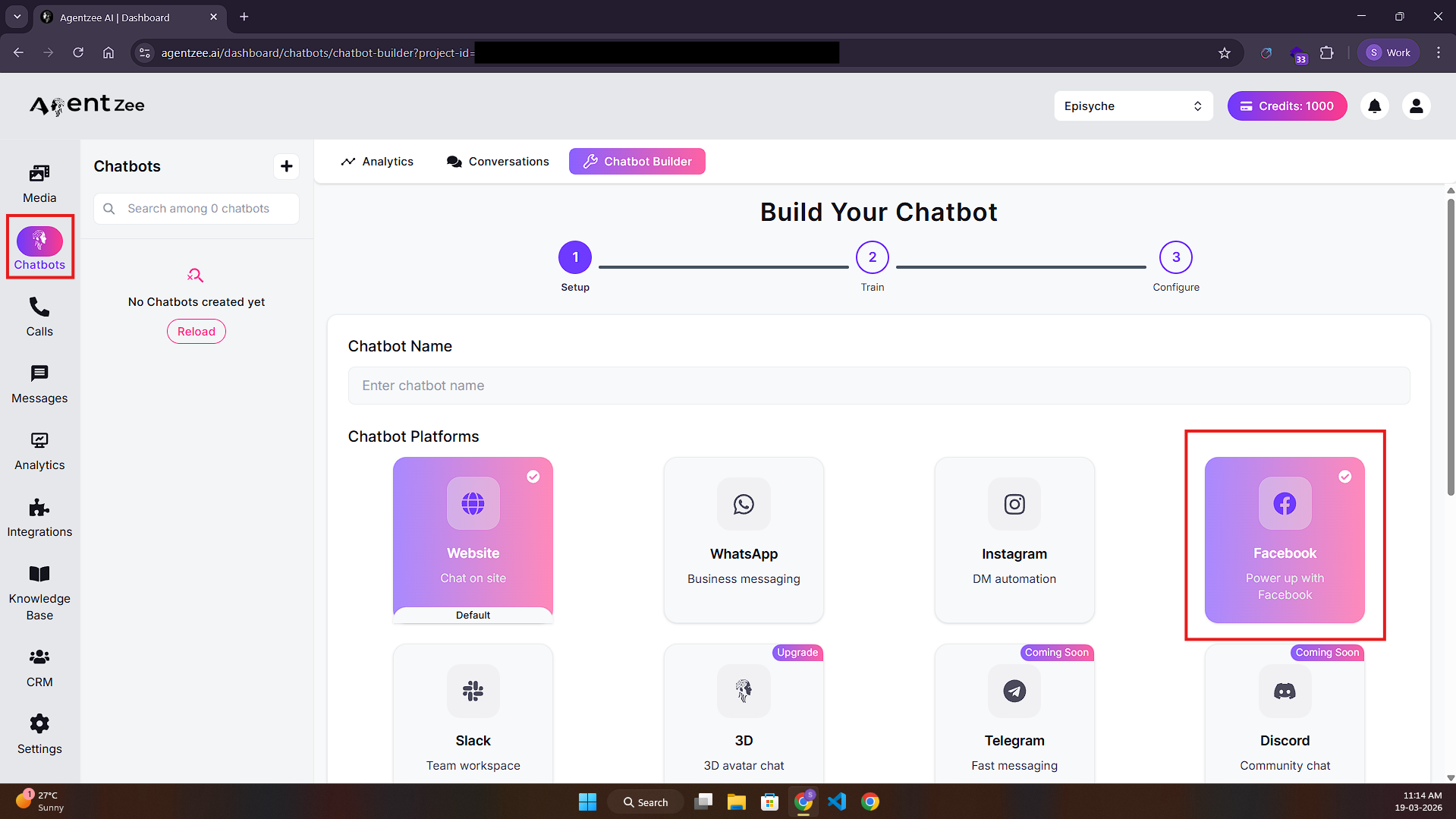
Connect your Facebook page. It takes one single click. The software handles all the required page permissions automatically and completely configures your Messenger webhook quietly in the background.
Paste in your website link. Agentzee instantly crawls your site and builds out a solid baseline of knowledge. Then you just start throwing things at it. Upload your PDFs and Excel inventory sheets. Drop in your Word documents. The AI reads it all and genuinely learns your specific listings, your sales process, and your exact brand voice.
Connect your CRM and calendar. It works best with Zoho, HubSpot, Google Calendar, and Calendly right out of the box. All that valuable lead data just starts flowing automatically. Those meeting slots get locked in instantly using real time connections.
Your bot goes live. Just like that, your Facebook AI bot is totally active. It is qualifying leads and booking meetings. It hands things off to your human team with complete context. Best of all, it handles those completely random 2 AM messages while your entire office is fast asleep.
That entire setup takes a couple of hours from start to finish. Not a few painful weeks.
Your agents deserve so much better than a spam-filled inbox
Top tier agents in Dubai definitely did not get into this crazy business to spend every single morning sorting through 150 random Facebook messages. They do not want to sit there blindly guessing who is actually serious about buying a property.
They got into real estate for the thrill of the deal. They want to build real relationships and actually feel that rush of handing a client the keys to a brand new home.
A proper Facebook AI chatbot gives them all of that wasted time back. It completely absorbs the insane message volume. It filters out all the useless noise. It just quietly books the meetings. By the time a real human finally jumps into the chat, they are walking into an incredibly warm situation. That lead is already engaged. They are fully qualified and actually looking forward to the phone call.
Here, you are not at all substituting your human agents. At last, you are allowing them to do what they truly excel at.
Are you prepared to start scheduling meetings around-the-clock and stop losing valuable leads? Agentzee gets your Facebook AI chatbot completely live in a matter of hours. You do not need expensive developers. You do not need to fight with complicated software integrations. There are literally no more excuses left.
See how your Facebook AI chatbot can start qualifying leads and booking property meetings automatically from day one: