
If you run a business and heavily rely upon social media platforms for leads you definitely need to read this article from top to bottom like “Bottoms up”. Because the Instagram bot is going to change your life.
Picture this: You have cracked a killer strategy of publishing videos. You’ve perfected your content creation pipeline with a solid team. You’ve hired video editors dedicated to your business, and you’ve got marketing folks watching your accounts and following up on leads.
Life is good. Systems are in place.
But then...
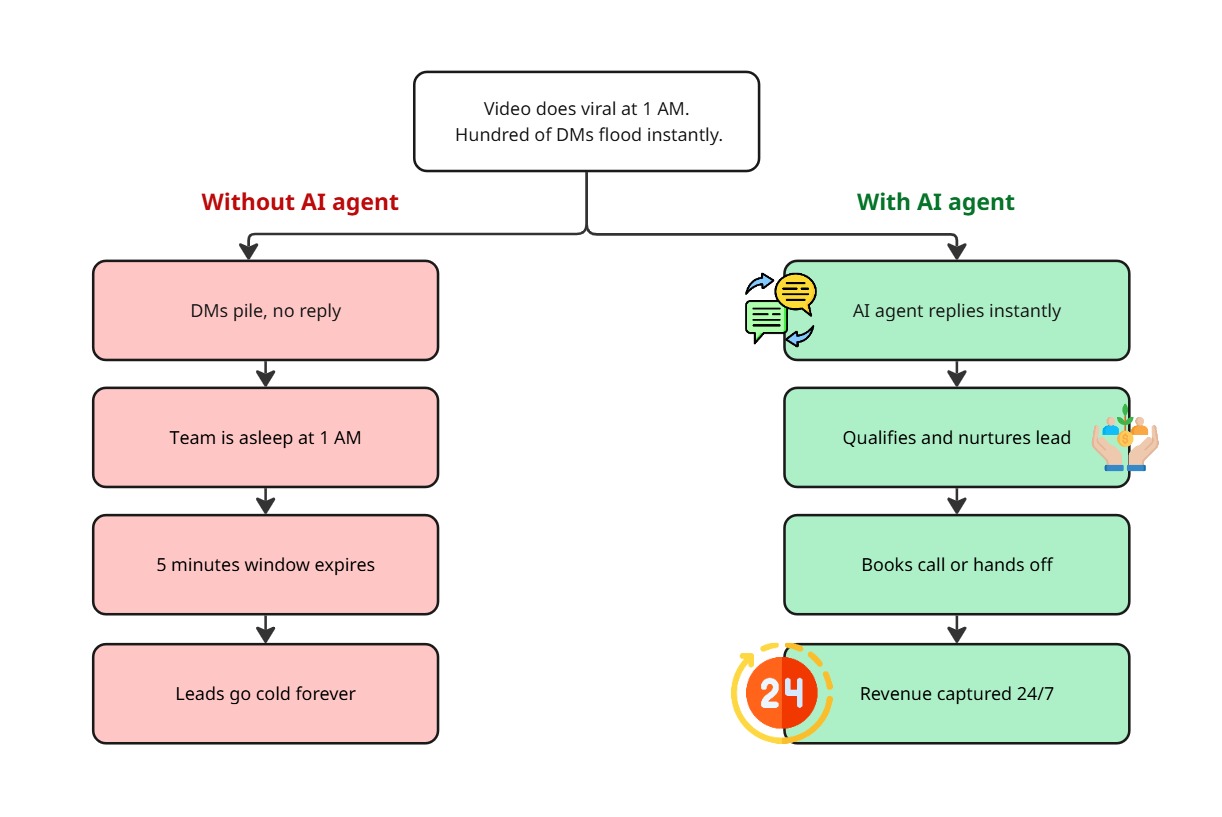
On a random Tuesday at 1 AM while you and your entire team are asleep one of your videos gets picked up by the algorithm. It’s going viral.
In a fraction of moments hundreds of people message you on Instagram to enquire about your product or service. Your mobile’s notification is going crazy in the middle of the night. You suddenly woke up and were unable to get a grip on the situation. When you finally check the Instagram analytics you finally come to know that the market strategy is paying off. One of your videos is viral now!
But there is hugeeee problem to face.
When you tried to call your marketing team members, none of them is picking up your call. Obviously it’s the middle of the night 1 AM and all your leads are getting cold.
Here’s the brutal truth: If you miss the first 5-minute window of user engagement then it’s hard to capture the leads and convert them into paying customers. Straight away, all of your efforts in creating and perfecting the content that users love are potentially wasted without proper user engagement strategies.
Solution: Instagram AI agent which never sleeps (AKA Instagram bot)
If you have been in this situation before, congratulations on driving traffic to your Instagram account. If not, you’re probably working hard to get there.
But here’s what we’ve clearly identified: There’s a missing piece in your success puzzle.
Your initial lead acquisition and lead conversion pipeline needs to be established before you start publishing content on Instagram. Not after your video goes viral at 1 AM when everyone’s asleep.
Step 1: Choose an Instagram AI agent provider such as Agentzee
There are many providers in the market, each with different features and pricing models. Agentzee is built for exactly this workflow, and the steps below use it as the example, but compare features and pricing before you choose.
Step 2: Connect your Instagram account to the provider.
Important:
You need to have an Instagram business or creator account (not a personal account) in order to configure the Instagram bot.
How to check if you have a business or creator account:
Open Instagram → Settings → Account → Account type
If it says Personal, switch to “Professional account”.
Step 3: Set up your Knowledge Base,Brain of the AI Instagram Bot.
The quality of the AI agent’s response is directly proportional to the data you feed to it. I will guide you on how to do it:
(1) Add your website URL
Paste your website link to crawl it and extract Product/service descriptions, pricing information, common FAQs, Customer testimonials, contact methods and return/refund policies.
Best suited for: Businesses with detailed and up to date information on their website. The Initial knowledge will be picked from this source.
(2) Upload Documents
Upload any kind of documents like PDF, Microsoft Word, Excel, CSV etc.
Best suited for: We can’t add all the business-related documents to the website; in this case, an external source gives added context to the knowledge base. Things include Enterprise pricing models, detailed FAQs, product specs, policies, brand story and upcoming promotions.
(3) Manual Text Input
Type or paste key information directly
Best for: Sometime if you want to quickly update the knowledge base with new information, it will be handy.
Step 4: Configure your Instagram Agent’s settings
This is where you customise how your AI agent’s behaviour:
Tone settings:
Casual and friendly (best for lifestyle brands)
Professional and helpful (best for B2B)
Warm and supportive (best for coaching/services)
Response triggers:
Respond to all DMs automatically
Respond only to first time messages
Respond only during off hours
Handoff Rules (Critical): Set conditions for when the AI should transfer the conversation to a human:
When someone says, “They want to speak to support team member”.
When someone is ready to purchase.
When questions go beyond the knowledge base.
Initially, when you set up the agent, start with broader handoff rules, then after some time, tighten the rules based on the agent’s performance. Better to overtransfer the leads to a human than losing it.
Step 5: Configure how and when to schedule a meeting or call.
When your team is not available don’t lose the lead. Instead schedule a callback.
Connect your calendar via Google Calendar, Calendly, etc.
Configure the AI to offer scheduling when:
No team member is online
The customer requests a call
Finally, ask the customer for a suitable time to call back or share your timeslot to book at the available time.
Sample callback response by the AI Agent:
Hey currently our team member are offline, But I can schedule a call for you. Would tomorrow at 10 AM or 2 PM works for you, if not please check this call schedule tracker to suitable time slot for your preference, Thanks.
If the above steps are done correctly, now the magic starts to work! :
Finally but is the most important part in the setup flow, make sure to test every kind of scenario before pushing to production.
When a customer DMs you, they’re automatically guided with top notch, relevant information about your product or service.
If the user is genuinely interested in buying? The Instagram bot hands them over to a marketing team member.
If no one’s available? Then it schedules a callback with the customer.
Later on? Your marketing team picks up right where the bot left off with full context.
When the marketing team is available, they can
Think of it as an Instagram bot on steroids. Minus the side effects.
Common mistakes you need to avoid are:
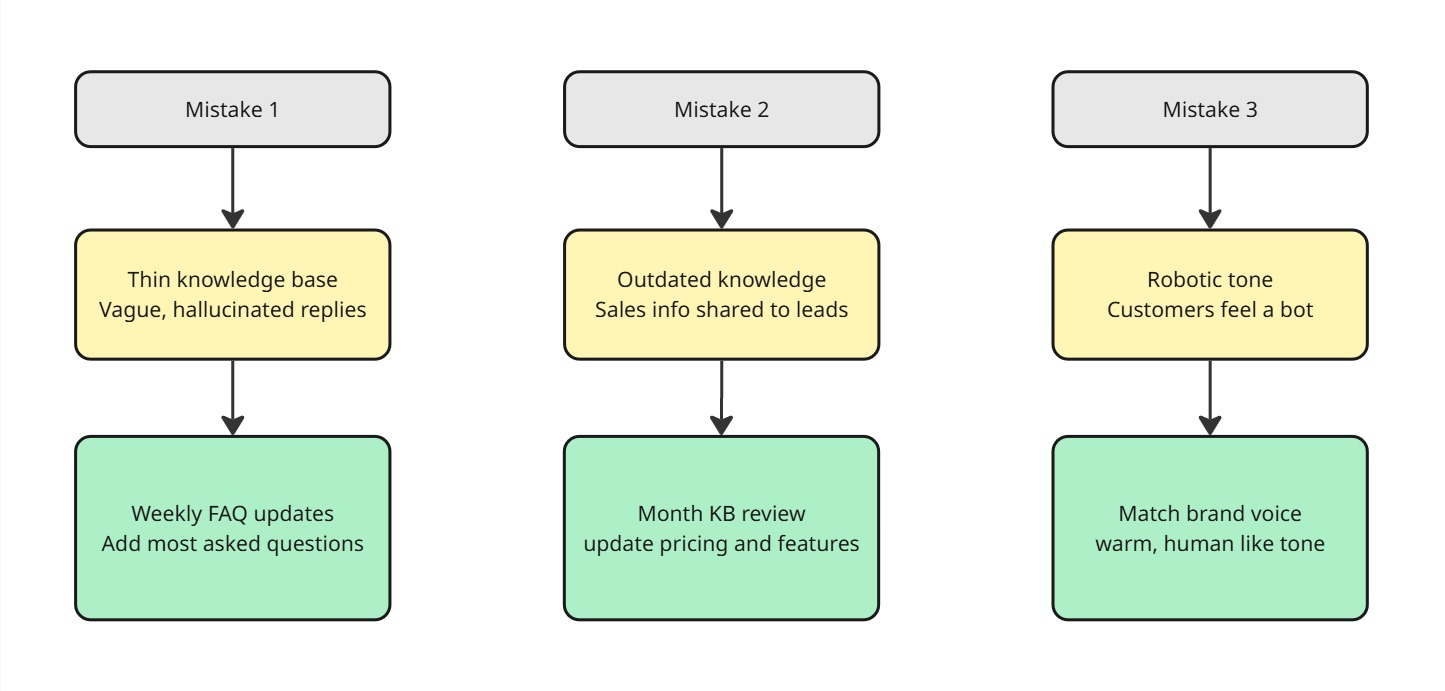
Mistake 1: Small amount of knowledge base
Problem: AI gives you vague or hallucinated answers.
Fix: Weekly review the most asked questions from the users and add them to the FAQ questions list.
Mistake 2: Periodic update of the knowledge base
Problem: An outdated knowledge base won’t answer questions about the latest feature of your product.
Fix: Review and update the knowledge base on a monthly basis, which includes new features, deprecated things, policy updates, pricing model updates, etc.
Mistake 3: Responses with robotic tone
Problem: Customers feel like they are talking to a bot.
Fix: Customise the tone to match your brand identity
The Bottom Line
An Instagram bot is not an automation thing, if you run a business which relies on social media, then it’s a necessity, an insurance policy for your business. Going viral is great, but going viral without an Instagram AI agent catching those leads at 1 AM in the middle of the night while our marketing team is asleep is like throwing a huge party and locking the entrance door.
At Agentzee, we have already built the solution for Instagram AI automation. So you don’t need to write a single line of code. You just connect your Instagram account, set up your knowledge base, configure your handoff rules, and that’s it. Agentzee takes care of everything: responding to DMs in a natural conversation, it qualifies the leads, books a call and hands off to your team, all with zero human interaction. No complicated configuration process and no enterprise contract.
To know how to connect our Instagram AI chatbot with your business, please check out this blog