
It’s an afternoon on Tuesday. Priya is attempting to maintain her clothing business while at home in Bengaluru. She’s got around 60 products, about 4,000 people following her on Facebook, and way too many emails to deal with.
Fifteen new messages. All are asking some version of the same thing.
“Hi, what all do you have?”
“Can you send me your catalogue?”
“Do you have dresses under ₹500?”
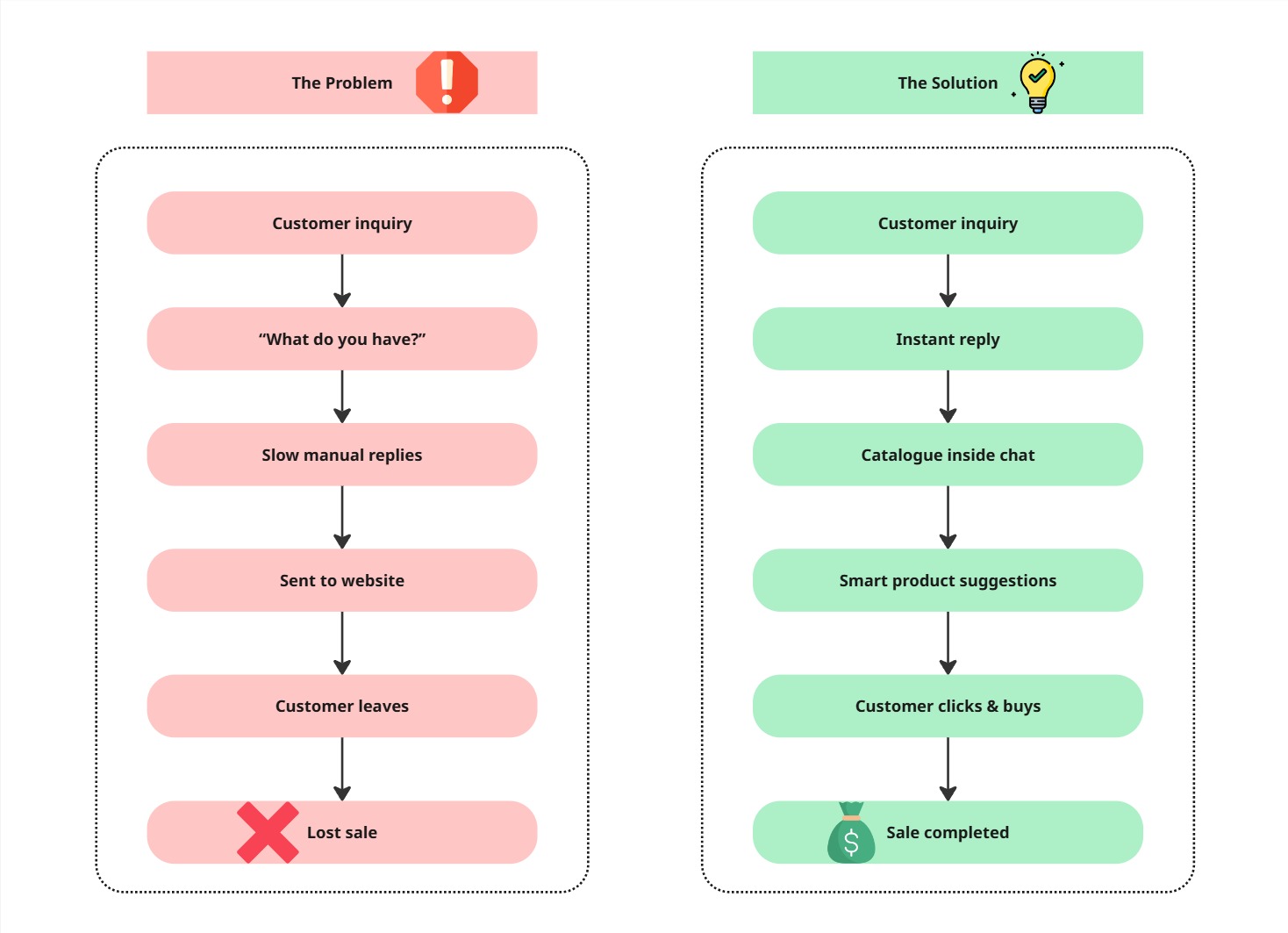
She types out replies to each one. Attaches photos. Lists prices. By the time she’s done with the eighth message, the first three people have gone quiet. They moved on. Not because they didn’t want to buy. Just because the gap between question and answer was long enough for them to scroll away.
This is the silent sales killer that nobody talks about. And a Facebook message catalogue is the fix that most small business owners don’t even know exists.
What a Facebook message catalogue actually is and why it’s not what you think
Most people hear “catalogue” and think of a PDF they email to customers, or a product tab sitting somewhere on their page that nobody visits. That’s not this.
A Facebook message catalogue is a product feed that lives inside Messenger. So, if you or your chatbot responds to a DM to your Facebook page, you can actually send that person a real product card, with a picture, name, and a “buy” button, inside that conversation. No need to click any links. No need to say “go check our website.” The product is just there.
The difference sounds small. It isn’t.
If the customer is already talking to you, they are in buying mode. It is a waste to send a customer to a website, and half of these people won’t even come back. But if the product is delivered to the chat, people browse, people tap, people buy.
That’s what a Facebook message catalogue does. It turns your Messenger inbox into a storefront.
Why “just send them to the website” is costing you sales
Most sellers don’t want to hear: your website is not where the decision happens. The conversation is.
By the time someone DMs your Facebook page, they’ve already seen something they like. They’re not doing research anymore. They’re one good reply away from buying. The moment you break that with “check our website for the full range,” you’ve introduced friction. And friction kills sales.
Facebook Messenger has a 70–80% open rate. Email has 18–22% on a good day. Your customers are not living in their inboxes. They’re on Messenger. Meet them there.
With a Facebook message catalogue, the entire customer journey happens within Messenger. Browse, ask a question, get an answer, buy. That’s it. No need to switch between tabs, no risk of forgetting to return to the site, and no “I’ll check it later” that turns into never.
The real business case: what changes when you set this up
Before getting into the steps, let’s talk about what actually shifts when a Facebook message catalogue is live and running.
You stop being a human search engine: Currently, when someone asks, “What do you have?”, an actual human being has to stop what they are doing to answer. That is time. That is energy. That adds up quickly when it is sale time, product time, or any time of the week.
Your response time drops to zero: The moment a customer asks about products, the catalogue can be sent instantly, either by you in two taps or by a chatbot automatically. No delay. No missed messages. No leads going cold overnight.
Your conversion rate goes up: When the product is there, tangible, and in front of you, impulse buying takes over. This is just how people shop. More people will say “yes” if it’s simple.
You look more professional: A clean product card with a proper image and price communicates legitimacy instantly. It signals that you’re a real business, not someone selling from a personal profile.
How to set up your Facebook message catalogue: the steps that actually matter
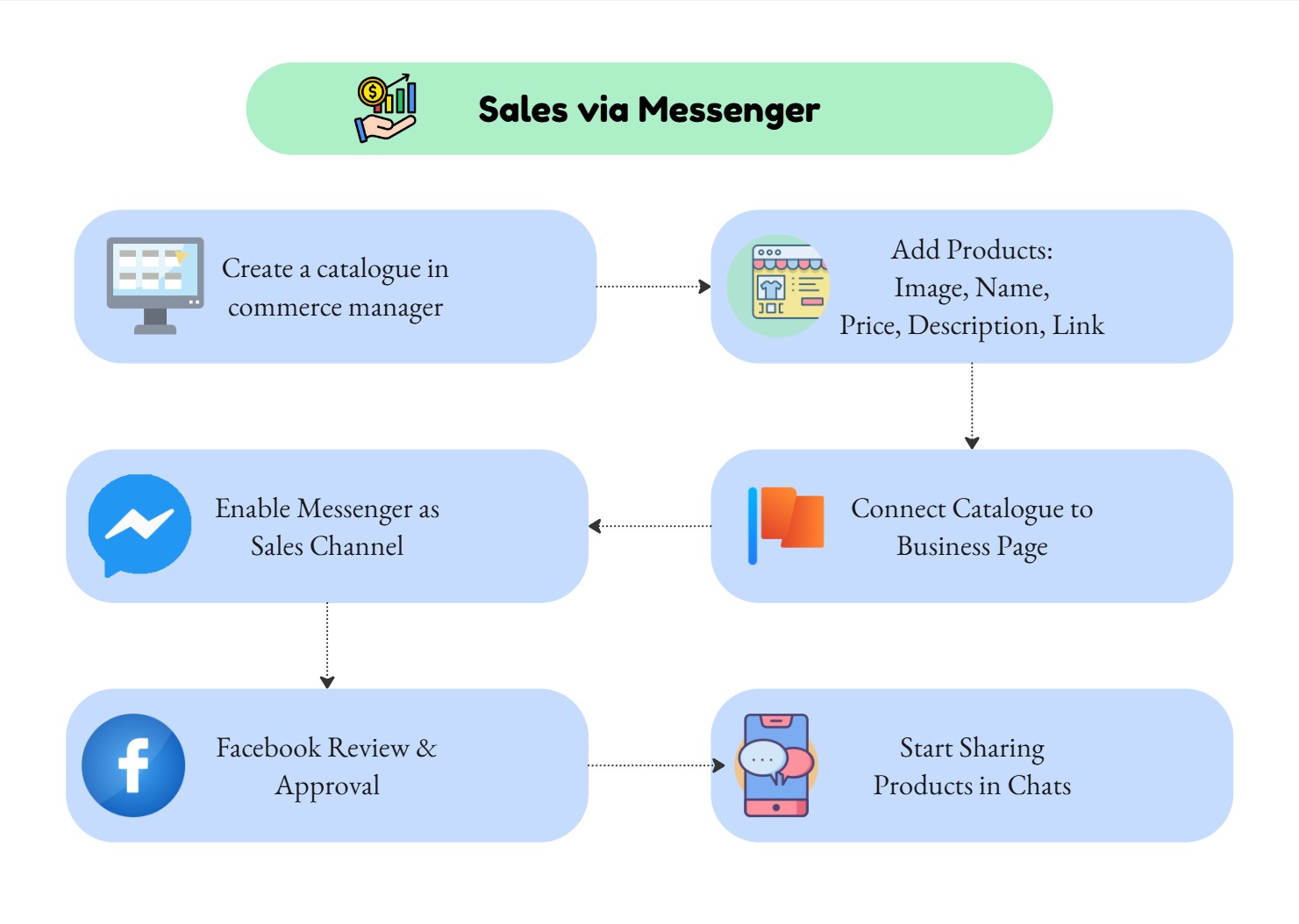
Step 1: Create your catalogue in Commerce Manager
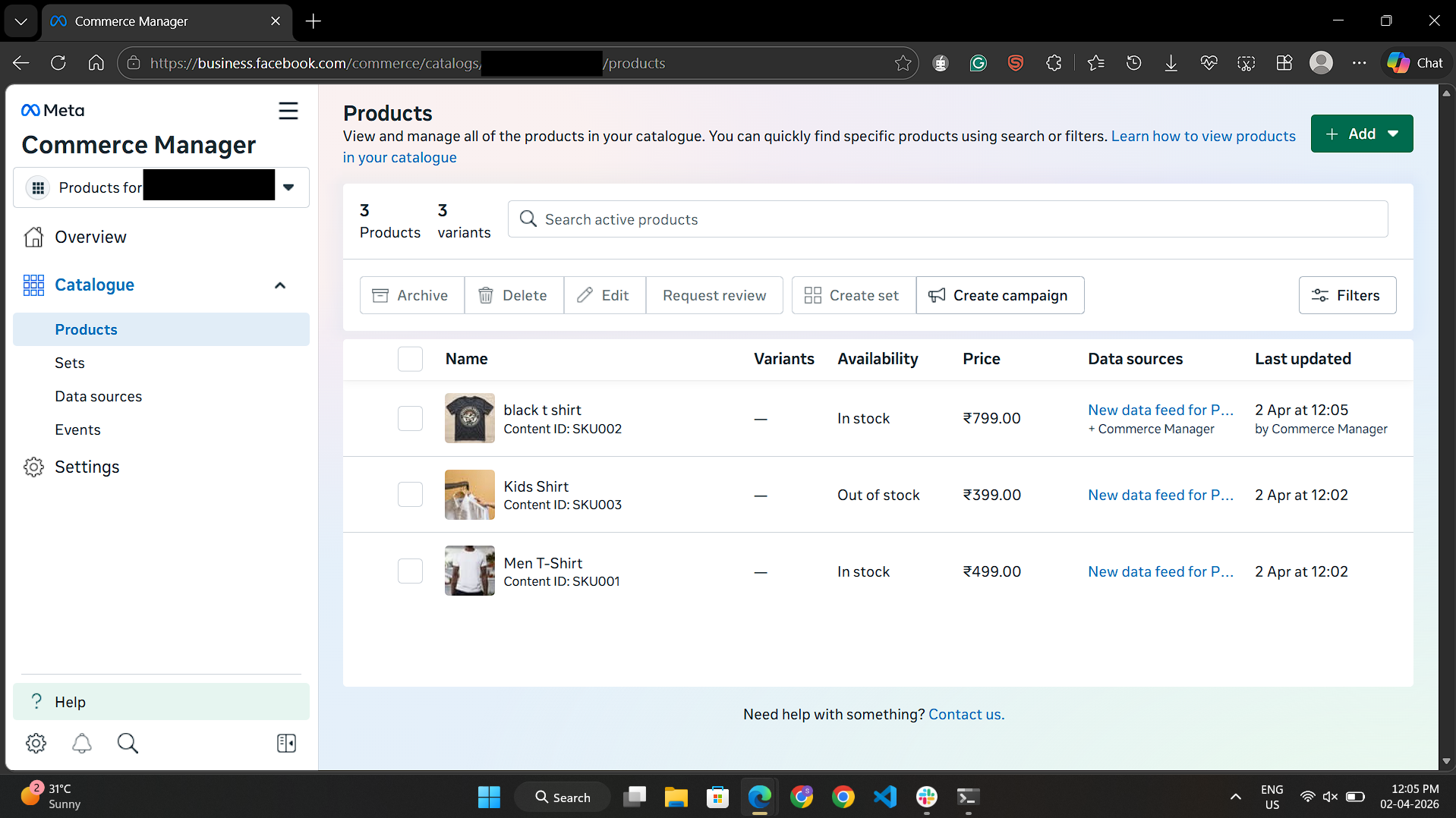
Go to https://business.facebook.com/ and open Commerce Manager. Click Add Catalogue, choose E-commerce, name it, and create it. This is your product container. Add them by hand if your product count is less than thirty. Use a CSV upload in addition to that. You need a clear picture, the product name, price, brief description, and a link to the product’s online store for every item. One thing most people skip: the image quality. Blurry photos kill the catalogue before it even starts. This is where most sellers mess up. The product card is your pitch. It needs to look good.
Step 2: Connect the catalogue to your business page
After adding your products, link the catalogue to your Facebook page. If you skip this, your catalogue will not appear in Messenger. And make sure you are working from a business page instead of a personal profile.
Step 3: Enable Messenger as a sales channel
Inside Commerce Manager, go to Shops and add Messenger as a channel. Facebook reviews your products before approving. Usually takes a few hours. Once approved, the catalogue is live inside Messenger.
Step 4: Start sharing products in conversations
Inside a Messenger conversation, you will find a small shopping bag icon in the message box. Click it, choose the product, and send it as a card. This gives the customer a clear visual along with a buy button, while saving you the effort of typing detailed responses each time.
That alone saves hours every week.
Where a Facebook chatbot turns this into a system
Here’s the honest truth about the manual approach: it still requires you to be online. If someone messages your page at 10 PM asking about your products, and you’re asleep, the catalogue doesn’t help. The message sits there until morning. And by morning, they’ve moved on.
This is where a Facebook AI chatbot connected to your Facebook message catalogue changes everything. The chatbot responds instantly, sends the appropriate products depending on what the customer is asking for, and sends these products as cards at any time without your presence.
A customer types, “I’m seeking a gift under ₹800.” The bot asks a couple of quick questions about the gift, filters through your catalogue, and sends the customer three relevant product cards. The customer selects one. Done. You wake up to a sale you didn’t make.
Agentzee’s Facebook chatbot is built exactly for this. It connects to your catalogue, understands what customers are asking for, and handles the entire product discovery conversation automatically. It doesn’t get tired at midnight. It doesn’t forget to mention the discount. And it never sends the wrong product.
The result is a Facebook page that sells around the clock, without a dedicated person watching the inbox all day.
The part nobody warns you about
Setting up the catalogue takes maybe a couple of hours. That’s the easy bit.
The real work is making sure someone (or something) is ready to respond when a customer engages with a product card. Because the catalogue creates interest. It doesn’t close the sale on its own. If a customer taps a product, has one question, and gets no reply for six hours, that’s a lost sale even though you had the perfect system in place.
Speed of response is the variable that determines whether the catalogue works or just sits there looking pretty.
Conclusion
Priya doesn’t type out product lists anymore. She set up her Facebook message catalogue, connected it to a chatbot, and now when someone DMs her page asking “what do you have?”, they get a visual catalogue inside the chat in seconds. She still gets the same number of messages. She just doesn’t have to answer them herself.
The sales haven’t just stayed the same. They’ve gone up. Because the gap between interest and purchase is now almost zero.
Your Messenger inbox is already getting traffic. The Facebook message catalogue just makes sure that traffic turns into revenue instead of unanswered questions.
If you want the whole thing running automatically, Agentzee’s Facebook AI chatbot connects to your catalogue and handles customer conversations around the clock, so your page sells even when you’re not watching. Take a look here: