
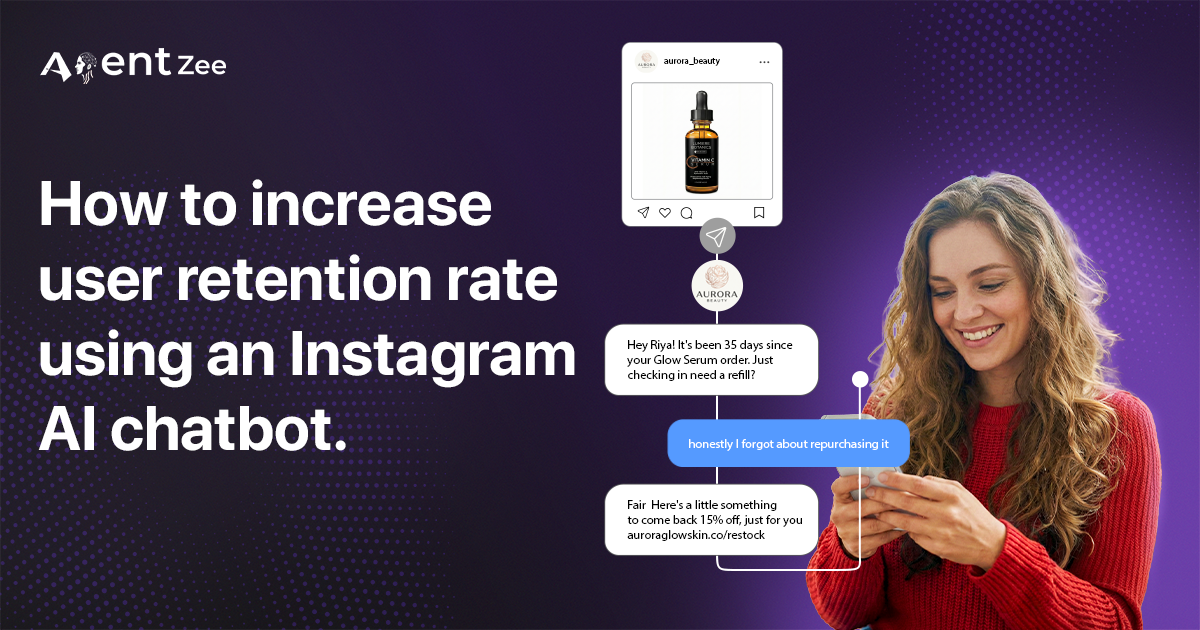
Tons and tons of capital invested in Instagram advertisements to promote your face serum product, and also finally your effort paid off, nearly thousands of people showed interest and with the lead acquisition pipeline you set up earlier kicks in, and voilà, hundreds of users now purchased your product it’s a success. We actually crossed the finish line 🏁 pickup the champagne bottle🍾, let’s celebrate it. No…. wait Don’t get too excited; the actual problem is yet to start. It’s not that the customer purchased your product this month, but will they re-purchase it next month?
I will explain it with an example and numbers: you run an Instagram ad on January 1st, and 10,000 users showed interest. out of those 2000 users messaged you on Instagram, enquiring about your face serum.
A quick callout: If you are a founder, you might have thought how are we going to handle 2000 DMs in a short period of time without losing the leads in the 5-minute window of user engagement starts after a user initially messaged us. If you’re curious, read this blog: How an Instagram Bot in 2026 might help you not miss a lead ever again, even at 1 PM.
Finally, 300 users purchased your products who were from Instagram.
Coming back to our story, the customers who bought your product on 3rd January won’t magically remember you on February 3rd when they are running low. Yes, you can send a follow-up email asking them to purchase again, but what if there is a golden opportunity you are missing?
In this blog i am going to explain how to retain the existing customers without spending thousands of dollars in ad campaigns or newsletters.
Let’s think differently...
An AI chatbot on Instagram is here to rescue your sales!
Instagram DMs are the silver bullet which is going to penetrate through all the promotional messages, regulatory restrictions, calls, notifications, email and hand it over to the hands of your user.
Why should I use the Instagram DM when I have the email? which is considered as the primary communication source to the customer. Technically correct, but the email from a skincare brand will be buried under the emails from the random newsletter and shipping notifications from Amazon. So it’s hard for the user to see your retention email.
Let’s see the stats 📊.
The email open rate will be at 18% or 22% on a good day.
But when it comes to Instagram DM it’s a different game altogether.
The open rate of Instagram DM is 70 - 80%. Seriously, it’s not a Typo.
The cherry 🍒 on top is that these 300 customers already came through Instagram, which means they’re comfortable being reached on Instagram. And the tool which is going to accomplish it is AI chatbot on Instagram. People live on Instagram; they don’t live in their inbox. So you can trust me on this strategy.
So 35 days later on February 5th (when the serum is running low) you send them a retention message. Not a generic blast. Personalised message that makes them think “Oh yeah, I would love to repurchase that stuff”. Now imagine doing this every month without lifting a finger. That’s the true power of an AI chatbot on Instagram, which is now your Personalised retention messages generation machine.
The Retention workflow: How it’s going to be implemented.
Let’s break down this workflow into a step by step process, so that you don’t need to manually DM 100 customers every month.
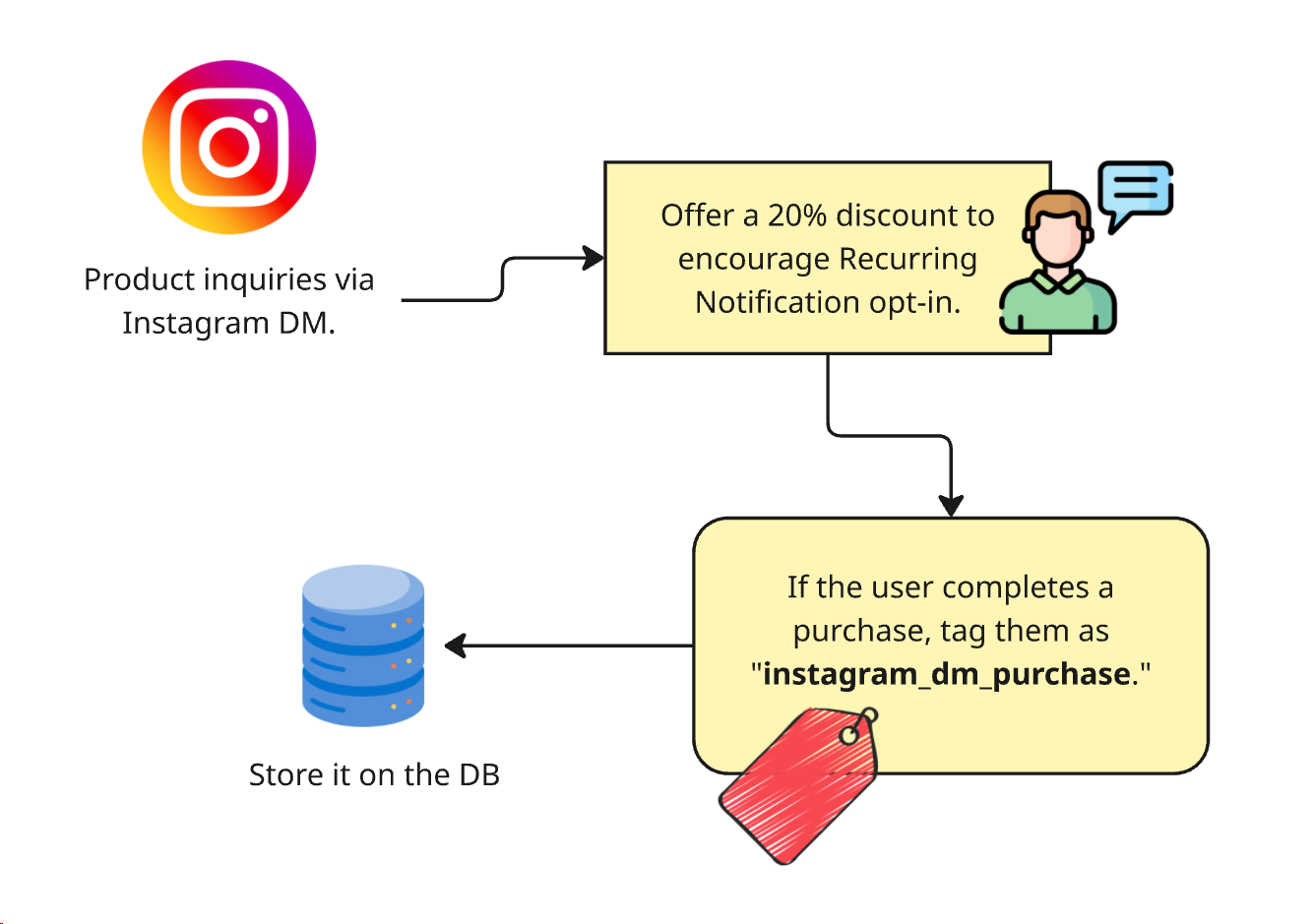
Step 1: Tag customers at the purchase stage who DM you on Instagram.
Instagram is not like WhatsApp we can’t send a message to the customer just like that since we have their contact details.
In Instagram platform, there are rules to send DM to your customers. Even though you have a business account with all the permissions, DM to the customer comes with some restrictions.
Meta’s messaging rules only let a business reply within 24 hours of the customer’s last message (up to 7 days for replies from a human agent using the Human Agent tag). After that window closes, the API won’t let you start a new DM.
The solution is to ask for permission while the window is still open. With the Recurring Notification feature (where Meta makes it available), a customer who opts in can receive messages from you after the window has closed. Check Meta’s current messaging policies before you rely on it.
How to configure Recurring Notification:
During the purchase conversation, ask the customers if they want to receive recurring reminders from the brands regarding the product information or updates. If the customer approves your request. You will get a token in the webhook, then use it to DM the customers whenever you want.
ok now the technical flow to access recurring notification is explained well. Now we can focus on a marketing strategy to force all the customers who DM on Instagram to opt in for the Recurring Notification. Send them “Accept this Recurring Notification request to avail an additional 20% off coupon”. So this may force all the customers on Instagram to opt in for Recurring Notification.
Finally, store the customer’s Instagram details and token from the webhook into your application DB.
Step 2: Calculate the Retention window
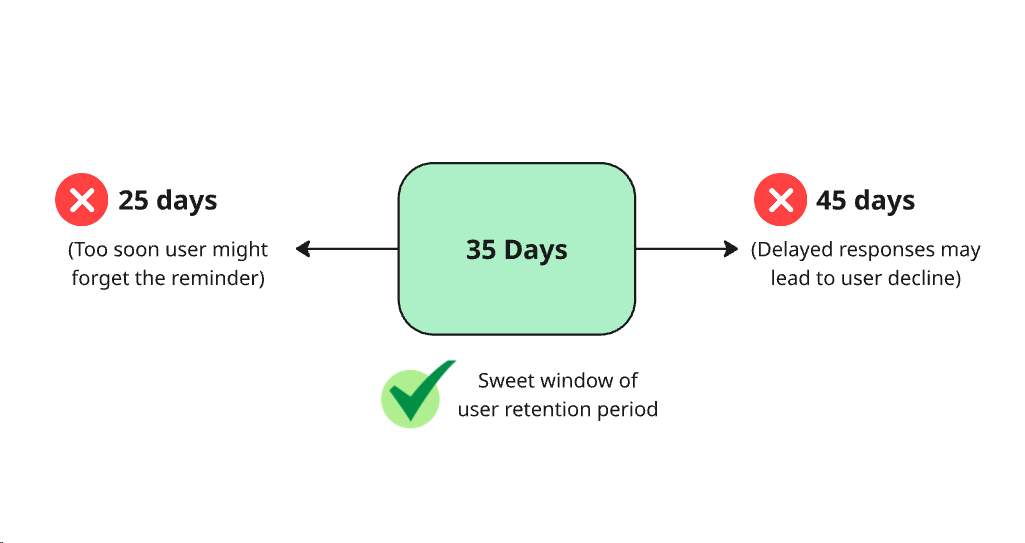
Every product has a different life cycle ( repurchase cycle ). A face serum typically has 35 days of usage before it completely runs out.
This calculation is very critical, if you send the message very soon the customer may see the message and ignore it since they already have enough face serum left. If the message is sent very late, the user might forget the product and move on.
So do some serious market research with your customer and find out the sweet spot. In this case, it’s 35 days. So we are going to send a retention message every 35 days, until the user opts out.
Step 3: How to craft a personalised retention message
If it’s a generic message, users might ignore it. So send a customer tailored message.
Here is an example: “Hey Sarah! Just a heads up, if you’re starting to use the Glow serum around the New year. You are probably running low now. We got a quick restock option if you want me to send the link. No pressure, just figured you’d want the reminder before it sells out again”.
The message does three things:
It timed to the sweet spot, using the user’s previous purchasing date.
It is casual, not corporate.
It triggers the customer to repurchase the product.
Once these reminder messages are sent to your customers, if anyone is interested in the repurchase and has any doubts, the AI Chatbot on Instagram can take of the queries. You simply sit back and count the retention money from those customers.
Step 4: Automate the process using a cron job or scheduler.
Here’s where most brands drop the ball. After the initial retention message, they might forget about the process or the sweet, sweet retention window might be missed.
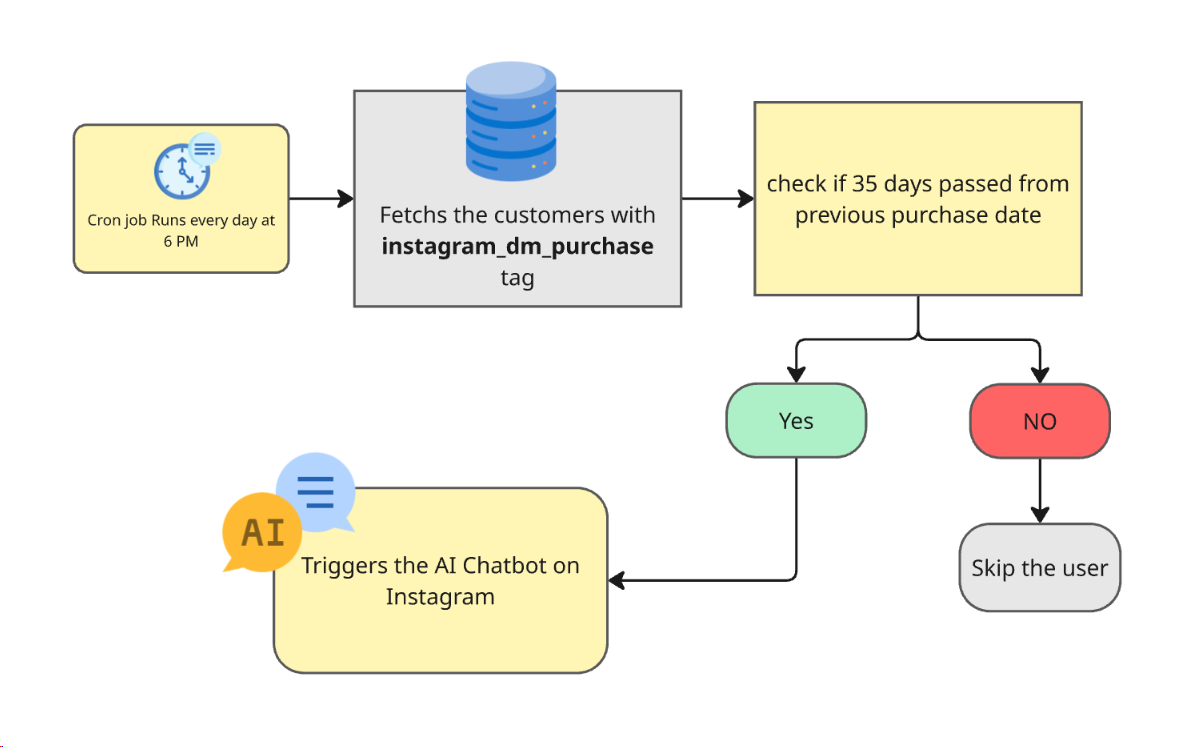
Instead, automate the process with a cron job or a scheduler which checks every customer in the database & performs the required steps. Here is how it works:
Every day at 6 PM, check if any customer is tagged with instagram_dm_purchase .
Calculates if 35 days passed since the previous purchase date.
Trigger the AI chatbot on Instagram to send a personalised message to the customer.
Logs all the actions, so you can debug or verify the flow later.
Important role of the AI Chat on Instagram:
When the scheduler or cron job triggers a retention message flow for a customer, the chatbot prepares a personalised message respective to the customer, but it also does other things:
The AI chatbot on Instagram analyses the customer’s purchase history, and while sending a retention message, it applies a loyalty discount. It may convince the customer to purchase the product again and again. Therefore, we can convert it into a nonstop recurring revenue.
After seeing the retention message, if the customer shows interest on other product and asks questions. Don’t worry, the Instagram AI chatbot covers you. It searches the e-commerce site and gets the relevant information to fulfil the user’s query.
All these re-engagement analytics are logged, so you can verify the stats later on a centralised dashboard.
If the customers say “Not right now”, the Instagram AI chatbot thanks them and moves on. No awkward follow ups.
AI Chat on Instagram hands off rules.
Whenever the AI chatbot feels it is not the right time to convince the customer with another message, the following things are done:
It hands off the conversation to a human support agent or if no one is available at the moment if asks the customer to schedule a call later and shares a timesheet.
Whenever the question is out of the knowledge base, the chatbot hands off to a human.
If the customer insists they want to speak to the support team, it redirects the chat straight away to a support team member.
If the customer says there is a problem with the purchase or order to immediately hands off to a human.
Conclusion
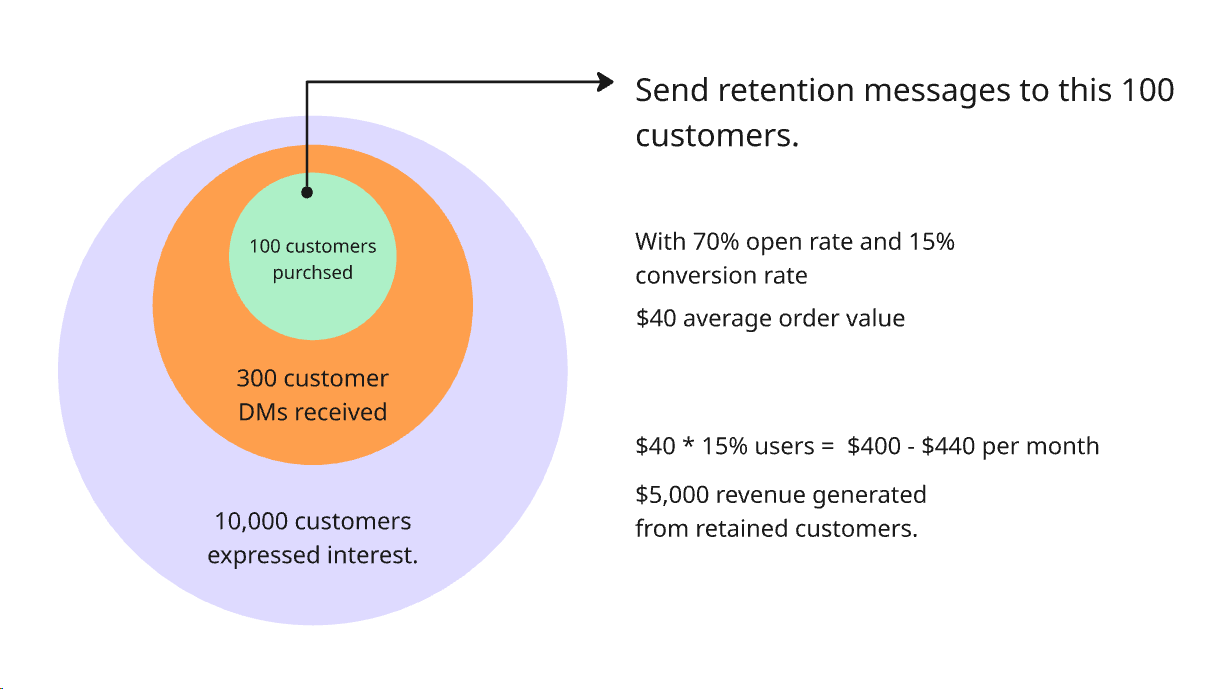
Let’s say you send retention DMs to 100 Instagram buyers each month. With 70% open rate and 15% conversion rate, that’s:
70 people will see your retention message.
10 - 11 people who may buy again.
At a $40 average order value, that’s $400 - $440 in recovered revenue per month from a single automated workflow.
Over a year, that’s around $5,000 in revenue from a single workflow. You definitely might forget about these things in the day-to-day operations of your business.
Here’s is the most uncomfortable truth: most of your Instagram buyers will never come back. Not because they didn’t like the product. Because they forget. They scrolled past. They moved on.
An AI chatbot on Instagram won’t let it happen. It shows up at the right time, with the right message, in the right place. And it does it every month, whether you’re asleep, on vacation or busy running your next campaign.
If you are ready to stop treating the purchases like an ending and start treating them as a beginning, it’s time to set up the retention workflow. We at Agentzee have perfected this workflow with many of our customers. If you’re searching for someone who takes care of the whole customer journey from initial query to monthly retention messages.
Then, please check out our Instagram AI chatbot