
Three weeks before, the patient booked an appointment online. They picked Wednesday, 11 March at 10:00 AM, and received a confirmation message and said yes.
Then Wednesday arrived. The chair was empty. The doctor was waiting. The patient ghosted. And somewhere in the background, a front desk coordinator named Anjali was handling continuous incoming calls, direct walk-in patients, reschedule requests, a printer that worked sometimes and sometimes didn’t.
Meanwhile, the reminder call that apparently need to go out on Monday were still on the pending list with other loads of pending tasks. This is the exact gap that the outbound AI voice agent is designed to solve. That’s not a staff failure. That’s a system that was never built for this volume. And it happens in almost all of the hospitals and clinics every week.
Because of this, patient no-show keeps increasing. And when patients ghost their appointment, it quietly but directly affects the hospital’s revenue.
The real problem doesn’t lie at the front desk
Reminder calls look simple and effective on paper. Call the patient 48 hours before the appointment and confirm they’re coming. Problem solved.
But in reality, the front desk isn’t the call centre; it’s the front desk that manages check-ins, walk-ins, patient enquiries, complaints, paperwork, and many other daily tasks. And adding another 40 reminder calls on top of it isn’t an efficient process. It’s an overload of stuff.
What works better is removing the reminder call from the manual process. Outbound AI voice agent can automatically handle reminder calls, get the confirmation, and even reschedule slots if the patient didn’t respond or ask for a reschedule. All of these without any manual intervention.
No need to put the reminder call in the pending list.
No empty chair on Wednesday because Monday got busy.
How setting up an Outbound AI voice agent makes a difference
An outbound AI voice agent doesn’t sound like a robot playing a pre-recorded message and hanging up. It calls the patient and makes a natural conversation in real time with the context available from the patient’s data.
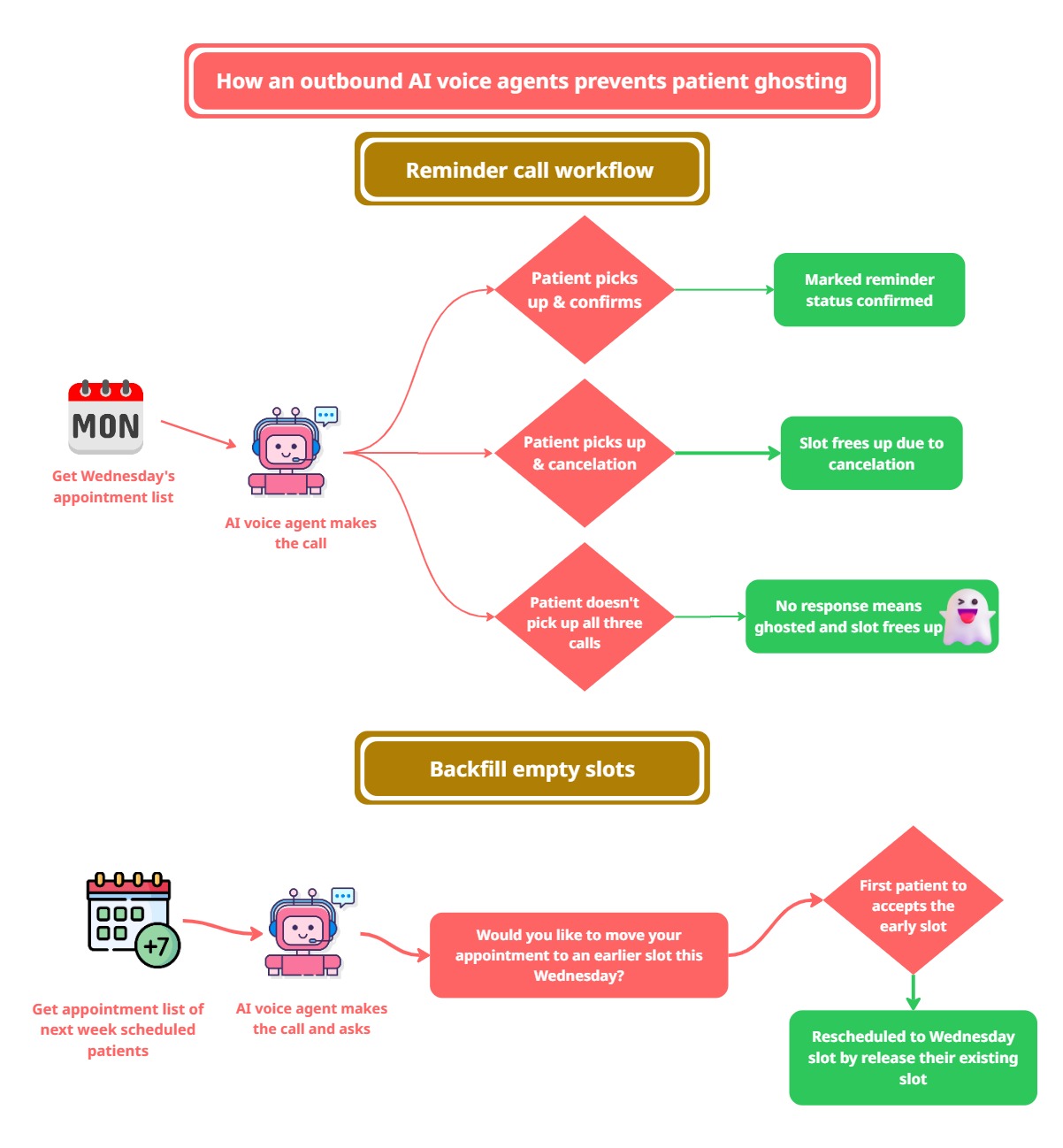
Here’s the outbound AI voice agent workflow that prevents patient ghosting, even before it happens.
On Monday, the agent gets the appointment list for Wednesday. It makes the first call on Monday morning. If the patient picks up and confirms? Then it marks the reminder status of the patient as confirmed.
If the patient doesn’t pick up the first call, then the agent automatically tries again on Monday afternoon. If still not responded, then make a final call on Tuesday morning. If they still don’t respond, which means three misses, the agent will cancel their slot in real time by marking the patient flagged or ghosted.
But here’s where it gets interesting.
The outbound AI voice agent doesn’t just free up the slots of ghosted patients, but it also refills them automatically.
It takes the next week appointment list of patients and starts calling them one by one. It asks simple question:
“Would you like to move your appointment to an earlier slot this Wednesday?”
First patient who agrees to it, gets rescheduled immediately. Their existing booked slot from next week has been released, and they have been moved into a newly available slot on Wednesday.
Here are the steps to set up the Outbound AI voice agent
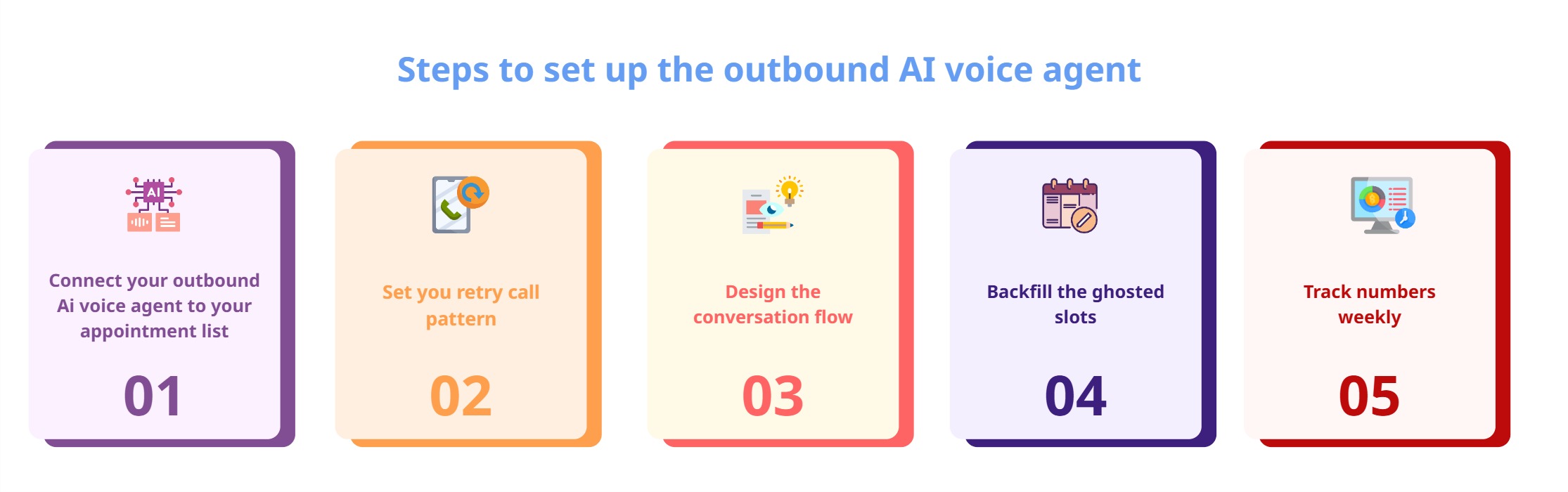
Step 1: Connect the outbound AI voice agent to your appointment data
The outbound AI voice agent needs to read the appointment list in real time. Connect it to a CRM or a database, whatever you’re comfortable with. In the CRM, store the patient records like
Patient name
Patient contact number
appointment data & time
Consultant doctor’s name
Patient age
Patient medical records
In the appointment list, storing the patient information like the above fields helps the Outbound AI voice agent to communicate with the patient better.
Step 2: Set your retry call pattern
Define the three call windows. Monday morning (48 hours), Monday evening (40 hours), Tuesday morning (24 hours) is a proven pattern for the Wednesday appointment. You can flexibly set the retry calls and timings as you want.
Important note: don’t stack the retry call in a short period of time. Space them across to hit different timings because patients pick up at different hours for different reasons.
Step 3: Design the conversation flow
Once the outbound AI voice agent starts making calls, it doesn’t need complicated scripts. In most cases, it follows two paths
Confirmation path
Reschedule path
Confirmation path flow:
Most of the patients come under this path. The outbound AI voice agents call the patient and confirm their upcoming appointment in simple and short way, like
“Hi, this is a reminder from the KKNM hospital. You have an appointment with Dr. Madhi on Wednesday at 10 AM. Can you confirm your arrival?”
If the patient says yes, the system automatically marks them confirmed.
Reschedule path flow:
Not every patient is going to answer the first call.
If the patient didn’t pick up, the AI will try again later in the afternoon and on the third call the next morning.
If the patient answers the call and says they can’t make the appointment, the AI frees up the slot and makes it available for another patient.
If the patient didn’t pick up all three calls, the AI flags them and frees the slot automatically at that moment itself.
Instead of seeing the empty chair on Wednesday, the hospitals know which patients will come and who will not in advance to refill that.
Step 4: Backfill the ghosted slots
When a patient misses confirmation or cancellation, the slot can’t be left empty. So, the outbound AI voice agent immediately looks at the next week’s appointment list to find a patient who could move to the earlier slot.
But who gets the call first?
That depends on your decision. Some hospitals prefer to call the patients who booked first, while others call the patient who lives closer to the hospital, so they can reach easily.
The outbound AI voice agent pulls next Monday’s appointment list and starts calling those patients one by one, and offers the earliest slot this Wednesday. The first patient who agrees gets moved to that earliest slot. Their original later slot is released for someone else, and the Wednesday slot is filled automatically in real time.
No double booking.
No manual correction.
Step 5: Track these numbers weekly
Call pick up rate - whether patients pick up calls? If not, try to adjust the calling time windows.
Confirmation rate - from those picked up calls, how many confirm it?
Slots backfill rate - percentage of backfilled slots rate
ghost rate - note the ghost rate after setting up this outbound AI voice agent
Conclusion
There are many reasons for patient ghosting appointments. But most of them are simpler than they seem; some forgot, for some other sudden urgent work at the last minute, no one reminded them in time.
For hospitals, that small gap opens the door for an empty chair, a doctor waiting, and a loss in the revenue.
An outbound AI voice agent fixes that gap. It calls the patient for a reminder 48 hours before, if not picked up, try again in some time and again in some time. It backfills the ghosted slots and automatically updates in your system to avoid double bookings.
The only question is how many more empty Wednesday chairs you want to count before doing something about it. When you’re ready to stop counting empty chairs, Agentzee builds an outbound AI voice agent to exactly solve this. Appointment confirmations, smart retry logics, automate backfills for the ghosted slots, and instant CRM updates. No development, no integration headaches. Just link your appointment list to the agent, and it takes care of the rest.
Please check out our product