
The Invisible Cost: How a slow reply can affect the salon and spa revenue?
An Instagram AI chatbot seems to be a futuristic upgrade for your salon & spa, but in a fast paced world, it’s essential.
It’s already 10:45 pm, and you just closed your shop after a long day.
Your feet hurt, your back hurts, and your shoulder pains. All you need is rest.
But before you sleep, you open Instagram, and there are 47 unread DMs.
Most of the questions look familiar:
What is the cost of the “balayage”?
Can you list out what services you provide for kids?
Can you please share your location?
During the weekends, do you guys offer any discounts?
You start manually replying one at a time.
Repeating the same answers. Copying, pasting, typing, explaining. By the time you reply to half of the question, it’s past midnight. And another important thing the shop owners don’t realise:
Most of the customers messaged you hours ago. They were ready to book an appointment. But they didn’t get a response. Most of them moved on to other salons that responded to them faster. Not because your service isn’t good. Not because your content on Instagram is boring. But because you didn’t reply in the time they wanted. In today’s fast paced, speed matters.
The Instagram AI chatbot helps you to solve the speed issue instantly. We can see how it fixes that in this blog.
Your Instagram page works 24/7. You don’t have to
Let’s look at this carefully. You’ve done the hardest part by putting the eye-catching reels of colorful transformation of hair, trending hairstyles like before and after, and different combos of services. Your Instagram page is like a colorful live brochure for your salon & spa. People on Instagram see that, are attracted by that, then they slide into your DMs to book the slot.
And when there’s no response for hours, it frustrates the interested customer who wants to book; they search for an alternative salon on Google and go, because they respond faster.
This is where our Instagram AI chatbot solves the problem. It replies instantly by knowing about your services inside and out with the knowledge base it has. And the tone to send the messages in a personalised way to sound like a human.
What an Instagram AI chatbot can do for your salon and spa?
Let’s say a new user sees your Instagram profile. And like the “undercut” hairstyle you posted in the reel. They loved it. They want the same style.
So, they decided to DM you.
The Instagram AI chatbot takes the conversation immediately. And doesn’t reply like “we’ll get back to you soon” as a receptionist does.
Instead of the user messaging like “Hey! I loved the undercut styling you did. I want the same. How much does it cost?”
And our Instagram AI chatbot replies like “Hey! That’s a great choice. The undercut hairstyle is trending currently and suits most face shapes really well. It costs ₹250. Want me to send the booking link so you can choose the slot that you prefer?”
And that’s how it deals with the conversation with a personal touch that feels like someone real who actually cares.
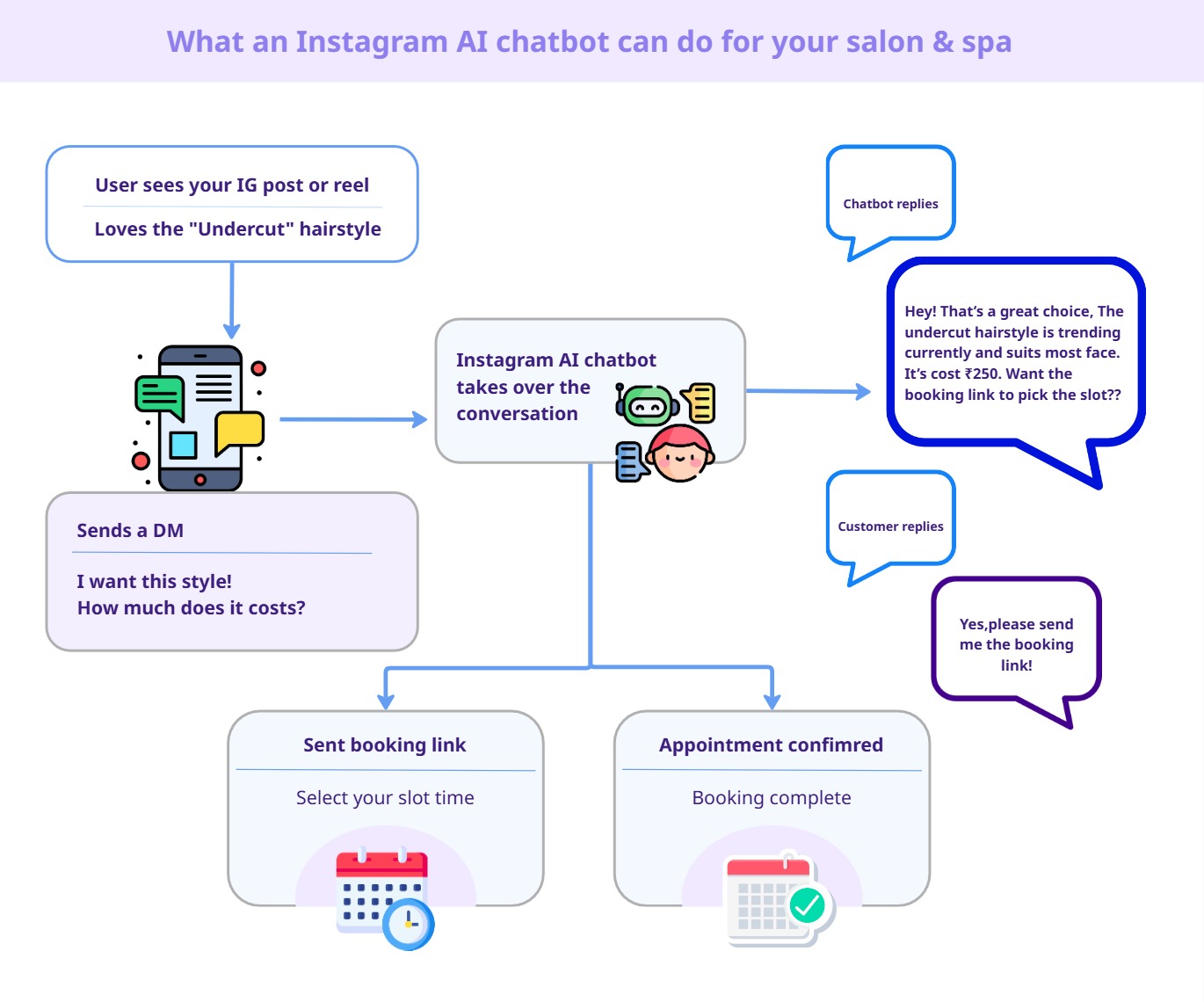
From a simple enquiry to slot booking, automatically handled by the Instagram AI chatbot
Replying to queries is one part of it. But the real magic happens when the user wants to book an appointment.
Instead of asking “Are you available at 3 pm?” the Instagram AI chatbot sends the link of the Calendly slot scheduling tool to their DMs. The customer picks the slot from the available slots that suits them.
That’s it. No phone call, no waiting hours for the response, no double booking the same slot.
An automated reminder goes to the customer’s DM 24 hours before the appointment.
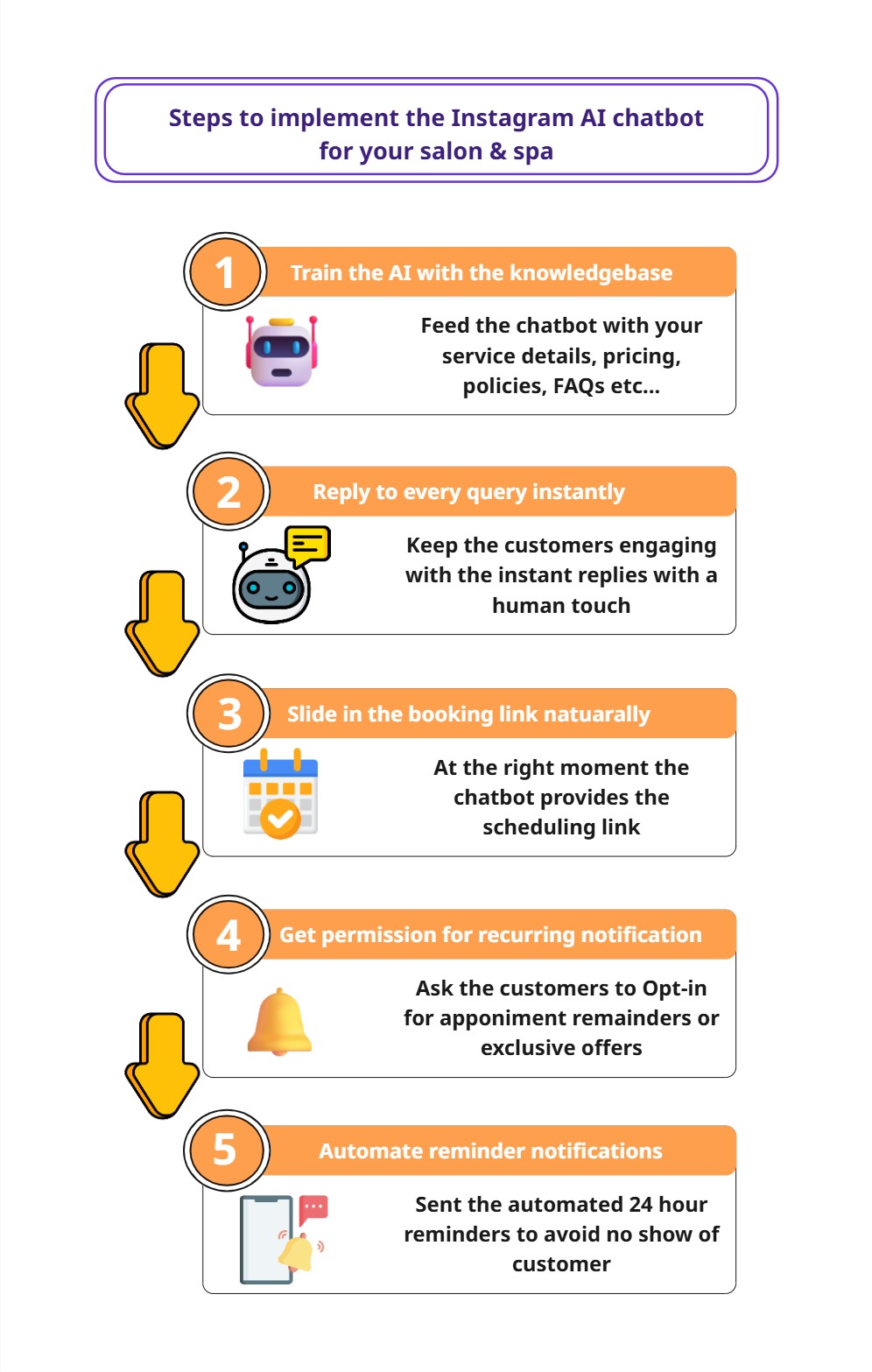
Here are the steps to implement your Instagram AI chatbot for your Salon and Spa
Step 1: Train the AI with your Knowledge base
The Instagram AI chatbot needs to sound like you.
Feed the chatbot with:
Your salon & spa service information
Opening and closing hours
pricing details
Exclusive combos
stylist specialization
FAQs
Policies(cancellations, rescheduling)
Your brand tone(friendly, personalised, sound like you)
The more you feed to the Instagram AI chatbot the more accurate the replies will be.
By training your AI like this, most of the customers don’t have the idea that they are talking to the bot because the conversation feels natural and smooth.
Step 2: Reply to every query consistently and instantly
After training the AI properly. It can respond to every query a customer asks within a few seconds.
If a customer asks, “What hair colours do you offer?” then the AI instantly provides what are the available options within seconds. If they ask, “Is car parking available?” then it is also handled if you feed it into the knowledge base.
But here’s where many salon owners forgot the random question part, not all the DM is going to be related to your page. Some unrelated random questions will also be asked because that’s how some people on Instagram like “What did you eat today?”
The Instagram AI chatbot handles situations like this with a polite message like “Haha, I wish that I could answer that, but I’m here to help with anything related to our salon & spa services. If you have any doubts about that, I’ll help you.”
This also needs to be trained to answer the irrelevant questions like this in step 1. This is the most underrated thing that it’s now become a 24*7 support system without hiring a single person for this.
Step 3: Slide in the booking link naturally
While the Instagram AI chatbot makes conversation with the customer, it naturally guides them towards booking.
At right moment, Our chatbot slide in the link of the scheduling tool (such as Calendly) in the message something like “Fantastic, here’s you link to book your slot [link of scheduling tool(Calendly)], Takes less than a minute to confirm booking. Please let me know if you need any assistance for it.” and now customer picks the slot from the available slots which are suitable for them.
Step 4: Get the permission for the recurring notification
Here’s the important part that most Instagram AI chat bot’s skip which is securing the recurring notification because when you don’t have the recurring notification permission you cannot send messages to the customer after the standard seven days of inactive period in the DM. which leads to we can’t send the appointment reminder to them when the booked slot is comes in next week or we can’t send the future engagement messages.
To continue the message beyond the standard window, we need to ask for opt-in permission. We can do that in two ways. You can use either of them
“You booked your slot. Want me to send a reminder, 24 hours before the appointment? Tap “yes” to receive it.”
or
“We’ve given exclusive discounts and early access to offers for customers who grant Opt-in permissions for future engagements. Would you like to receive them? “
Almost every customer accepts this. Once they grant permission, a token is generated for that customer, which is the key to message the same customer at any time. One click from the customer opens the door for future engagements and repeated booking opportunities.
Step 5: Automate the 24 hour reminder
Why do we need to set a 24 hour reminder? because to avoid no show, forgetting the problems of the customers. A simple reminder reduces the no-show problem effectively.
Once the appointment is booked and the recurring notification permission is granted, then the Instagram AI chatbot sends an automated 24 hour reply to the customer in their DMs.
For example:
“Hey! Just a quick reminder about your appointment tomorrow at 4 pm. Looking forward to seeing you here!!”
Not in the crowded email section or normal SMS messages. It appears in the same app where they spend most of their time.
The Numbers don’t Lie
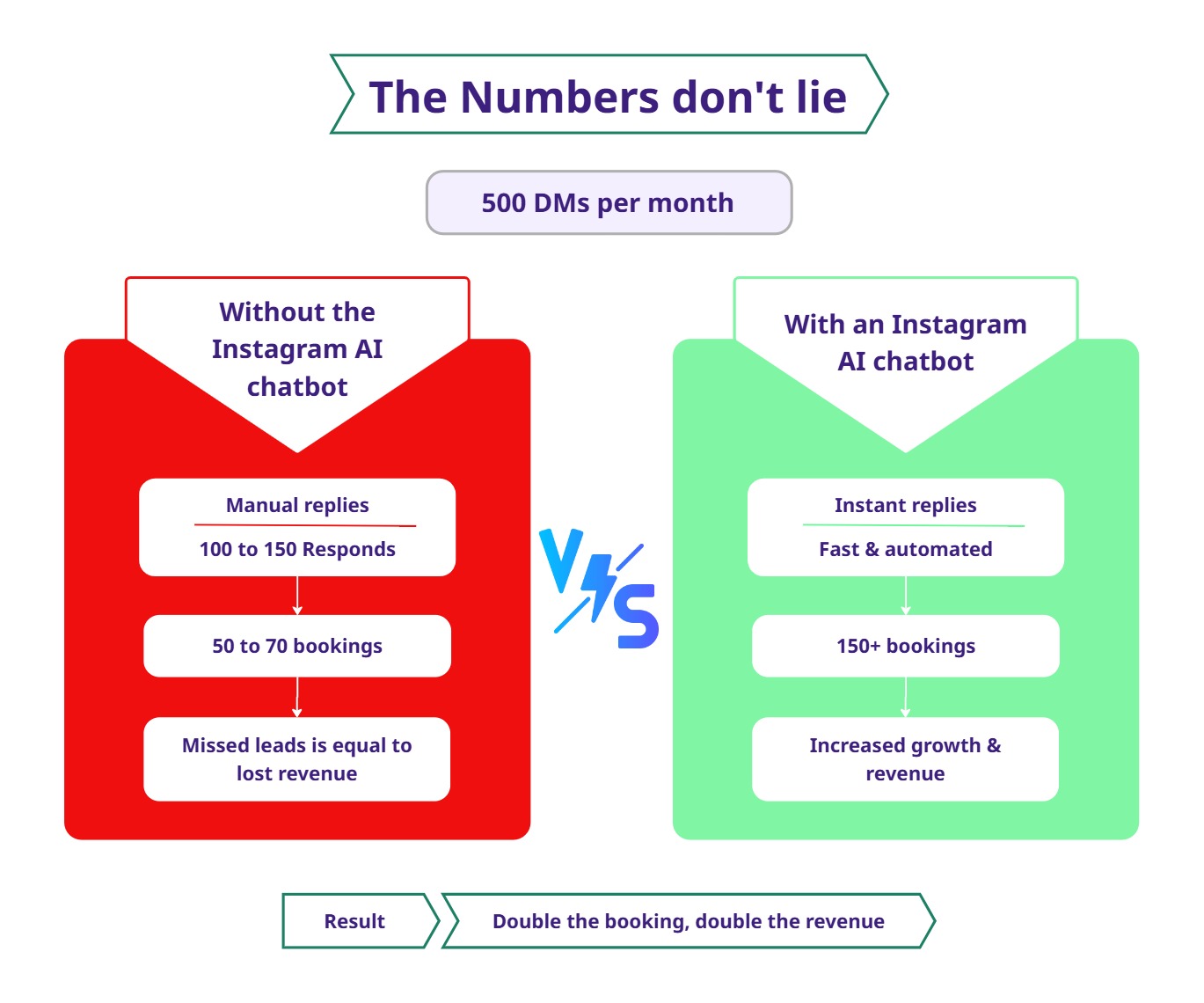
Let’s say that your Instagram page receives 500 DMs per month.
Without an Instagram AI chatbot:
You manage to manually reply to 100 to 150 messages before the customer loses interest.
Out of those, you can able to convert 50 to 70 customers into confirmed bookings.
Now, let’s look at a similar situation with the Instagram AI chatbot:
Every single DM gets replies instantly.
Traction rate becomes high
Even at a conservative 30% conversion rate, that becomes 150 customers in your bookings, which is more than double your manual conversion.
Your revenue increases as your responsiveness improves. The leads are always there, but the system isn’t.
Conclusion
Your Instagram page is already doing the hard work by grabbing the attention of potential customers in your DMs. Don’t allow the slow replies to kill your leads.
An Instagram AI chatbot doesn’t just save time. It converts potential leads into confirmed bookings. It works all the time without the need for existing support. It makes sure that all the DMs are answered instantly.
If your Instagram page is growing but not your leads, then the problem is not the content you post on Instagram. It was an automation issue, and it has a way to be fixed.
At Agentzee, we build this Instagram AI chatbot with specific business purposes. It takes care of the initial customer bookings to confirmed bookings to 24 hour reminder without your need.
Your next client is in your DMs, but the question is how fast you reply to them.
Please check out our product