
After decades of experience working in a big corporate law firm, you finally start your own law firm. You have recently hired junior associates to support you, and at the current situation, they are the maximum number of staff you can hire without burning a hole in your pocket.
The newly hired junior associates are very good, as a result of that you old clients’ issues are resolved in a short period of time. Suddenly, you need more clients to run your business. So you spoke to a digital marketing agency and improved your business SEO. As a result of that, multiple new enquiries emerge daily. But wait, there is a problem that comes along with it.
On a random Tuesday morning when you have a meeting with a client who flew from a different city to sign a contract worth $15,000. At the exact moment when you’re going to sign a contract you phone buzzes. You know you have to pick up the call but you can’t. It will be an unprofessional act.
As soon as the meeting ends you check your voicemail. Three missed calls. One potential client needed your urgent advice on an employment dispute. Another wanted to schedule a consultation for next week. The third client hung up the phone without leaving a message.
A month of work you spent on improving the SEO of the business is now paying off. But the sad reality is that those calls come exactly at the moment during negotiation, during court trials and it will be unprofessional to pick up these calls.
So you let them go to voicemail, and after that the conversion rate drops to 5%.
Many potential clients won’t leave a voicemail. They just move on the next competitor on google search.
But what if you have a receptionist who answers every single call, never losing any caller again. Who handles your business front desk 24 hours a day, 7 days a week and 365 days a year. That too, greeting every caller with the warmth of the best receptionist and the patience of a saint😇.
That’s exactly what an AI virtual receptionist powered by AI voice agent. And it doesn’t need a coffee ☕️ break.
The AI virtual receptionist goes beyond just answering the call.
Don’t underestimate the capability of an AI virtual receptionist. It’s not the same VR system from the 2010s that responded in a robotic tone, “Press 1 for financial problems, Press 2 for Refunds till the last number in the dial pad “. You lose your temper and search for the medication to lower your BP level.
The modern day Agentic voice system communicates with humans in a natural and warm, welcoming tone. It won’t change its tone to anger or show any attitude. Mainly, it doesn’t classify humans, you know what I mean there. Everyone gets the same kind of response.
The AI virtual receptionist is powered by an AI voice agent that speaks to humans in a natural tone with the help of emotional intelligence to match the tone of the caller’s voice and mental state. So when a client calls the business the system greets the client with a warm welcome tone and by analysing the client voice the AI adjust it’s tone according to the client’s mental state. Which helps the client to feel their problem are addressed in a proper manner.
What if multiple clients try to reach you at the same time?
The AI virtual receptionist can be configured to handle multiple caller’s simultaneously without any busy tone or call on hold voice. In fact the other caller speaking to the system won’t know that “simultaneously tens or twenty or fifty other interactions to the same business with any lags, call overlap or errors. Each call is handled by an independent process with full access to your business workflow tools.
So if client queries suddenly spike, there is no need to panic. The system handles everything. In this scenario if human are assigned to do this task than we to hire a additional support person just to handle the surge in the calls and later on drop the new hire if there is no work to do that’s awkward to do.
What if the client doesn’t speak English?
The spanish speaking client dealing with an employment dispute is not going to struggle through a broken conversation and hope for the best. The caller is going find an attorney who speaks their native language, which makes them feel comfortable. The initial appointment booking part is the most difficult one, once the appointment is scheduled. The in-person meeting can be handled with ease.
If we were not native English speaker, in a stressful situation our minds speaks in our native language in this kind of moment if there a person who speak any native language with the emotional tone and situation awareness he is the one who most client prefer to talk. And it’s how the human brain works. So an virtual receptionist who speaks multiple language will drastically increase client conversion ratio.
Can we get to the interesting stuff, integrating AI virtual receptionist into your business?
Step 1: Capture & document the type of calls your business receives.
Before implementing any types of automation workflow, first we need to understand what types of calls do we receive from the clients. Analyse and document it. Something like the format below.
New client enquiries - need to be qualified and an appointment should be booked in your Google calendar
Call from an existing client - requests an update on the case or attorney callback
General question - Nurture the client with the data from the knowledge base
urgent or emergency - immediately notify the attorney or redirect the existing call.
Vendor or spam call - needs to be filtered out.
Then these workflows need to be added to the system to make it understand the situation and take a decision on its own from this data. Think it as the brain’s wiring before turning it on.
Step 2: Build the knowledge base.
The AI performs well based on the data you feed to it. So you need to feed the system all the information a human receptionist knows. Practice areas, attorney’s personal information, employees professional information, office hours, financial data, parking instructions, intake form, policies, FAQs, etc.
The more context the AI virtual receptionist has, the more smoothly it handles the client queries and completes the task. So when a client calls and ask “do you guys handle accidental truck cases?” if there is enough data feed to the system. The AI handles the situation confidently “Yes, we handle all kinds of commercial vehicle accidents. Would you like to book a free consultation with one of our attorneys?”.
But in this scenario, if the right amount of data is not present in the knowledge base the AI says, “Hmm I don’t have the relevant information rightnow. But I can redirect you to one of our attorneys” but the problem is in that moment any one of you should be available to pick up the call if not another client is missing out.
Step 3: Integrate it with your CRM and business tools.
With the help of MCP protocol you can directly link the AI virtual receptionist to your business tools, whether it is Gmail, Calendly, Google Calendar, Clio, Outlook mail, etc.
When a client calls at 8 Pm while you are enjoying your dinner, the AI kicks in and picks up the call resolves the client’s query and right away it books a consultation based on your availability in your calendar and adds it to the CRM. So the next day, when the team walks in, there already be meetings booked with full details infomation about the client and the case.
Step 4: Configure the handoff rules.
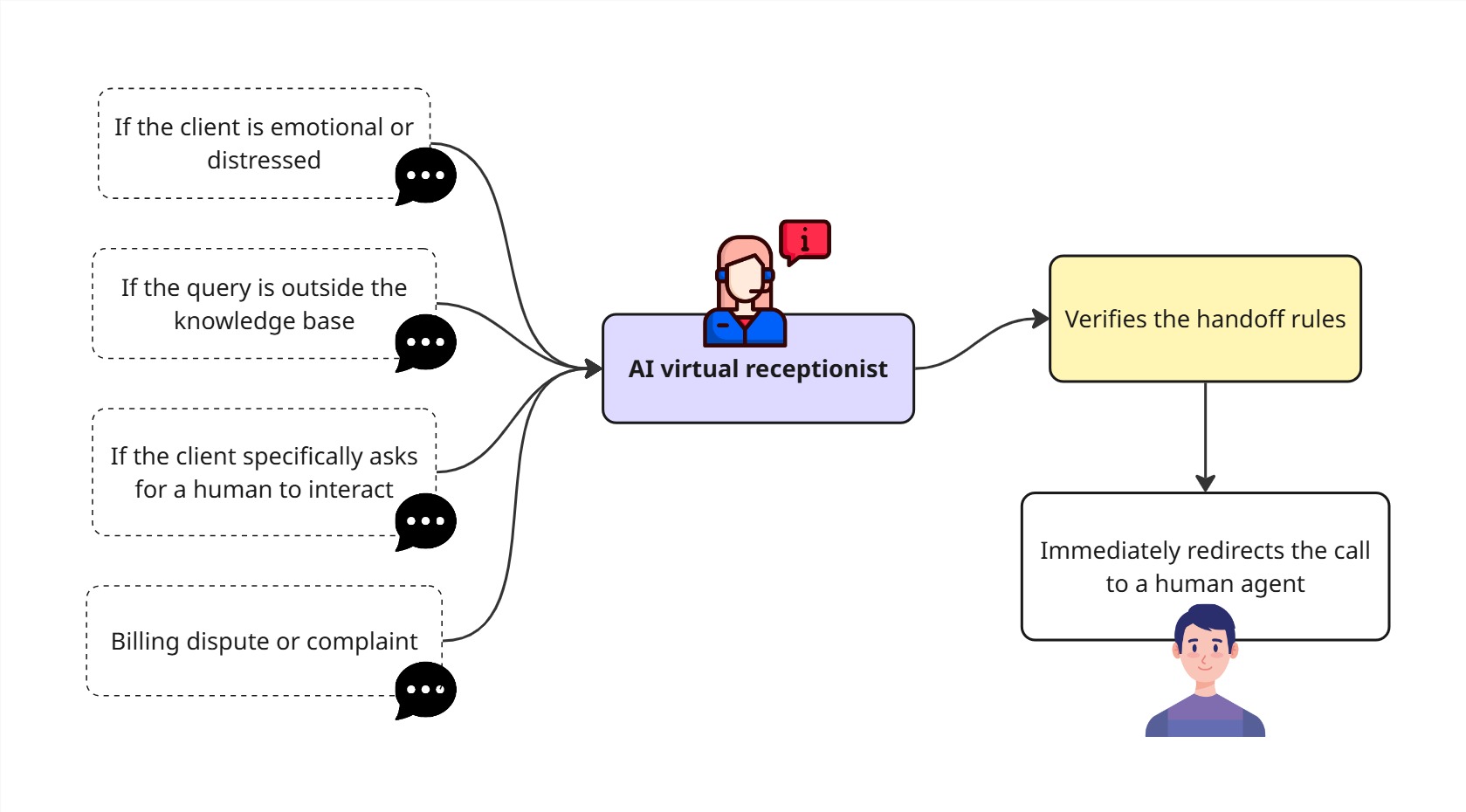
The critical part is that the AI should know when to stop talking and hand over the call to a human, because there a situation where AI should step aside.
If the client is emotional or distressed - Redirect the call to a human immediately.
If the query is outside the knowledge base, try to book an appointment later or send a follow-up message the human with full caller context.
If the client specifically asks for a human to interact - Redirect the call or schedule a call later.
Billing dispute or complaint - Redirect the call or schedule a call later.
Whenever a call is redirected to a human, the full context of the previous conversation data is stored on the CRM so that when a human speaks to the client, they won’t need to ask the same repeated question. In order to understand the client’s problem.
Step 5: Refine the knowledge base and handoff rules.
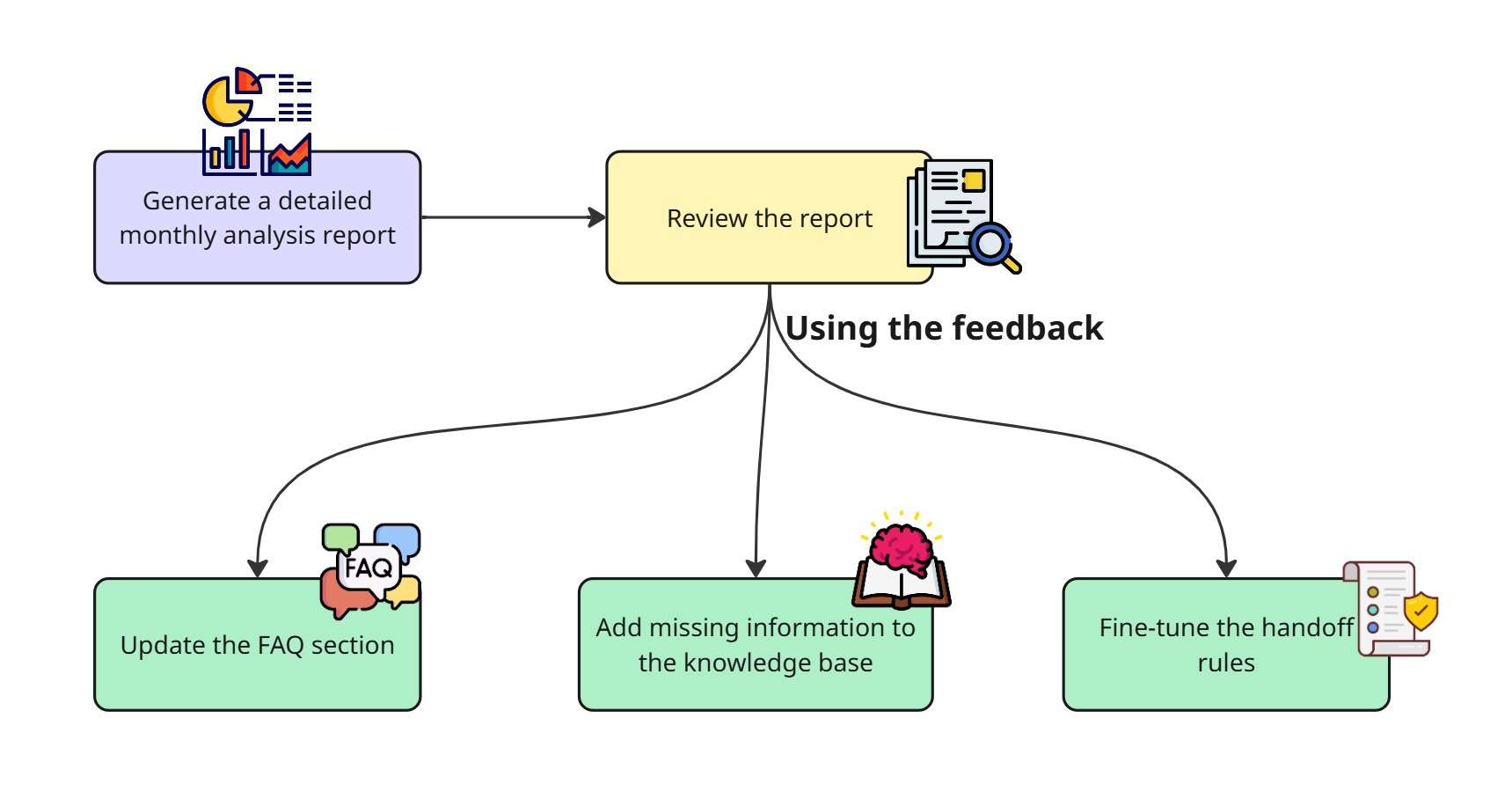
When the automated workflow is set up for the first time, you need to review the analytics data every week, and after two or three months, you can switch to a monthly analytics review process.
The analytics contains the following data to consider :
If a couple of questions were asked many times, then try to add more context related to those questions in the knowledge base and with the updated information you currently have.
If any questions are asked outside the current knowledge base, and it’s relevant then try to add it to the system.
Initially, while starting, go with broad handoff rules and over time, try to narrow down to some specific use cases. It’s better to handoff the call while in the initial phase rather than losing the customer by trying to handle the customer with the AI.
The most important thing is try to update the knowledge base every month, because if the knowledge is not synced with the business, it affects the conversion ratio.
The feeling of a “Big firm” without the corporate setup.
Here is something which is not talked about in public perception matters.
When a client searches Google results and calls you, they are greeted with a professional voice without any delay. Their queries are resolved without any back and forth and finally a consultation is booked. The client feels the operation is run by a well established corporate setup. But they don’t know is that it’s just you and your junior associates and a lot of coffee☕☕. Even before signing a contract, trust is built here. In a competitive business the trust is the most important thing you need to have.
The bottom line.
It’s great you read this far, probably by now you will be calculating the number of customers you missed in the previous month. But you can’t guess the real number just because 35% of the clients won’t leave a voicemail.
So, what we are going to do is, using the knowledge you gather from this article, you can build your own AI virtual receptionist, but the problem is you have to choose the right AI voice agent provider, and experiment with the LLM models to choose the right LLM provider. You have to figure out how to connect your office tools with the AI using the MCP protocol. It won’t end here, there’s still DB schema design, the logs management, error management and constant updates will be needed to keep up with the growing technology.
If running a profitable business is your main goal, don’t spend time building these things. Leave it to the professional who takes care of the system functionality; you just need to worry about the integration outcome and how it’s going to profit you.
We at Agentzee will take care of the technical things. We specialise in building all kinds of AI agents to support your business, like website chatbots, Instagram chatbots, WhatsApp chatbots, AI voice agents and much more.
To integrate our virtual ai receptionist to your business please check out this page