
Any form of marketing campaign that doesn’t generate leads is like shouting into the void. There’s no point. So, a lead is like golden flakes scattered across the way you travel. Collecting as many leads for your business venture will definitely help, but how can we do this? I would say for sure that a Facebook AI chatbot is one of them.
Any business that ignores Messenger for marketing is missing out on a surplus of potential leads. Messenger is used by around a billion people every month, according to Meta.
Facebook Messenger, buffed up with a proper Facebook AI chatbot, will become one of the most efficient lead-generating sources for most businesses. Instead of manually replying to direct messages individually, a Facebook AI chatbot can initiate conversations, answer user queries, and also collect contact information automatically.
In this guide, let us walk through the complete process for onboarding a Facebook AI chatbot, starting from the moment when someone sees our Facebook post to the point where their details are safely stored in the CRM of our business implementation.
Step 1: Turn Your Facebook Page into a Strong Brand Hub
Consider your Facebook page for a brand as a digital storefront, not any social profile. Before someone sends a message regarding any enquiries, your Facebook page will be taken into consideration for sure.
A page with proper and genuine posts will create a good impression on users. Also, it increases the chances of an increased incoming message rate.
How to have a Facebook page with an increased incoming message rate?
💡Tip: Many users quickly judge whether a business is credible before messaging them. Reviews and responsiveness matter a lot. A minimum of 100+ reviews and a badge that shows “Very responsive” will increase trust.
Step 2: Create Posts That Will Increase Messenger Conversation Rate
If lead generation is our primary goal, the posts should have more than just getting likes. It should have something like this: It should draw people into initiating conversations with us in Messenger. These are often called Click-to-Messenger posts.
A Lead-Generating Post’s Outlook
Hook: A question or statement that captivates attention.
Value: What will the user get if they message you (a free guide, quote, resource, or consultation)?
Call to Action: Clearly tell them what to do, for example, “Comment INTERESTED” or “Click Send Message.”
Visual Content: In general, videos receive much higher engagement than normal text posts.
Post Types That Work Well
• “Comment to receive our free checklist” posts
• Facebook ads that open Messenger conversations
• Live videos inviting viewers to message for more details
• Stories with a Send Message button
💡 Example Post
“Struggling to get consistent leads? Comment ‘LEADS’ below, and we’ll send you our free 5-step messenger funnel template. No strings attached.”
Step 3: The 24/7 Facebook AI Chatbot
A Facebook AI chatbot will reply to users automatically the moment the page receives a message. This Facebook AI chatbot will start to reply immediately instead of waiting for someone from the support team to respond.

Why businesses benefit from using Facebook AI chatbots.
💡 Interesting fact:
Leads that are contacted within a five-minute window have a much higher conversion rate than those that will be contacted later.
A clear page description that explains who you help and how you help them.
A professional cover photo and profile image that shows your logo, product, or team.
A visible call-to-action button set to “Send Message.”
Consistent content posting (about 3–5 posts per week).
A pinned post highlighting your best offer or a useful free resource.
Step 4: Qualification of Leads
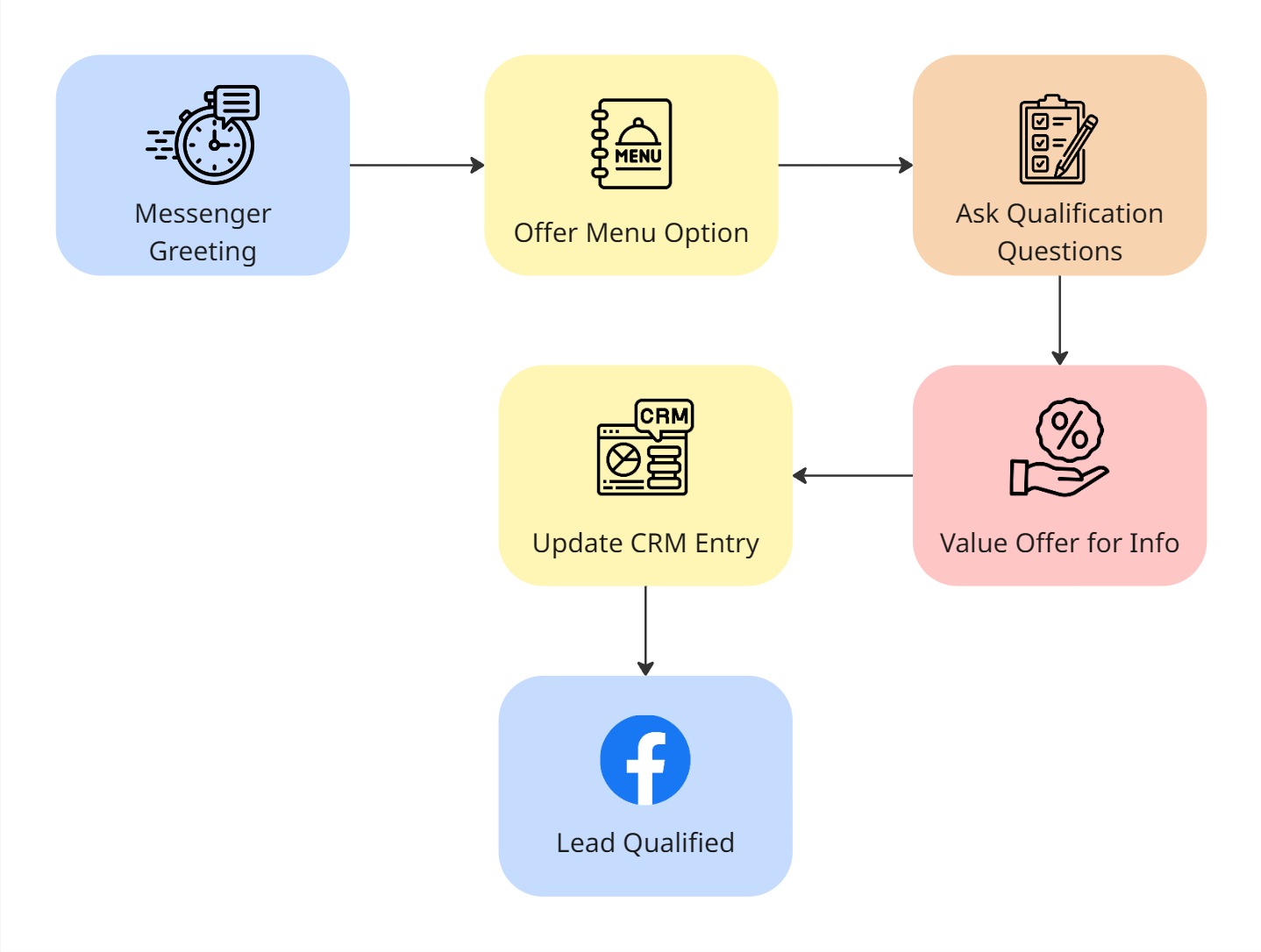
When a user messages our Facebook account, the Facebook AI chatbot we configured welcomes them. After having a conversation with them, it finds out what they need and help us determine whether they are a lead or not.
Creating a Template
This is the way a basic template message structure might appear.
Greetings start with a friendly welcome: “Hey [First Name]! Greetings from [Brand]. How can we assist you right now?”
Menu Options
Give users a quick reply button like the following:
Get a Quote
Learn More
Talk to a Human
Leads Qualification Question
Simple questions related to a business service you provide, such as company size, budget, or any other qualifying factors.
Offer Value
Something valuable must be provided based on the business, like a guide to set up a process, a personalised report, a discount, or something different.
Gather Contact Details
Request the user’s email or phone number for a medium of communication.
Confirmation
Thank them and explain what happens next.
Step 5: Asking for Email and Phone Number
While contacting leads, the most important thing is timing. If you ask anything regarding contact information too early, people may immediately leave the conversation. The thing is, we should wait enough so that we feel the connection and then ask for the number rather than risk losing the opportunity. The best moment to ask is after you’ve already provided some value.
Tips for Collecting Contact Information:
Frame it as a benefit: “Where should I send your guide?”
Ask for one detail at a time, starting with email first, then phone number, etc.
State a clear reason for asking these details
Use Messenger input fields so responses are automatically captured
Add a simple privacy reassurance
Example: “Great choice! I’ll send you the full guide. What’s the best email address to send it to? (Don’t worry. We hate spam too.)”
Step 6: What Happens After They Submit Their Details
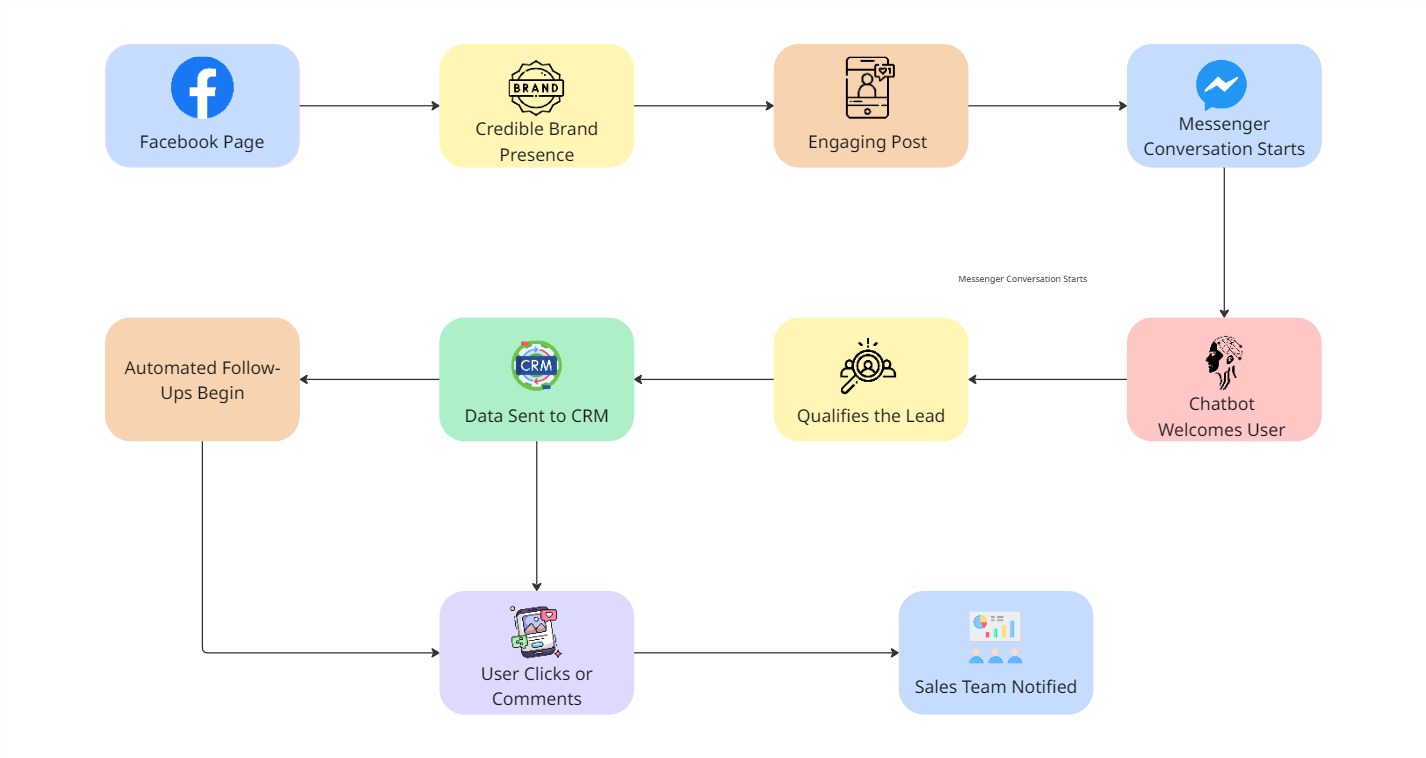
When a user sends their contact information, several things should happen automatically.
The Facebook AI chatbot stores the email or phone number
The user receives a confirmation message in Messenger
The information is sent to your CRM through an integration or webhook
A follow-up email or SMS is triggered
Your sales team receives a notification
This moment is when the lead is most interested, so responding quickly is crucial.
Step 7: Storing the Leads in CRM
To make it easy for your team to properly follow up, the data that the Facebook AI chatbot collects should be stored in a database or CRM.
The data that has been collected by our Facebook AI chatbot during its chat session must be stored in the database or CRM. This process is followed to make it easy for our team to follow up in a proper manner.
Popular CRM Integrations
HubSpot is a great option for inbound marketing teams.
Salesforce: a profitable company solution
Zoho CRM: Strong automation features at a reasonable cost
Pipedrive: Excellent for pipelines in sales
Airtable or Google Sheets: Easy alternatives for smaller teams
Important Information to Gather
Email Address
First Name
Telephone Number
Intent or interest
Source (which campaign or post)
Messenger user ID
Timestamp
Final Thoughts
The Facebook Messenger platform is no longer restricted just to casual conversations. For many companies to engage with prospective clients and produce leads, it has become a very efficient tool. By combining an effective Facebook page, captivating posts that lead users to start conversations, and a well-designed and responsive chatbot, one can build a successful lead generation system. Every message you send on Messenger is a potential lead.
The secret is being straightforward. Always keep it simple for people to share their contact information and ask appropriate queries. Your Messenger inbox has the potential to become one of your company’s most effective and efficient lead generation mediums.
The Easier Way: Agentzee
After reading through the entire blog, I can smell your laziness. As an online brand, you wouldn’t want your mind to be filled with all these technical piles of something.
“But somehow, you have to implement this, right?” So, let me provide you with an easier option, and that’s us: Agentzee. (Agentzee)
We not only provide a Facebook AI chatbot but also one for Instagram and WhatsApp.
“It means I have got it all covered under one roof. Try signing up.”
Here, you can explore how it works:
Agentzee Facebook Messenger chatbot