
You wonder why we need the Instagram comment bot? Let me explain with a real-world example.
On one fine day, suddenly, one of your posts goes viral, and there are hundreds of comments pouring into your post, like
how much does it cost?
Will you ship it to my location?
Do you give any offers?
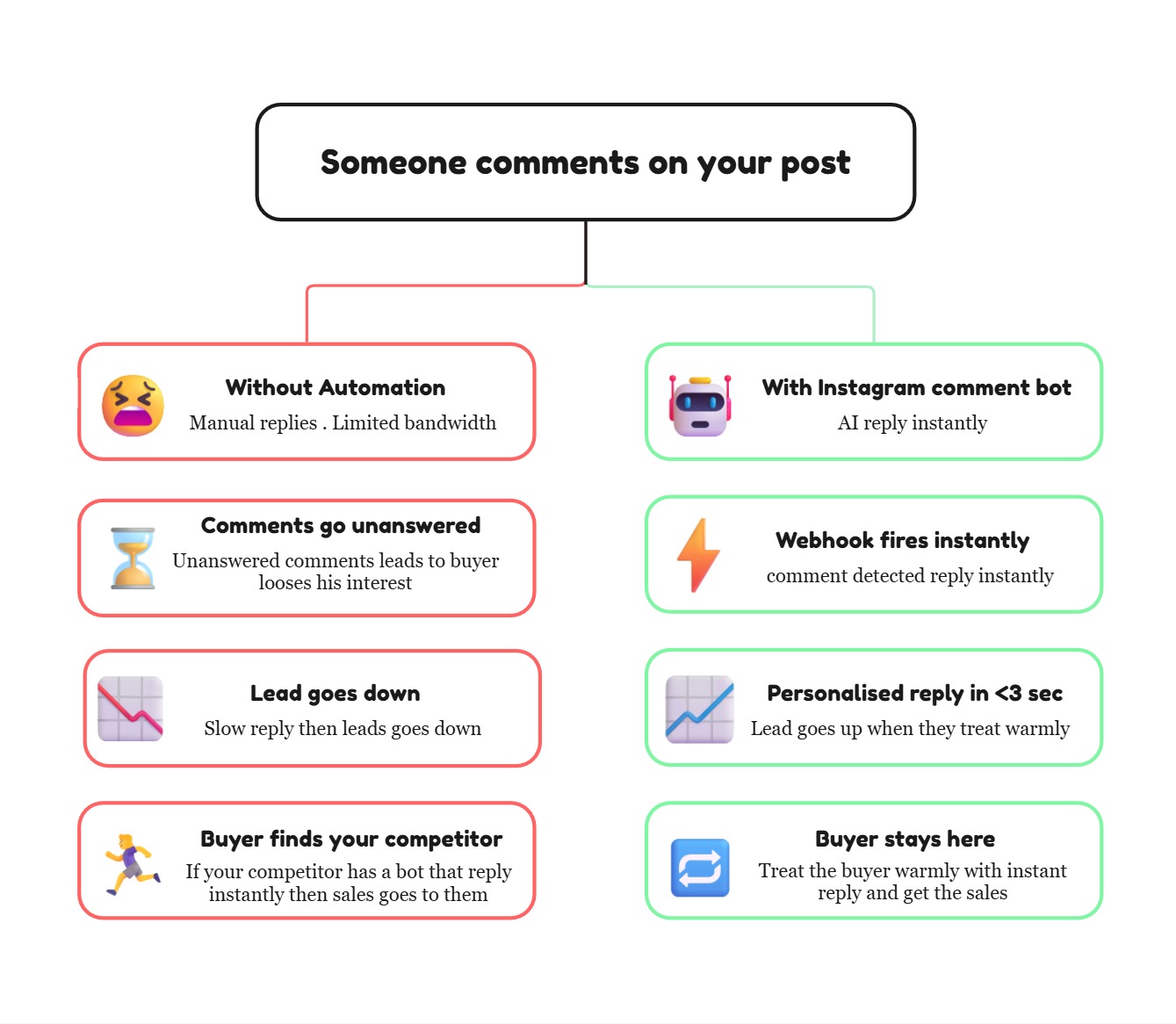
were coming thick and fast by the time you replied to some amount of customers, then other customers either bought from another competitor or got frustrated that no reply had come. We can’t afford to let the slow reply affect our business growth, can we?
Manually handling all the comments isn’t the right strategy. It’s a fantasy.
This is where the Instagram comment bot steps in with a real-time webhook used to fetch the right conversations to you, and reply instantly to your customer, which sounds natural rather than robotic.
Engagement itself isn’t our goal, but conversion is
Let us take a moment to think about what the comments sections actually are for a brand. It is simply not just a boost for engagement, a hook for the algorithm. It’s a goldmine without knowing its worth.
Someone asks, “What are the different styles of it?” That’s a potential buyer who likes to purchase.
Some others ask, “How many days will the shipment take to reach my location?” That’s a potential purchase intent waiting for your reply, as many of the comments are going unnoticed, which then goes to your competitors who may have automated bots to convert those leads.
The Calculation is quite simple. The larger your account grows, the quicker the reply goes down unless you have something that handles scaled responses fast.
What does this Instagram comment bot actually do
Before we dive into the technical part of it, let me paint the flow of the working system.
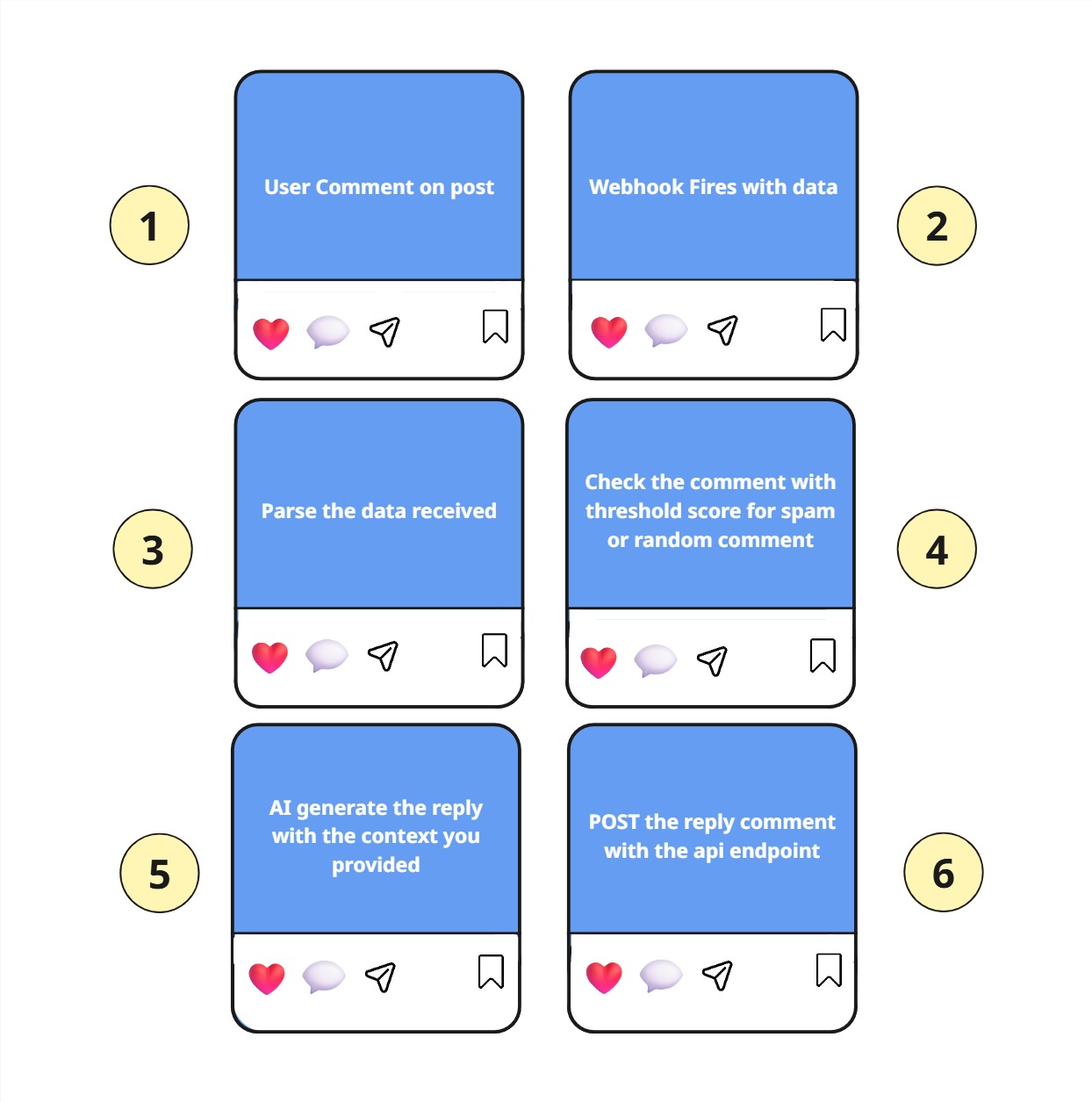
When someone comments on your Instagram post
The webhooks identify the comment and fire instantly to the server
Our AI Agents will process the comment and understand the intent of the comment, then match it with the knowledge that we feed to it about our product.
Then it generates the response, which sounds like a human
Finally, it uses the comment endpoint to reply to the comment instantly.
By doing the above process, we can make our Instagram comment bot reply instantly and feel more human.
Prerequisites
Before building your Instagram comment bot, we need to set up the account.
First, you must have a Meta Developer account, which gives you access to the necessary api endpoints. Secondly, you need to have a Instagram business account because for personal accounts api endpoints are not provided access. For a detailed step-by-step guide, refer to this blog - How to generate an access token from Instagram to interact with the Instagram graph API
Step 1 - Set up a webhook for live comment updates
This is the step that actually tells you when the user comments on the post.
Let’s see with an example for better understanding. Assume the webhooks as a doorbell. We don’t open the door to check that anybody is there; instead, we only check if the doorbell is ringing. That’s how the webhooks also work. We don’t need to check for the comments regularly; it was taken care of by webhooks, which means the ring is the webhook.
Okay, now jump into the actual setup. If you follow the prerequisites, then you’ll be set up like
A Meta Developer Account
A verified business Instagram account
Then you need a
public HTTPS server(use ngrok for local testing)
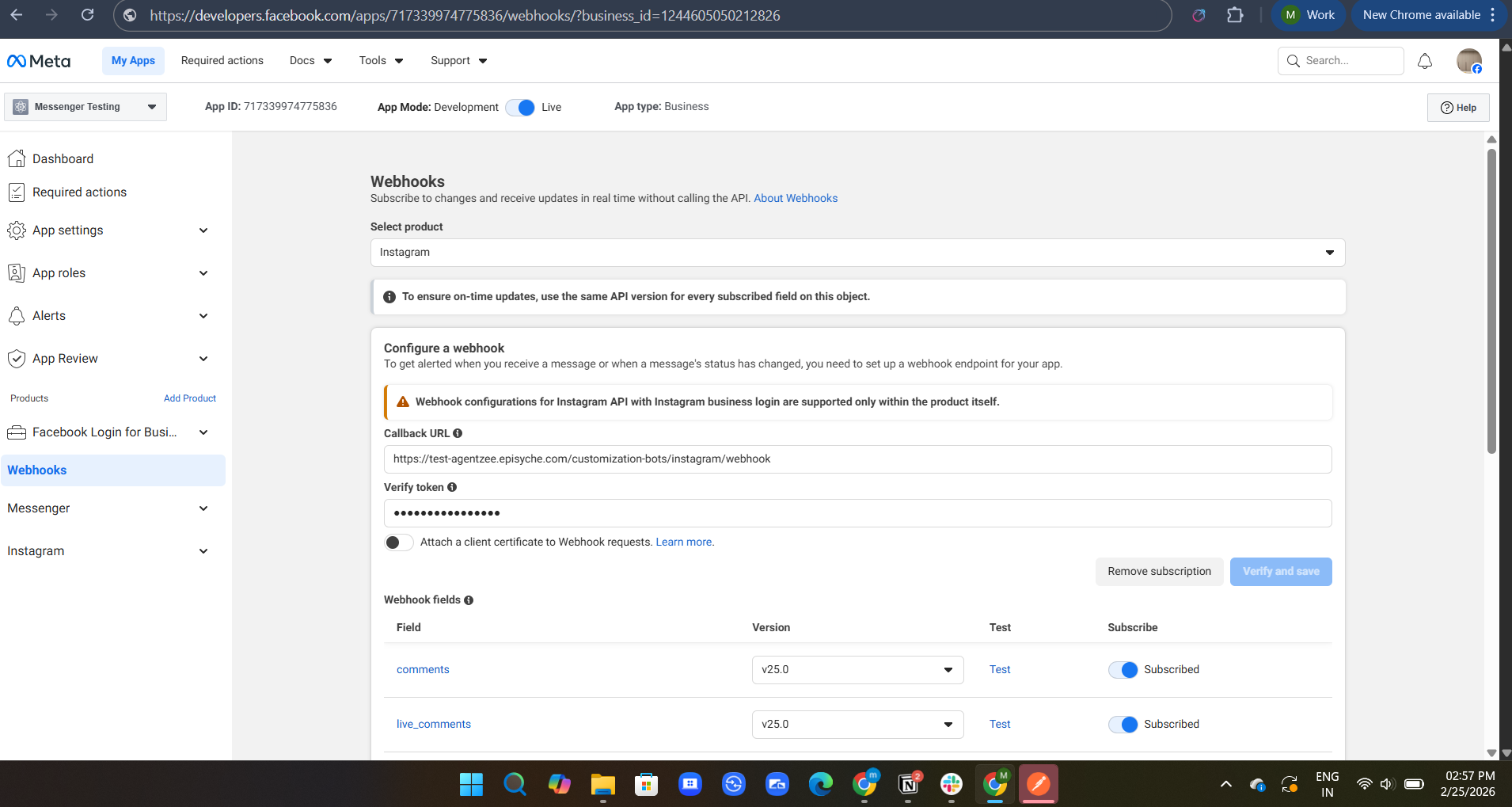
Register your webhooks with the Instagram business account
Find the webhook in your app and click “Set up.”
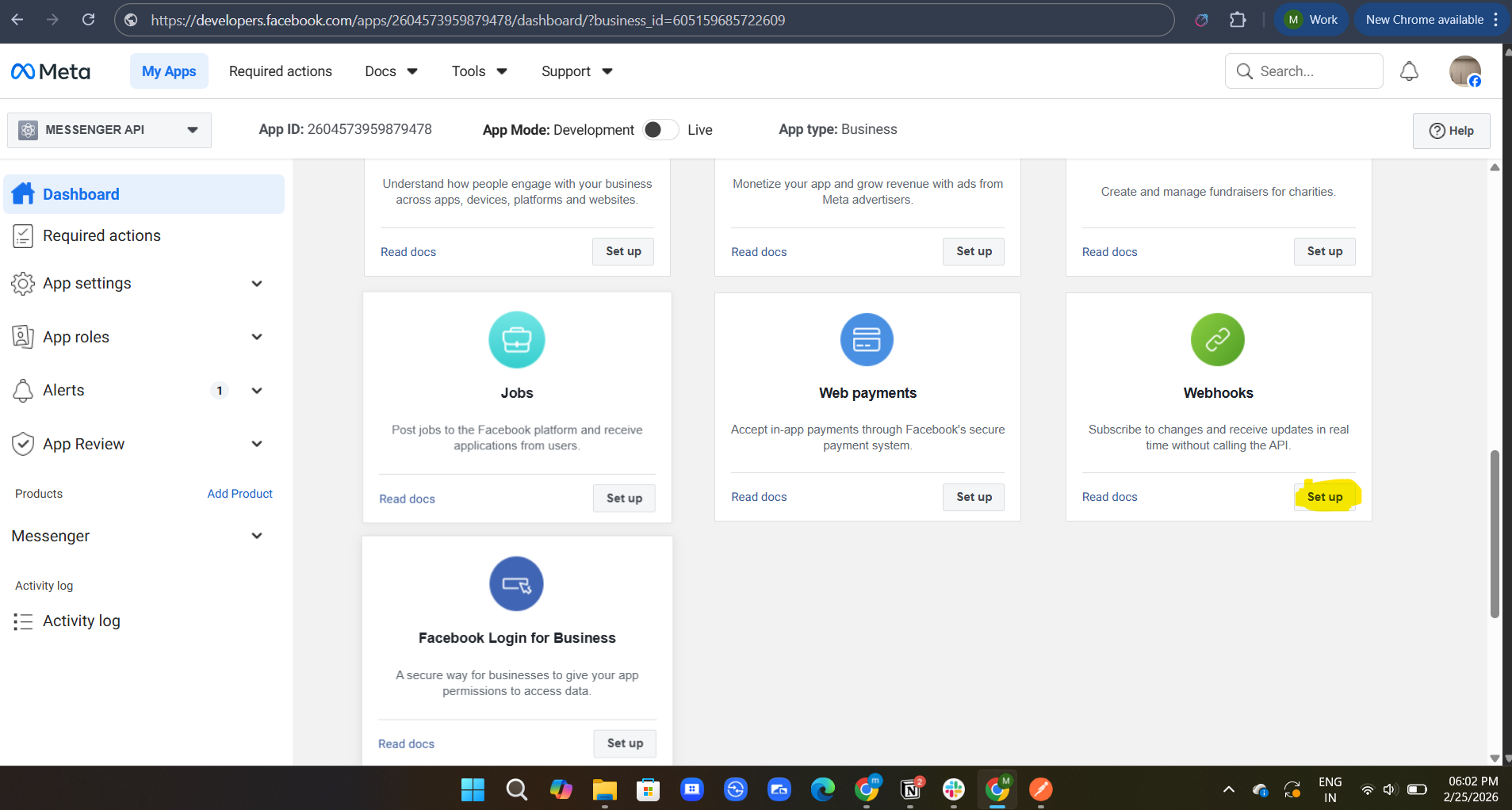
Change the selected product to Instagram
In the callback URL, set up the server pointed endpoint
Verify Token is like a password set up by you
Then, in the webhook fields, subscribe to the comments fields.
After that, click verify and save for the first time only.
Example code snippet for verifying a token
from flask import Flask, request, jsonify

app = Flask(__name__)

VERIFY_TOKEN = "your_secret_verify_token"

@app.route("/webhook", methods=["GET"])
def verify_webhook():
    mode = request.args.get("hub.mode")
    token = request.args.get("hub.verify_token")
    challenge = request.args.get("hub.challenge")

    if mode == "subscribe" and token == VERIFY_TOKEN:
        return challenge, 200
    return "Forbidden", 403
Once it gets the verification, you get the comments via webhooks with the POST method with the same endpoint.
Step 2 - Get the comments instantly from the webhook payload
Now, if someone comments on your post, webhooks identify the comment and send you a response via POST to your endpoint. Sample response format looks like:
{
  "entry": [{
    "changes": [{
      "field": "comments",
      "value": {
        "from": {
          "id": "66781475998304643",  // user-id
          "username": "potential_customer"
        },
        "media": {
          "id": "98041475998304645" //post-id
        },
        "id": "17841475998304643", //comment-id
        "text": "Does this come in a size large? And do you ship to Canada?"
      }
    }]
  }]
}
The comment ID is the key here to reply to any comments. Here is the sample POST request:
@app.route("/webhook", methods=["POST"])
def handle_webhook():
    data = request.json

    for entry in data.get("entry", []):
        for change in entry.get("changes", []):
            if change.get("field") == "comments":
                comment_data = change["value"]
                comment_id = comment_data["id"]
                comment_text = comment_data["text"]
                username = comment_data["from"]["username"]

                # Pass to AI for reply generation
                reply_text = generate_ai_reply(comment_text, username)

                # Fire the reply
                post_reply(comment_id, reply_text)

    return "OK", 200
Step 3 - Align your AI to sound like your brand while replying
When using an Instagram comment bot, most of the people feel that the reply is so generic or robotic. To solve this issue, we need to train our AI with our detailed information feed to it, set the tone of the reply as your brand voice, your policies, your regular updates, and much more.
Step 4 - Now, reply using the endpoint
Endpoint for the comment
POST /<IG_COMMENT_ID>/repliesOnce we have the reply ready from the AI, we simply push it with a POST call
import requests

ACCESS_TOKEN = "your_instagram_graph_api_access_token"

def post_reply(comment_id: str, reply_text: str):
    url = f"https://graph.facebook.com/v18.0/{comment_id}/replies"

    payload = {
        "message": reply_text,
        "access_token": ACCESS_TOKEN
    }

    response = requests.post(url, data=payload)

    if response.status_code == 200:
        print(f"Reply posted successfully: {reply_text}")
    else:
        print(f"Error: {response.status_code} — {response.text}")
This will reply to comments within a few seconds with your trained tone.
The Important part: managing your Instagram comment bot to handle the edge cases
Here’s the crucial part that completes our Instagram comment bot as a production-level product.
How we deal with the negative or offensive words matters a lot. We need to add another layer of checks for this kind of comment. If the scores didn’t meet or exceed our base score, then it goes to the human review before replying to those kinds of comments.
How can we deal with the spam comments?
We skip if someone sends the suspicious links. We monitor the user comment pattern. If the same user repeats the comment in a short time, we skip them.
Conclusion
The goal of this Instagram comment bot is to make your comments to be noticed and reply in a way that your brand feels more human than a bot. A reply that will answer for comments within a few seconds of a comment being posted by the user, which answers the question in a human way, which sounds like someone who really cares.
The Instagram comment bot used to save a lot of time and gain more customers at the same time. The AI speaks from the context that you provided as your voice to your customers. Build this once. Let this handle the rest. Focus more on other parts of the business where real brain is needed.
Every unanswered comment may lead to not turning into sales. So, build the Instagram comment bot or use the production-ready Agentzee Instagram comment bot. Either way, stop letting potential customers slip away.
Please check out our product