
The telephone at the hospital is ringing continuously on a Monday morning.
A receptionist is trying to answer all the calls. One patient asks for a cardiologist, another asks about a dermatologist, and another wants to check if a gynecologist is free this weekend.
Meanwhile, some patients walk directly into the hospital to book an appointment. Because they know calling means holding, holding means waiting. Waiting means giving up and trying again tomorrow, but tomorrow repeats the same cycle.
This is the exact problem our WhatsApp AI chatbot helps you automate the appointment booking of patients through a smooth WhatsApp conversation.
The real problem is not with the receptionist, but it’s the system
The receptionist is doing everything right, as the system is designed for her to manually handle all the workload of scheduling an appointment by checking the availability of the doctor, handling the basic queries, calling the patient for the reminder of an appointment, and more.
When the number of patients grows, it becomes very difficult to answer every enquiry. Each specialist has a different schedule. Each department has a different coordinator. Every booking still gets confirmed by phone, patients’ details are manually updated, and a call is made again to remind them about their appointment.
That’s not a smooth process. That’s a never ending marathon race which goes on and on and on.
And the cost isn’t just operational, every unanswered call leads to losing a patient to another hospital, which indirectly affects the revenue of the hospital.
How a WhatsApp AI chatbot helps you simplify the booking
A WhatsApp AI chatbot greets the patient when they first message on WhatsApp. If the patient sends a message like “I need to see the heart specialist,” and our bot takes the conversation and replies correctly to the patient, and asks the right question to the patient, one at a time. It guides them towards booking. It checks the real time availability of the specialised doctors and provides the available slot timings to the patients. They choose the timing that is comfortable for them and confirm the appointment by providing the essential information. Then writes the chat records and booking details in the hospital CRM.
The WhatsApp AI chatbot doesn’t need any breaks; patients need not wait for the replies because it replies instantly. It can handle multiple patients at once and still reply to each one with the right question.
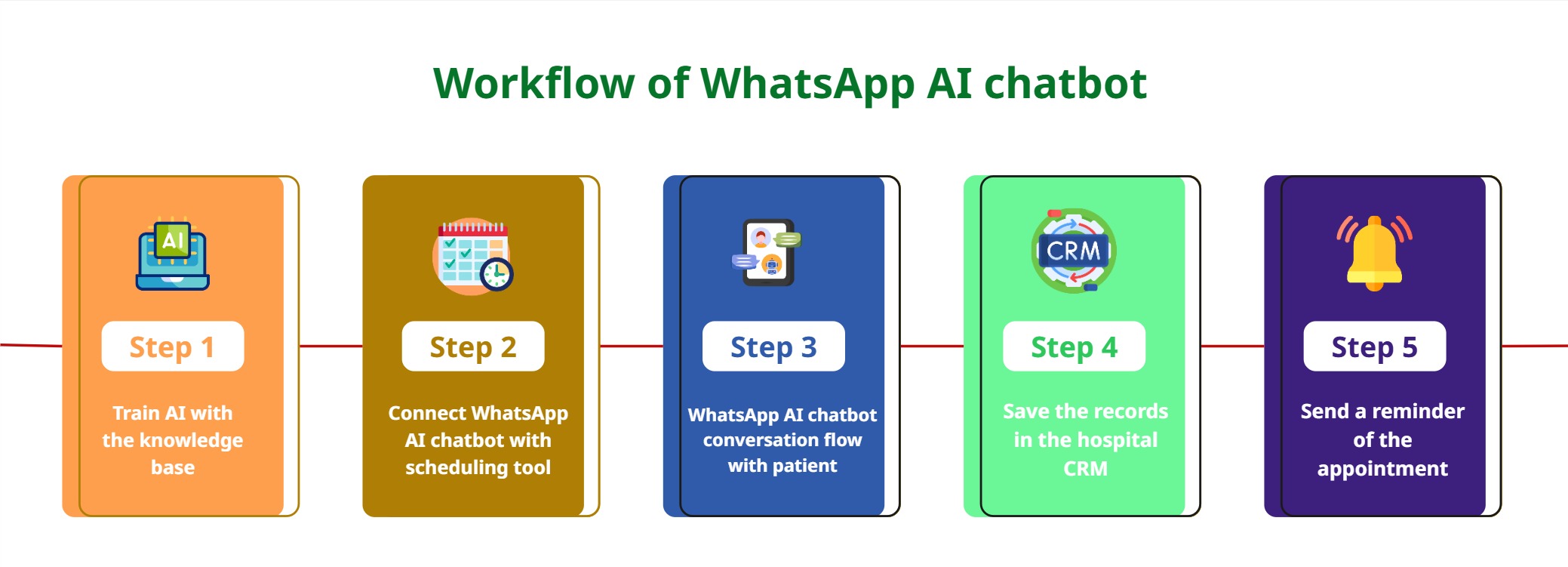
Here’s the step-by-step process of the WhatsApp AI chatbot
Step 1: Train AI with the knowledge base
This is the foundation step of a WhatsApp AI chatbot, which includes training the AI with the knowledge base. This knowledge base contains information such as
doctor specialties
department details
consultation timings
available services
appointment procedures
frequently asked patient questions
The WhatsApp AI chatbot is also trained with a conversation flow that guides patients naturally towards booking an appointment. Let’s see an example, if a patient says they want to consult a heart specialist, the chatbot learns to ask the next follow-up questions one by one, it checks which doctors are available, provides the available time slots, and helps the patient confirm the booking. This training helps the AI to make conversation with the patient more accurately and maintain a smooth, human like conversation.
Step 2: Connect the WhatsApp AI chatbot with a real-time schedule tool
The next step is connecting your WhatsApp AI chatbot with a real time scheduling tool. At Agentzee, you can find multiple tools in the integration section that extend the chatbot’s capabilities.
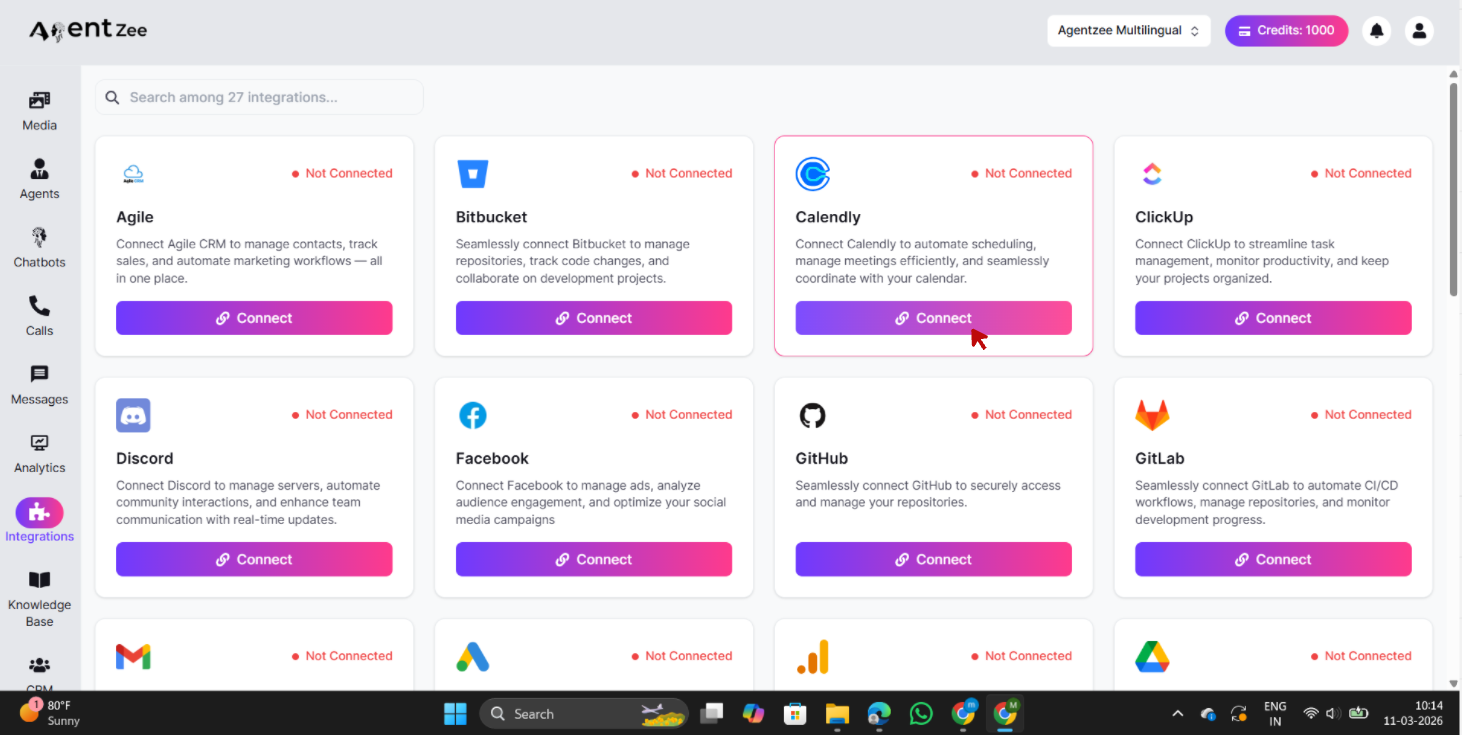
As shown in the Integration section, Agentzee provides support to multiple tool integrations, and for real time scheduling, you can simply connect Calendly to your WhatsApp AI chatbot.
Once connected, the chatbot can be able to fetch the real time doctor’s slots availability and provide the patients with available slot timings. Patients can choose a slot from the given options. This real time schedule integration helps the chatbot provide real time slot availability and avoids double booking.
Step 3: WhatsApp AI chatbot conversation flow with the patients
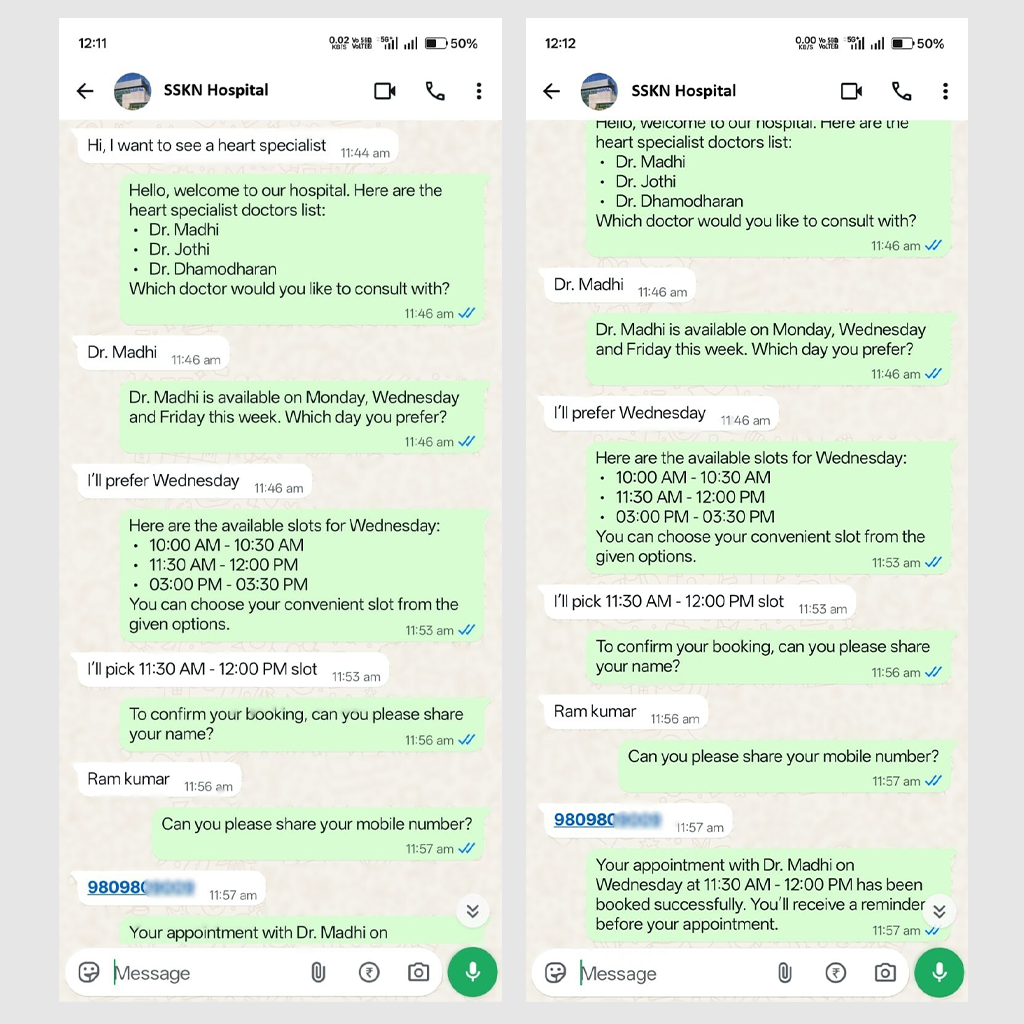
This step explains the conversation flow between the WhatsApp AI chatbot and the patient.
Sample conversation:
Patient: Hi, I want to see a heart specialist
Bot: Hello, welcome to our hospital. Here is the heart specialist doctors’ list:
Dr. Madhi
Dr. Jothi
Dr. Dhamodharan
Which doctor would you like to consult with?
Patient: Dr. Madhi
Bot: Dr. Madhi is available on Monday, Wednesday, and Friday this week. Which day do you prefer?
Patient: I’ll prefer Wednesday
Bot: Here are the available slots for Wednesday:
10:00 AM - 10:30 AM
11:30 AM - 12:00 PM
03:00 PM - 03:30 PM
You can choose your convenient slot from the given options.
Patient: I’ll pick 11:30 AM
Bot: To confirm your booking, can you please share your name?
Patient: Ram Kumar
Bot: Can you please share your mobile number?
Patient: 980980000*
Bot: Your appointment with Dr. Madhi on Wednesday at 11:30 AM - 12:00 PM has been booked successfully. You’ll receive a reminder before your appointment.
Step 4: Save the records in the hospital CRM
The next step is storing all the confirmed appointment details in the hospital CRM. At Agentzee, You can find multiple CRM tools in the integration section, including Zoho CRM
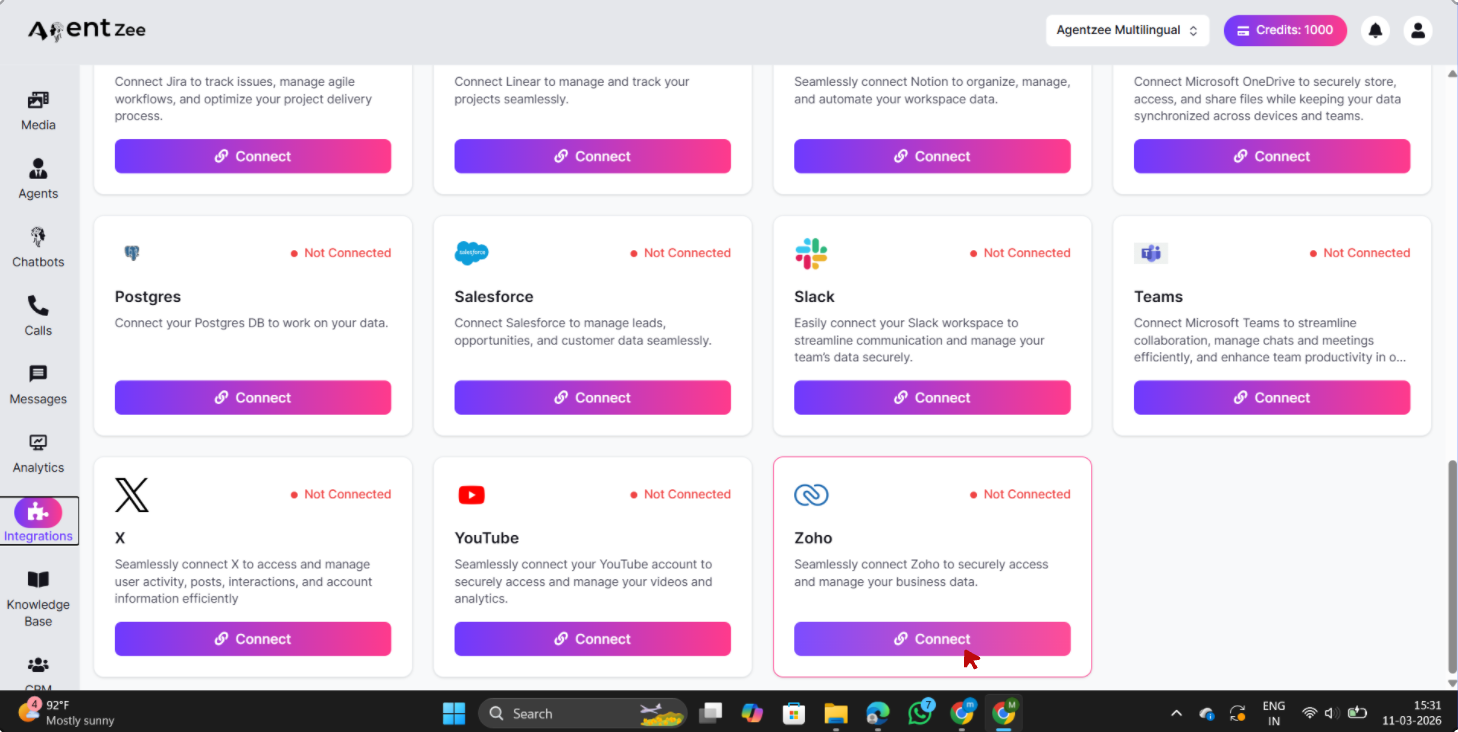
As shown in the integration dashboard, you can simply connect Zoho CRM to your WhatsApp AI chatbot. Once connected, every confirmed appointment booking will get stored automatically in the CRM.
The WhatsApp AI chatbot also records vital information such as patient name, contact number, chosen doctor, appointment date and timing, and intake notes. This assists the hospital in organising bookings and appointments and recording the patients’ information.
Step 5: Send the 24 hour reminder before the appointment
You can now create an automation within WhatsApp Messenger so that an AI powered chatbot can send reminders about upcoming appointments to your patients. The reminders will be sent out exactly 24 hours in advance, and then again during the last 1-2 hours leading up to the appointment itself. Providing reminder information to patients will drastically reduce the no-show percentage. The reminder message includes details about the doctor’s name, floor or room number, items to bring, and a reschedule option.
Conclusion
A WhatsApp AI chatbot can transform how hospitals handle patient appointments. Instead of relying on phone calls, manual schedule check and confirmation, reminder phone calls, manually gathering data and managing a hectic workload on the front desk, hospitals can simply integrate a WhatsApp AI chatbot with the right knowledge base, which handles the patient’s conversation to real time schedule checking to confirm appointments, to store records in the CRM to automate reminder seamlessly.
The result is a faster and smooth appointment booking experience for the patients, reducing workload for the front desk and no missing calls and losing potential patients to the hospital.
With Agentzee, hospitals can easily build and deploy a WhatsApp AI chatbot that includes multiple tools like a scheduling tool to check real time available slots, CRMs for patient records, and all without the complex development. From patient enquiry to confirmed appointment and reminders, Agentzee helps you to automate the full workflow so hospitals can take care of the patients who need more attention.
Please check out our product