
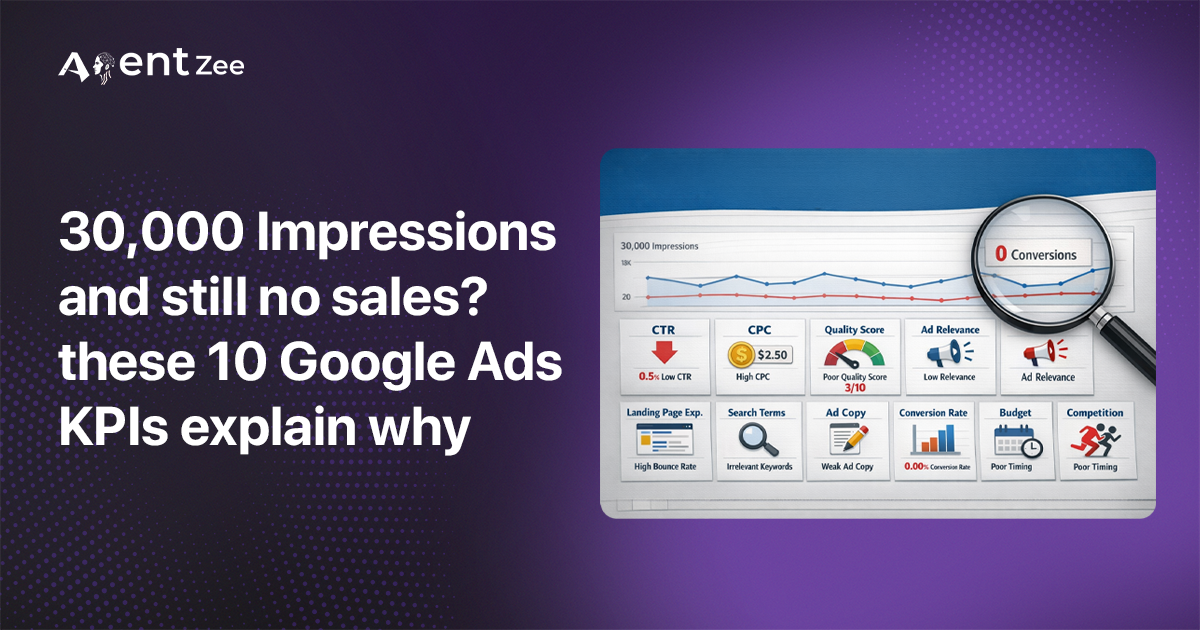
If your Google Ads campaign got 30,000 impressions yesterday, yes, it’s a good number, but these impressions alone are not going to describe your business growth. Impressions don’t cover customers. Clicks don’t close any deals. The Google Ads KPIs are tracking the ones that explicitly show our status, spend, and revenue.
This blog guides you to understand the top 10 metrics you should know. And as a decision-maker, you will get what each one tells you and how to fetch them programmatically. So you don’t need to spend time on the Google Ads dashboard and refresh it every time you want to get data
Top 10 Google Ads KPIs you need to know
Most advertisers focus on clicks and impressions. Successful businesses look at other key metrics of Google Ads to make smart decisions. They check Google Ads KPIs.
These Google Ads KPIs help them know if their ads are working well. They use these important Google Ads KPIs to plan their steps.
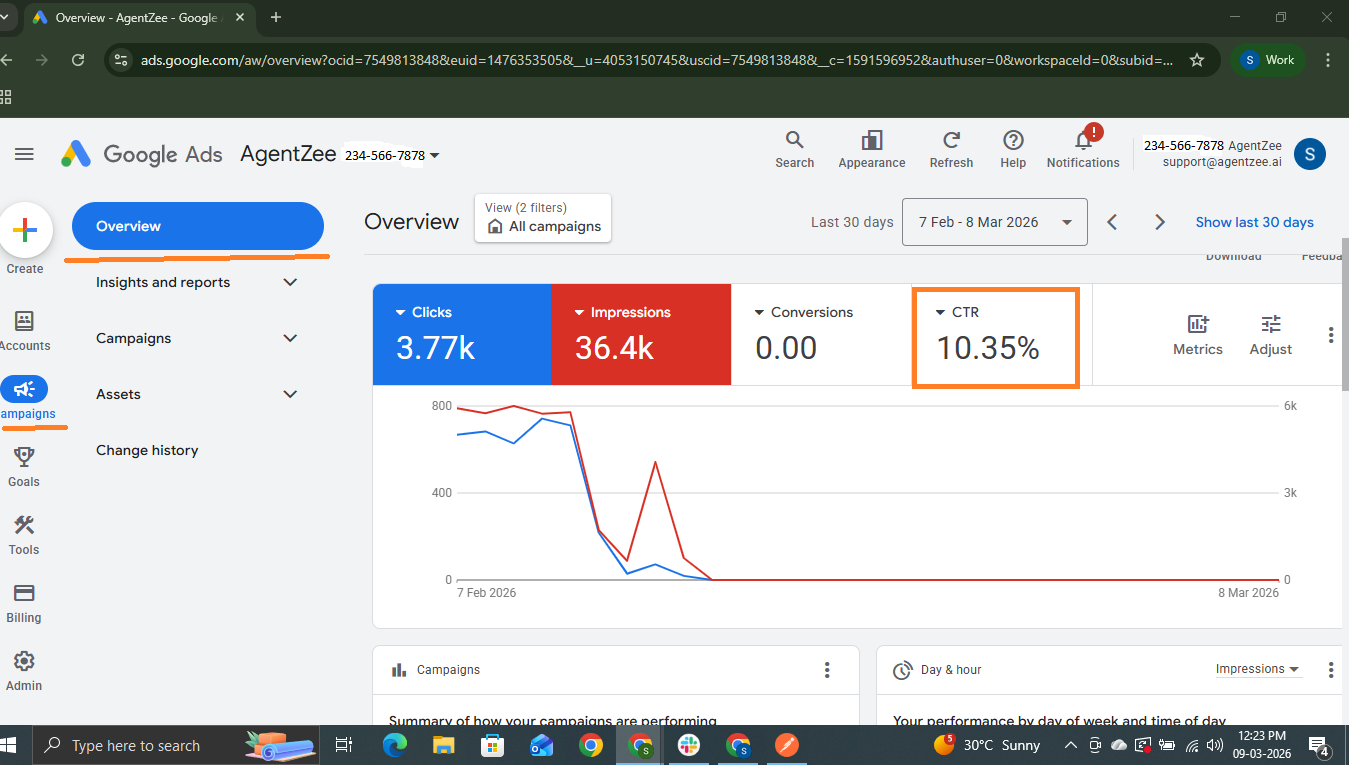
1. Click-Through Rate (CTR) KPI
This thing we measure is really important for businesses. It helps them figure out if they are using their time and money on the right people. The right people are the ones that the businesses want to sell to, so this metric is one of the important things for businesses to know about their target audience.
If this value is high, then you get a long breath for creating an ad that attracts quality leads, and it increases revenue. If it is low, then you have to focus on the ad creatives; just make it meaningful and attractive. And make sure you are setting the correct target audience.
Picture this: if you are running a facial cream business you get 10% as CTR and then only 10 people out of 100 people click your ad.
curl -X POST https://googleads.googleapis.com/v25/customers/customer_id/googleAds:search \
-H "Authorization: Bearer ACCESS_TOKEN" \
-H "developer-token: DEVELOPER_TOKEN" \
-H "Content-Type: application/json" \
-d '{
  "query": "SELECT campaign.name, metrics.impressions, metrics.clicks,
       metrics.ctr FROM campaign WHERE segments.date DURING YESTERDAY"
}'
Sample response:
{
  "results": [
    {
      "campaign": {"name": "Running Facial Cream Campaign"},
      "metrics": {
        "impressions": "10000",
        "clicks": "600",
        "ctr": 0.010
      }
    }
  ]
}
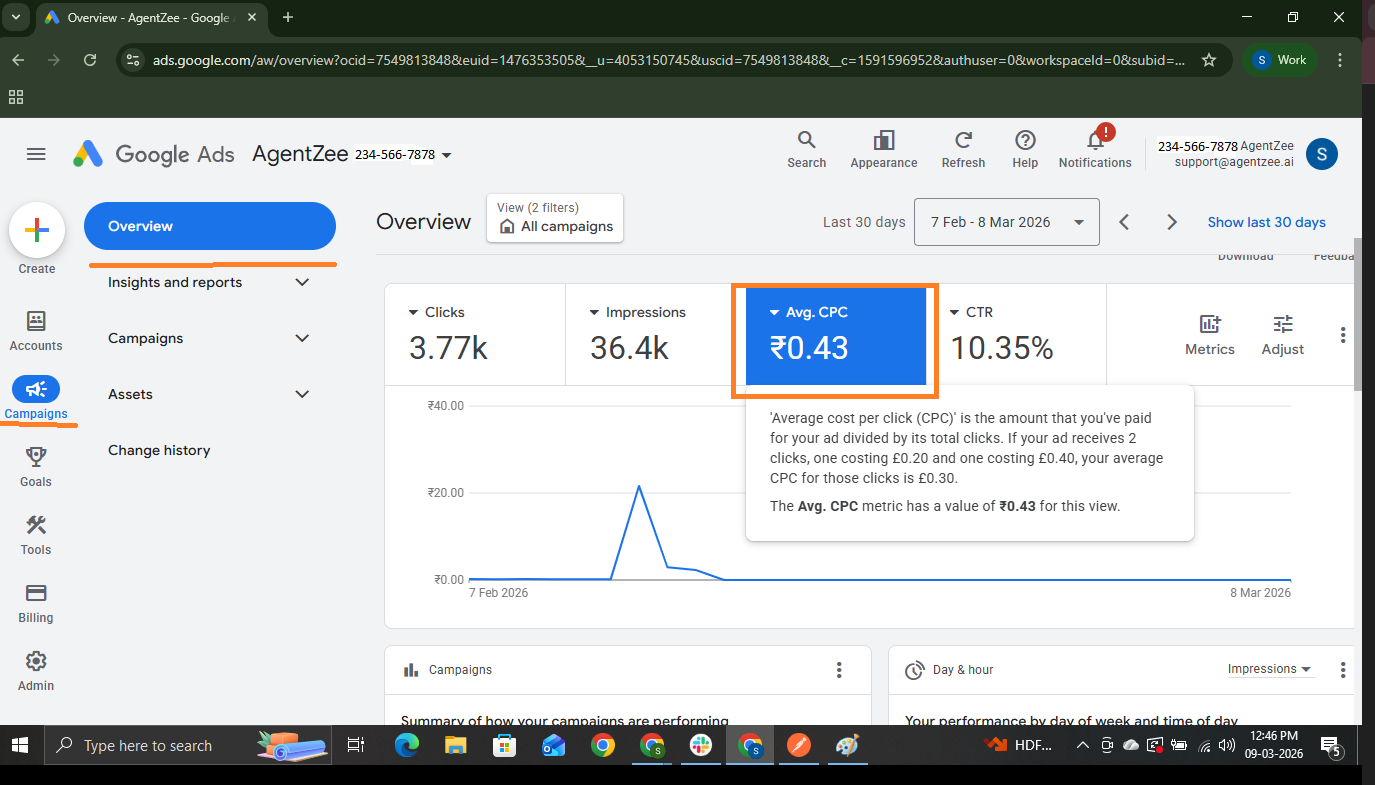
2. Cost Per Click (CPC) KPI
The cost per click metric defines it as the amount you spend every time someone clicks your ad. It is the price for each person who visits your website after clicking your ad. You pay for each click on your ad. The cost per click varies depending on ad performance.
It helps you know how much you spend on visitors. If the cost per click goes up and the number of people who buy something from you stays the same, then you are slowly losing money. The cost per click going up by itself is not a deal. The cost per click is going up and the cost per action staying the same is okay. If the cost per click goes up and fewer people buy something from you then you have a problem that needs to be fixed.
curl -X POST https://googleads.googleapis.com/v25/customers/customer_id/googleAds:search \
-H "Authorization: Bearer ACCESS_TOKEN" \
-H "developer-token: DEVELOPER_TOKEN" \
-H "Content-Type: application/json" \
-d '{
  "query": "SELECT campaign.name, metrics.average_cpc
      FROM campaign WHERE segments.date DURING YESTERDAY"
}'
Sample response:
{
    "results": [
        {
            "campaign": {
                "resourceName": "customers/73455563/campaigns/5476788909",
                "name": "AI Chatbot"
            },
            "metrics": {
                "averageCpc": 4208976.2483370285
            }
        }
  ]
}
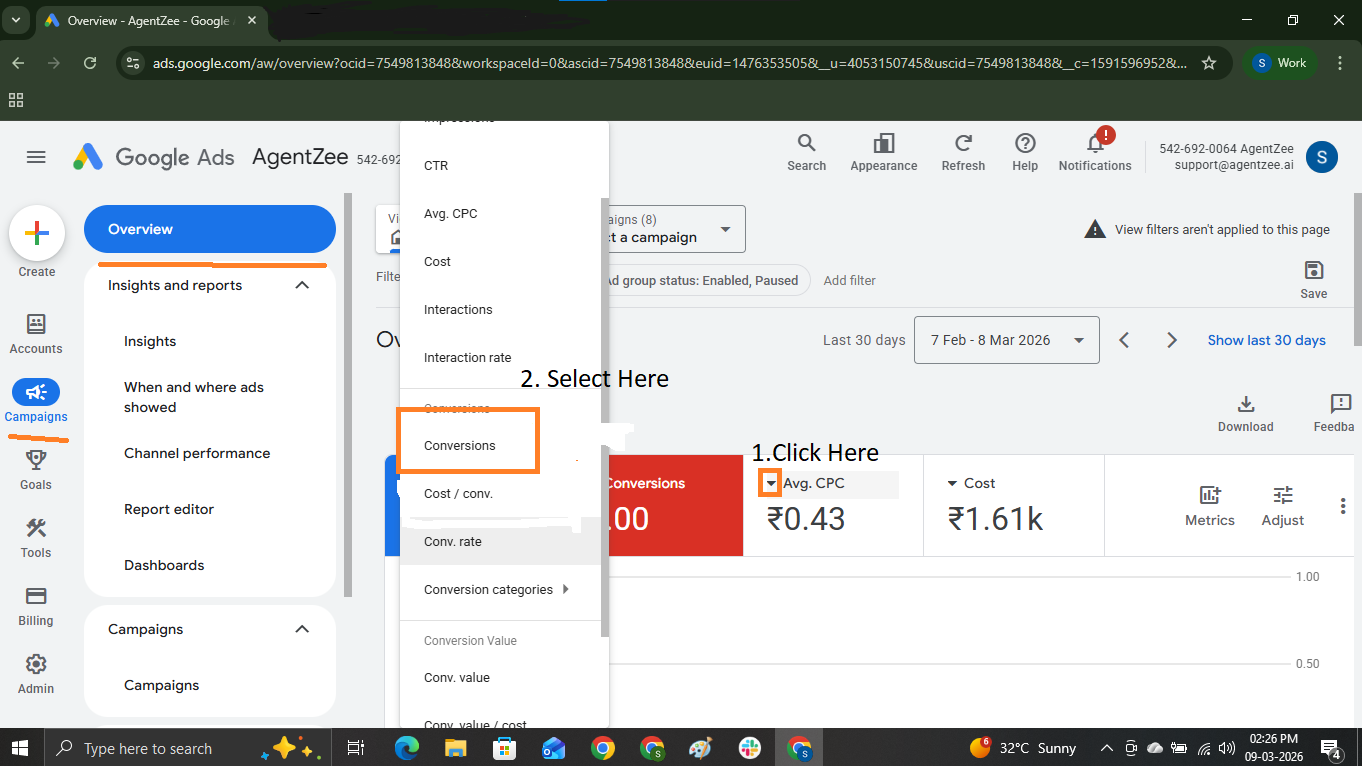
3. Conversion Rate
If your goal is to make a customer purchase, form submission, sign-up, or download something, this conversion rate metric calculates the percentage of people who did these from your ad. For every business, this metric is one of the most important Google Ads KPIs. Rather than traffic, it directly reflects the campaign’s effectiveness.
curl -X POST https://googleads.googleapis.com/v25/customers/customer_id/googleAds:search \
-H "Authorization: Bearer ACCESS_TOKEN" \
-H "developer-token: DEVELOPER_TOKEN" \
-H "Content-Type: application/json" \
-d '{
  "query": "SELECT campaign.name, metrics.conversions,
metrics.conversions_from_interactions_rate FROM campaign WHERE segments.date DURING YESTERDAY"
}'
Sample response:
{
  "results": [
    {
      "campaign": {
                "resourceName": "customers/73455563/campaigns/5476788909",
                "name": "AI Chatbot"
            },
      "metrics": {
        "conversions": "120",
        "conversion_rate": 0.045
      }
    }
  ]
}
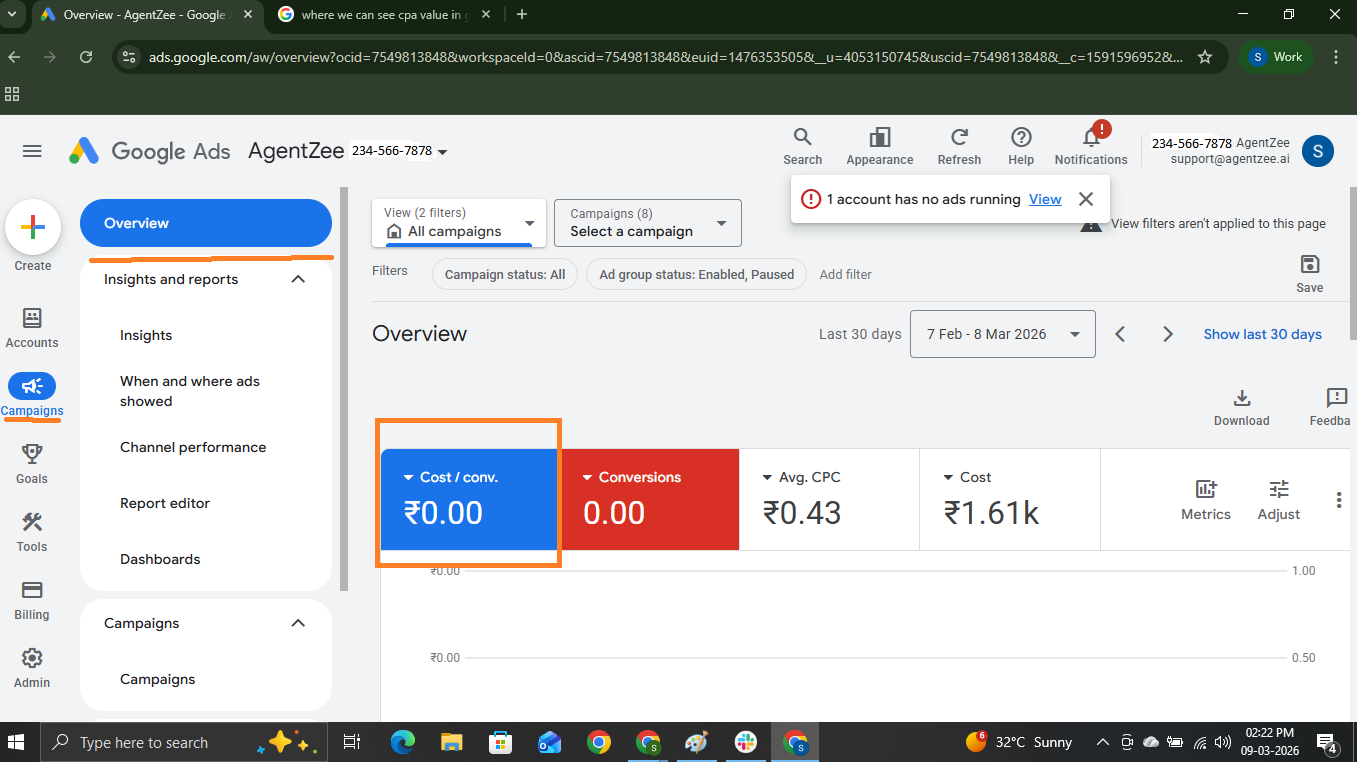
4. Cost Per Acquisition (CPA)
Cost per acquisition represents the average cost you spend to acquire a new customer or a lead. You can get this data from Google Ads by dividing the total spend by the number of conversions. If your campaign’s CPA value is low, then your campaign performs well, but if it is high, then you need to focus on optimisation. To improve conversion rate, optimise the landing pages so that more clicks turn into conversions.
CPA = total ad spend/total conversions
curl -X POST https://googleads.googleapis.com/v25/customers/customer_id/googleAds:search \
-H "Authorization: Bearer ACCESS_TOKEN" \
-H "developer-token: DEVELOPER_TOKEN" \
-H "Content-Type: application/json" \
-d '{
  "query": "SELECT campaign.name, metrics.cost_per_conversion
      FROM campaign WHERE segments.date DURING YESTERDAY"
}'
Sample response:
{
    "results": [
        {
            "campaign": {
                "resourceName": "customers/73455563/campaigns/5476788909",
                "name": "AI Chatbot"
            },
            "metrics": {
                "costPerConversion": 16224344.341880342
            }
        }
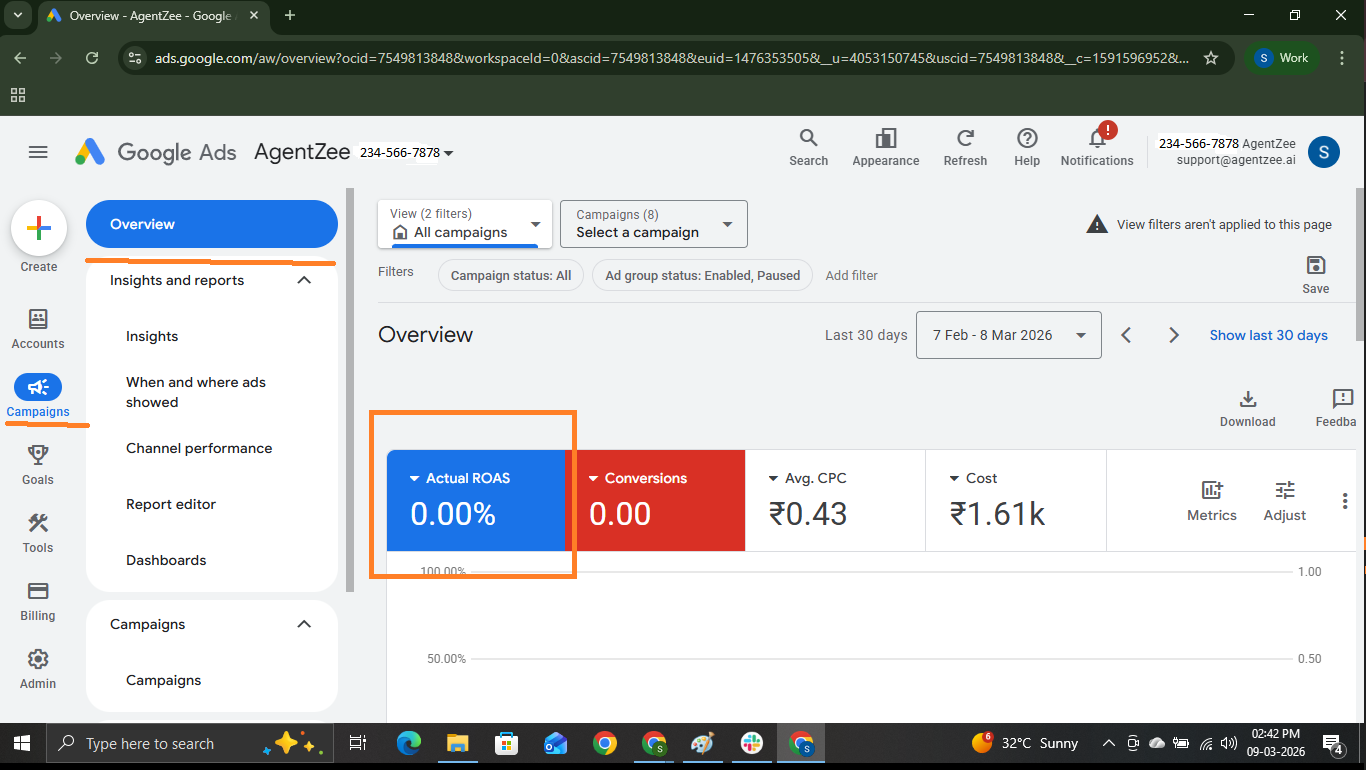
5. Return on Ad Spend (ROAS) KPI
Return on ad spend tells how much revenue you get after spending some amount on advertising. This Google Ads KPI explicitly describes your campaign’s health. If you are running an e-commerce business site, then your generated revenue is $5000, and you spend $1000 on Google Ads, then your ROAS is 5x, or 500%. That means you got revenue 5 times more than your investment in ads.
curl -X POST https://googleads.googleapis.com/v25/customers/customer_id/googleAds:search \
-H "Authorization: Bearer ACCESS_TOKEN" \
-H "developer-token: DEVELOPER_TOKEN" \
-H "Content-Type: application/json" \
-d '{
  "query": "SELECT campaign.name, metrics.conversions_value, metrics.cost_micros
       FROM campaign WHERE segments.date DURING YESTERDAY"
}'
Sample response:
{
    "results": [
        {
            "campaign": {
                "resourceName": "customers/73455563/campaigns/5476788909",
                "name": "AI Chatbot"
            },
            "metrics": {
                "conversionsValue": 0,
                "costMicros": "0"
            }
        }
   ]
}
6. Quality Score
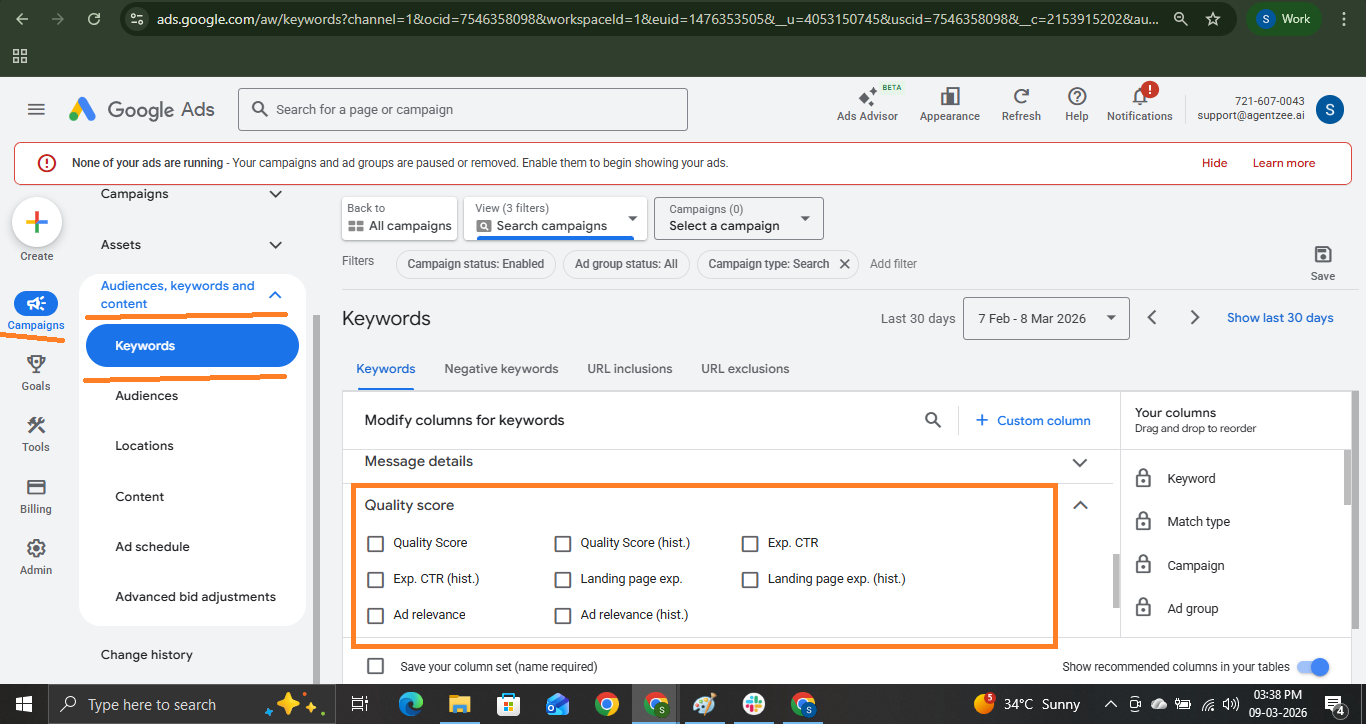
A quality score is the rating (1-10) from Google based on your ad, keywords, and landing page quality. If your quality score is high, then advertising cost might be reduced, and it improves the ad ranking. From this Google Ads KPI, marketers identify the quality issue and optimise ad relevance and improve user experience. To get a quality score value, your campaign will be a search campaign.
curl -X POST https://googleads.googleapis.com/v25/customers/customer_id/googleAds:search \
-H "Authorization: Bearer ACCESS_TOKEN" \
-H "developer-token: DEVELOPER_TOKEN" \
-H "Content-Type: application/json" \
-d '{
  "query":"SELECT ad_group_criterion.keyword.text,
        ad_group_criterion.quality_info.quality_score
        FROM keyword_view WHERE segments.date DURING YESTERDAY"
}'
Sample response:
{
    "results": [
        {
            "adGroupCriterion": {
                "resourceName": "customers/73455563/adGroupCriteria
                                       /456576834334~435456677645434",
                "keyword": {
                    "text": "face cream for dry skin",
                    "quality_score": 8
                }
            },
            "keywordView": {
                "resourceName": "customers/73455563/keywordViews/456576834334~435456677645434"
            }
        }
    ]
 }
If you are running a search campaign, then you can find the quality score value from this path:
Campaigns → Audiences, Keywords, and content → Keywords → Columns Custom columns → Quality Score → Click Apply
7. Impression Share
Impression share tells you how often your ads appear to the customer. If this impression share percentage is 39%, then in the remaining 61%, you are invisible. The low impression share may happen for 2 reasons. If it is caused by the budget, then increase your budget on ads, or if it is caused by the rank, then improve your quality score. These 2 were different problems.
curl -X POST https://googleads.googleapis.com/v25/customers/customer_id/googleAds:search \
-H "Authorization: Bearer ACCESS_TOKEN" \
-H "developer-token: DEVELOPER_TOKEN" \
-H "Content-Type: application/json" \
-d '{
  "query": "SELECT campaign.name, metrics.search_impression_share
      FROM campaign WHERE segments.date DURING YESTERDAY"
}'
Sample response:
{
    "results": [
        {
            "campaign": {
                "resourceName": "customers/73455563/campaigns/5476788909",
                "name": "AI Chatbot"
            }
        },
        { "metrics": { "search_impression_share": 0.62 } }
    ]
}
To find the impression share value, follow the steps below:
Step 1: Campaigns → Columns → Modify columns
Step 2: You can add the columns you want to be present in the campaigns table
Step 3: You can see the impression share value in the dashboard
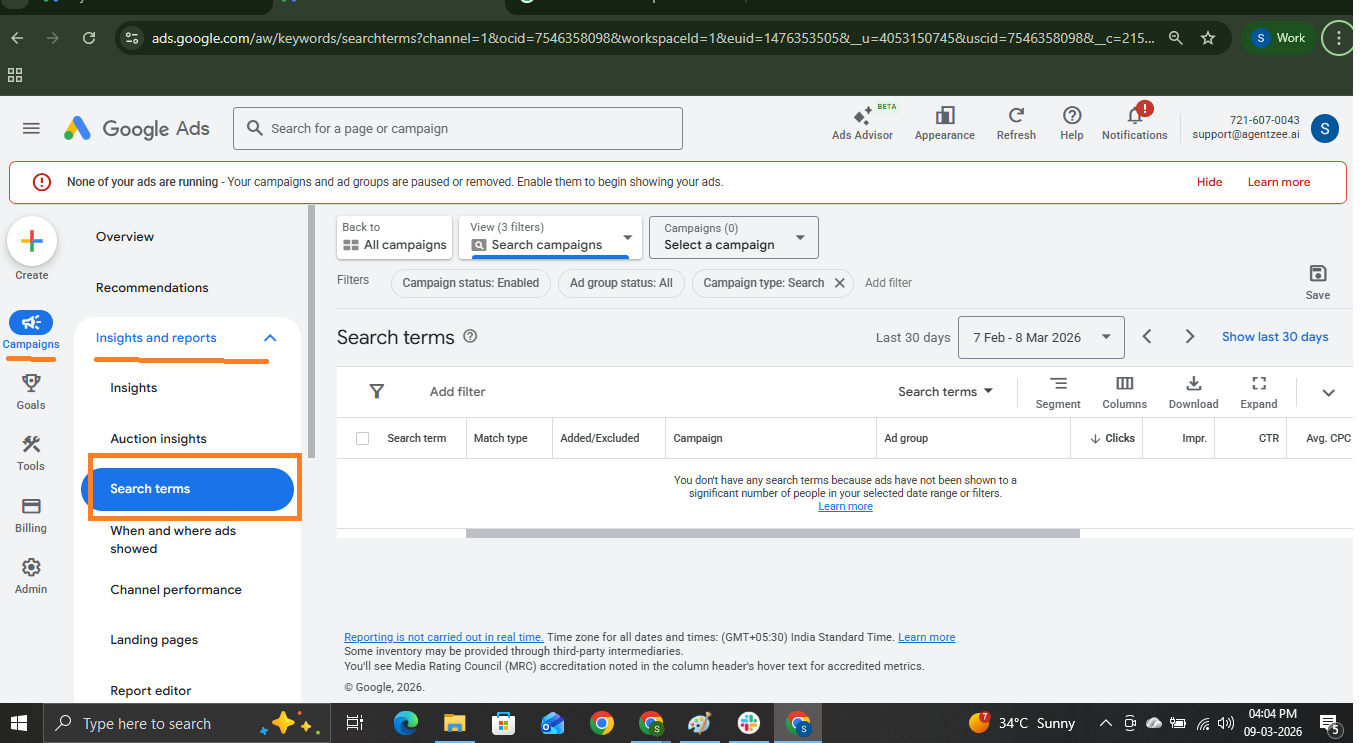
8. Search Terms Performance
Search term KPIs are the actual phrases users used to search on the Google search engine. “Search term” and “keywords” are both different, but they depend on each other. The search term indicates the text users used for searching, and our ad will appear to them if it matches. On the other hand, keywords mean words that we bid on for our ads.
This Google Ads KPI helps to track the high-performing keywords and remove unwanted traffic for our ad. If you are running a facial cream campaign, then you can search for terms users used to reach your campaign.
1. If your campaign is a search campaign
curl -X POST https://googleads.googleapis.com/v25/customers/customer_id/googleAds:search \
-H "Authorization: Bearer ACCESS_TOKEN" \
-H "developer-token: DEVELOPER_TOKEN" \
-H "Content-Type: application/json" \
-d '{
  "query": "SELECT search_term_view.search_term, metrics.clicks, metrics.conversions
      FROM search_term_view WHERE segments.date DURING YESTERDAY"
}'
2. If your campaign type is a smart campaign
curl -X POST https://googleads.googleapis.com/v25/customers/customer_id/googleAds:search \
-H "Authorization: Bearer ACCESS_TOKEN" \
-H "developer-token: DEVELOPER_TOKEN" \
-H "Content-Type: application/json" \
-d '{
  "query": "SELECT smart_campaign_search_term_view.search_term, metrics.clicks,
          metrics.impressions, metrics.cost_micros
          FROM smart_campaign_search_term_view WHERE segments.date DURING YESTERDAY"
}'
Sample response:
{
    "results": [
        {
            "metrics": {
                "clicks": "0",
                "costMicros": "0",
                "impressions": "10"
            },
            "smartCampaignSearchTermView": {
                "resourceName": "customers/73455563/
                                  smartCampaignSearchTermViews/343454554656~
                                  YnVpbGRpegvdsweweYWdlbnRz",
                "searchTerm": "building ai agents"
            }
        }
]
}
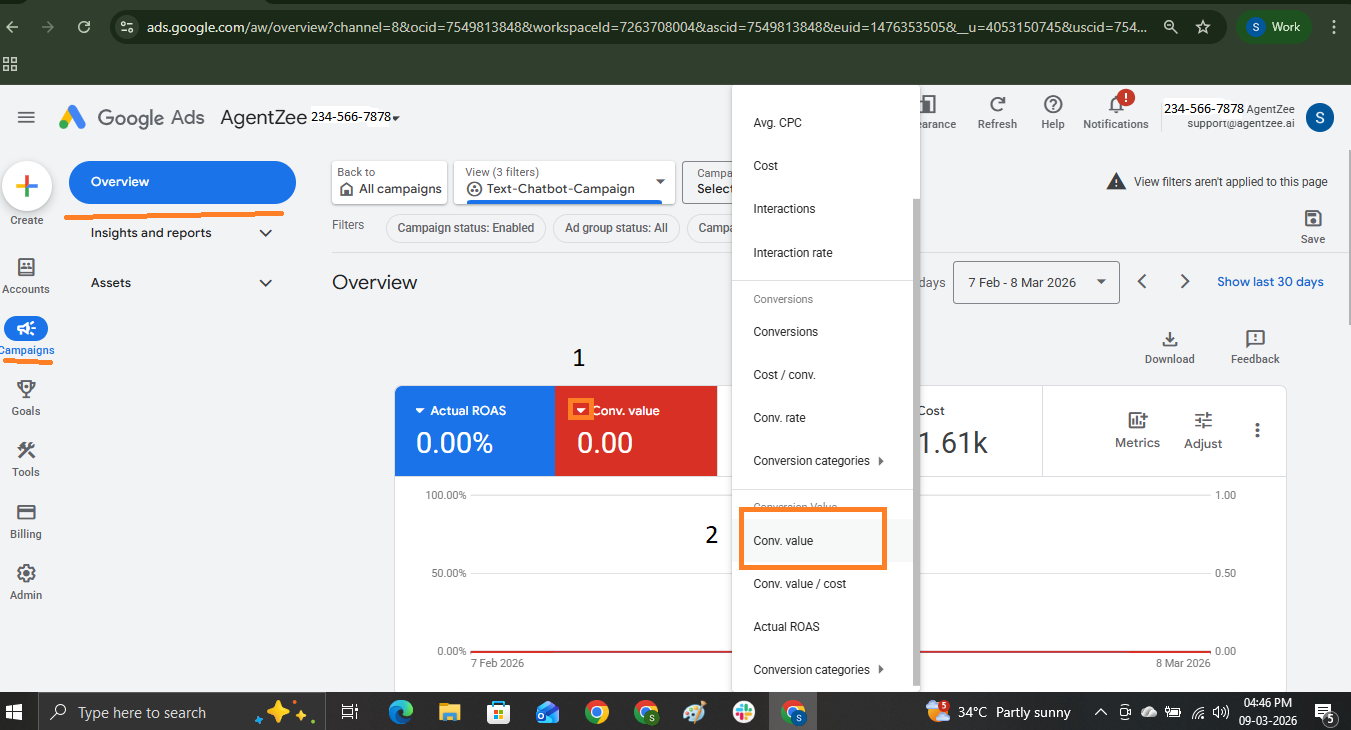
9. Conversion Value
Conversion value indicates the total revenue generated from the conversions. This Google Ads KPI helps to track the financial performance of the ad and is used to calculate ROI (Return On Investment). This metric measures its true business impact.
curl -X POST https://googleads.googleapis.com/v25/customers/customer_id/googleAds:search \
-H "Authorization: Bearer ACCESS_TOKEN" \
-H "developer-token: DEVELOPER_TOKEN" \
-H "Content-Type: application/json" \
-d '{
  "query": "SELECT campaign.name, metrics.conversions_value
              FROM campaign WHERE segments.date DURING YESTERDAY"
}'
Sample response:
{
    "results": [
        {
            "campaign": {
                "resourceName": "customers/73455563/campaigns/5476788909",
                "name": "AI Chatbot"
            },
            "metrics": {
                "conversionsValue": 0
            }
        }
 ]
}
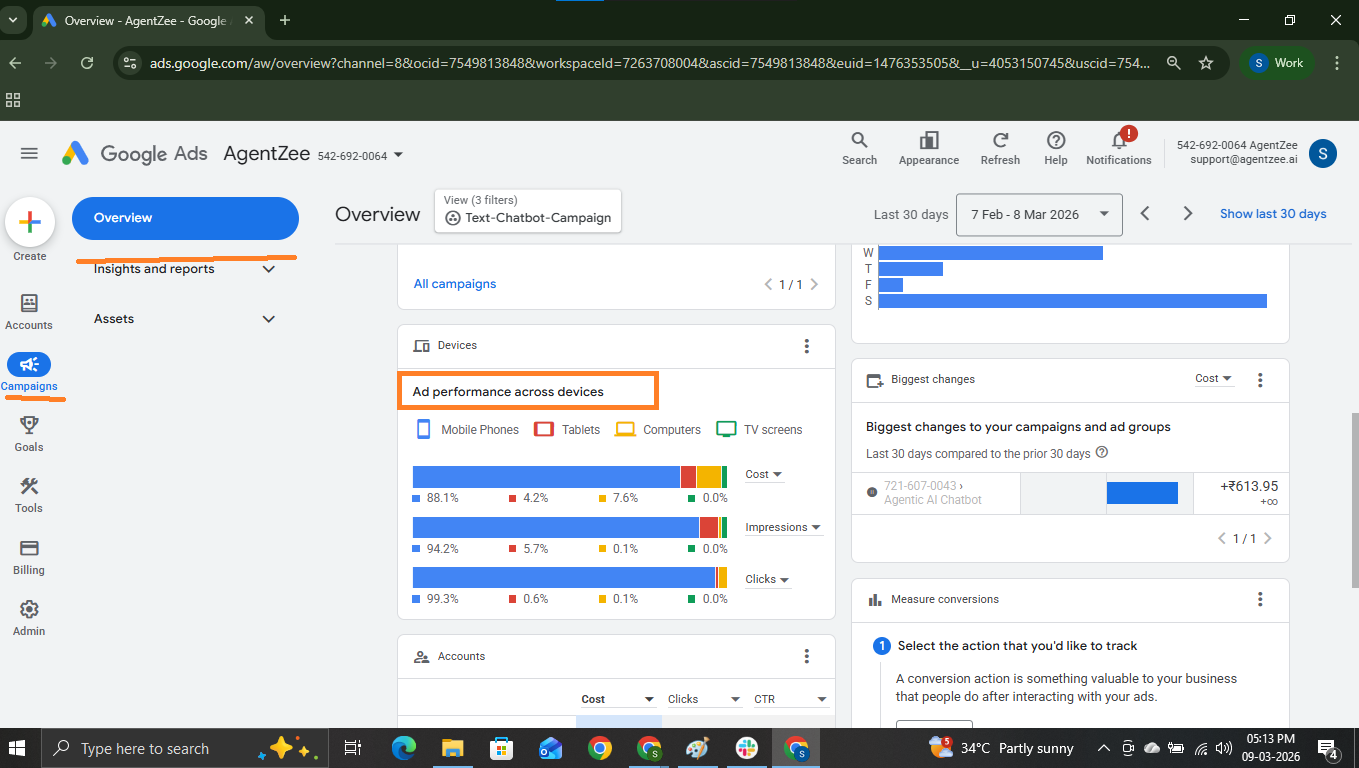
10. Device Performance
This device’s performance gives data across all device types, like desktop, mobile, tablet, etc. This Google Ads KPI helps to identify the campaign performance across devices and helps to optimise campaigns for device-specific audiences.
So that you can improve the quality of content on your pages to improve more conversions.
curl -X POST https://googleads.googleapis.com/v25/customers/customer_id/googleAds:search \
-H "Authorization: Bearer ACCESS_TOKEN" \
-H "developer-token: DEVELOPER_TOKEN" \
-H "Content-Type: application/json" \
-d '{
  "query": "SELECT segments.device, metrics.clicks, metrics.conversions
              FROM campaign WHERE segments.date DURING YESTERDAY"
}'
Sample response:
{
    "results": [
        {
            "campaign": {
                "resourceName": "customers/73455563/campaigns/5476788909"
            },
            "metrics": {
                "clicks": "5",
                "conversions": 1
            },
            "segments": {
                "device": "DESKTOP"
            }
        },
        {
            "campaign": {
                "resourceName": "customers/73455563/campaigns/5476788909"
            },
            "metrics": {
                "clicks": "445",
                "conversions": 116
            },
            "segments": {
                "device": "MOBILE"
            }
        },
        {
            "campaign": {
                "resourceName": "customers/73455563/campaigns/5476788909"
            },
            "metrics": {
                "clicks": "1",
                "conversions": 0
            },
            "segments": {
                "device": "TABLET"
            }
        }
    ],
    "fieldMask": "segments.device,metrics.clicks,metrics.conversions",
    "queryResourceConsumption": "668"
}
Don’t confuse account types while using the API
I know you may get confused about account types. There are 2 types of accounts.
Manager account
Customer account. Let’s see how to use the API for these account types.
If you have a manager account and a customer account you can use an API request like this. Just add one line “-H ‘login-customer-id: 9999999999’.”
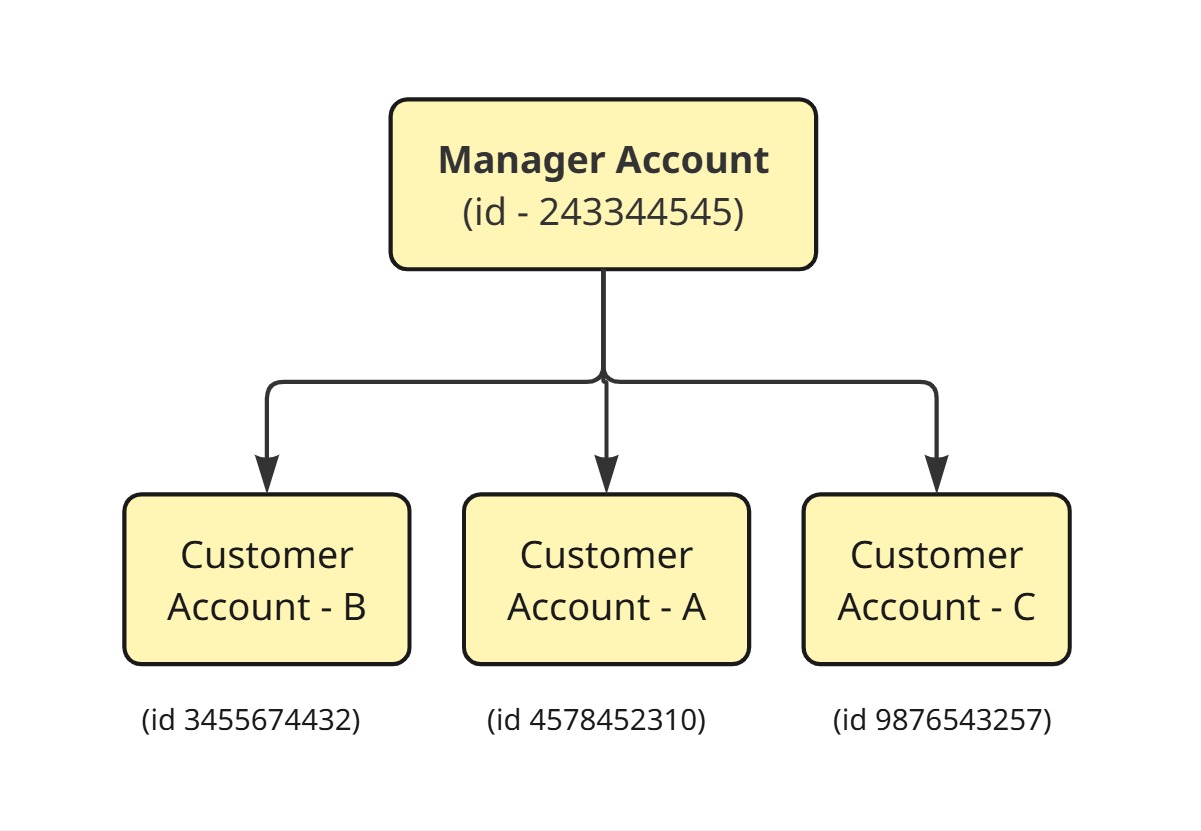
In order to access the APIs using the Manager account, use the below API structure:
Replace your customer account ID here.
POST https://googleads.googleapis.com/v25/customers/(customer id)/googleAds:search \
curl -X POST https://googleads.googleapis.com/v25/customers/customer_id/googleAds:search \
-H "Authorization: Bearer ACCESS_TOKEN" \
-H "developer-token: DEVELOPER_TOKEN" \
-H "login-customer-id: 9999999999" \  -----> manager account is
-H "Content-Type: application/json" \
-d '{
  "query": "SELECT campaign.name, metrics.clicks, metrics.impressions
            FROM campaign
            WHERE segments.date DURING LAST_7_DAYS"
}'
In order to access the APIs using the customer account, use the below API structure: Replace your customer account ID here.
POST https://googleads.googleapis.com/v25/customers/(customer id)/googleAds:search \
curl -X POST https://googleads.googleapis.com/v25/customers/12345678/googleAds:search \
-H "Authorization: Bearer ACCESS_TOKEN" \
-H "developer-token: DEVELOPER_TOKEN" \
-H "Content-Type: application/json" \
-d '{
  "query": "SELECT campaign.name, metrics.impressions, metrics.clicks,
       metrics.ctr FROM campaign WHERE segments.date DURING YESTERDAY"
}'
Conclusion
Most of the businesses made the mistake of choosing metrics for their analysis. Sometimes, they might miss an important one that causes the real effect in their growth. Identifying the right Google Ads KPI is important to identify the real drawback of their campaign. Some metrics like cost, clicks, and impressions are the basic metrics that provide basic insights about the campaign performance; some deeper KPIs like conversion rate, click-through rate, cost per acquisition, CPC, and ROAS help businesses to understand the real impact.
From a business perspective, these metrics help rapidly increase the chance of conversions, new customer acquisition, and revenue. From the KPI performance data, advertisers can easily identify the breaking point so they can optimise the keywords, prevent wasted budget allocation, and find the right audience.
In 2026, by combining marketing strategies with technical automations, companies will get a high success rate. By tracking these Top 10 Google Ads KPIs, businesses can get actionable insights for their business growth.
If you are looking forward to building the Google Ads report workflow to expand your vision, then Agentzee will build it for you. You don’t need to write code of your own. Just open Agentzee and connect your account we will build what you want.
To make your work easy visit our product